Blue Iris Constantly Crashing

It has to have a DB folder somewhere.

It is one of the reasons why many here find a stable version and then doesn't update until something is added that they want or need.
Strange but I put a copy of the db folder on the desktop and not in the c: blue iris directory as I took it out . The system never created a new one ...
 
I think this is an on going issue. Some setting will make it worse, and most of time, BI wiill crash and restart and most user dont even notice it

I have all those crashes since first day of BI, and I searched the forum many times for a solution, and there is no solution.
Many people been complaining about it, if you search "0xc0000409 blueiris" or "0xc0000005 blueiris" on google

Many will just suggest to clean install, windows, BI, start everything from fresh. I have try all of those, non of them help to completely solve BI crashing, some will make it better (So, I'll live with it)

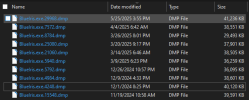
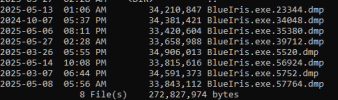
For those who claim BI is running perfectly fine in the system, just take a look in the folder "C:\Users\[BI_USERNAME]\AppData\Local\CrashDumps", I am pretty sure (like 99% confident, if you run your BI over a year or so), you will find a few crash dump file like the screenshot below. And then find the crash report in windows event log, it is most likely one of the 0xc0000409 and/or 0xc0000005 errors

My machine:
1748495084288.png
Friend's machine:
1748496341788.png

Unfortunately, at this point I am very pessimistic to find a solution for this issue as completely fixing those kind of crashes,
Since there is no clear cause of the crash. As from my dump files, it crashed a lot in March and early April, and then ran fine until May 25th, and I didnt change anything during those days. Same thing from December last year

I am also very pessimistic if dev ever care to fix those crashes, as many been complain a lot already, and then people stop respond to the post, and the post eventually die without a clear solution nor attention from BI dev

Oh well, live with it or find another software... I'll live with it for now
 
I think this is an on going issue. Some setting will make it worse, and most of time, BI wiill crash and restart and most user dont even notice it

I have all those crashes since first day of BI, and I searched the forum many times for a solution, and there is no solution.
Many people been complaining about it, if you search "0xc0000409 blueiris" or "0xc0000005 blueiris" on google

Many will just suggest to clean install, windows, BI, start everything from fresh. I have try all of those, non of them help to completely solve BI crashing, some will make it better (So, I'll live with it)

For those who claim BI is running perfectly fine in the system, just take a look in the folder "C:\Users\[BI_USERNAME]\AppData\Local\CrashDumps", I am pretty sure (like 99% confident, if you run your BI over a year or so), you will find a few crash dump file like the screenshot below. And then find the crash report in windows event log, it is most likely one of the 0xc0000409 and/or 0xc0000005 errors

My machine:
View attachment 221706
Friend's machine:
View attachment 221707

Unfortunately, at this point I am very pessimistic to find a solution for this issue as completely fixing those kind of crashes,
Since there is no clear cause of the crash. As from my dump files, it crashed a lot in March and early April, and then ran fine until May 25th, and I didnt change anything during those days. Same thing from December last year

I am also very pessimistic if dev ever care to fix those crashes, as many been complain a lot already, and then people stop respond to the post, and the post eventually die without a clear solution nor attention from BI dev

Oh well, live with it or find another software... I'll live with it for now
Mornin

I have ended up wiping it out ( Which I hate to do ) and rebuilding ) It seemed to be stable for a while but then last week I got a records too large in red error msg . I will DEF take a look at this - Thx !
 
I think this is an on going issue. Some setting will make it worse, and most of time, BI wiill crash and restart and most user dont even notice it

I have all those crashes since first day of BI, and I searched the forum many times for a solution, and there is no solution.
Many people been complaining about it, if you search "0xc0000409 blueiris" or "0xc0000005 blueiris" on google

Many will just suggest to clean install, windows, BI, start everything from fresh. I have try all of those, non of them help to completely solve BI crashing, some will make it better (So, I'll live with it)

For those who claim BI is running perfectly fine in the system, just take a look in the folder "C:\Users\[BI_USERNAME]\AppData\Local\CrashDumps", I am pretty sure (like 99% confident, if you run your BI over a year or so), you will find a few crash dump file like the screenshot below. And then find the crash report in windows event log, it is most likely one of the 0xc0000409 and/or 0xc0000005 errors

My machine:
View attachment 221706
Friend's machine:
View attachment 221707

Unfortunately, at this point I am very pessimistic to find a solution for this issue as completely fixing those kind of crashes,
Since there is no clear cause of the crash. As from my dump files, it crashed a lot in March and early April, and then ran fine until May 25th, and I didnt change anything during those days. Same thing from December last year

I am also very pessimistic if dev ever care to fix those crashes, as many been complain a lot already, and then people stop respond to the post, and the post eventually die without a clear solution nor attention from BI dev

Oh well, live with it or find another software... I'll live with it for now
I've been using BI for over 6 years. I only found one dmp file for BI and it's recent. As I recall there was some sort of significant power issue that day. I didn't read all your posts but I'm pretty confident that someone probably already mentioned the video driver you have on your system. This issue had something to do with a memory leak due to having an incompatible video driver. I recall having to locate an older video driver for my system and installing it to fix the issue. It was six years ago so I don't have the details on the specifics but if you do a search for "memory leak" you'll find plenty about it.

1748523548362.png
 

0xc0000005, Access is denied or Access Violation error​


Is the service account used for BI a member of the Administrators group?
 
I've been using BI for over 6 years. I only found one dmp file for BI and it's recent. As I recall there was some sort of significant power issue that day. I didn't read all your posts but I'm pretty confident that someone probably already mentioned the video driver you have on your system. This issue had something to do with a memory leak due to having an incompatible video driver. I recall having to locate an older video driver for my system and installing it to fix the issue. It was six years ago so I don't have the details on the specifics but if you do a search for "memory leak" you'll find plenty about it.

View attachment 221713

you have the cleanest dump file folder i have ever seen!
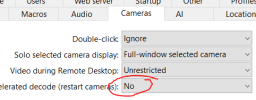
Does video driver matter if Hardware accelerated decode is system wide off? Also blueiris software forum is pretty dead with a bunch 404 results
1748534267730.png

0xc0000005, Access is denied or Access Violation error​


Is the service account used for BI a member of the Administrators group?

And yes BI is running with system admin right, or else it won't start, I tried that years ago when i was setting it up
 
Does video driver matter if Hardware accelerated decode is system wide off? Also blueiris software forum is pretty dead with a bunch 404 results
The Blueiris forum is NOT dead, they just changed the URL, and don't want it linked to; here is what they posted about it

You will now find the user forum at /bbs on this website (sorry, a clickable link must be avoided). We are battling spam bots, web crawlers and the like that cause thousands of “guest users online” ultimately crippling our web server’s ability to do its job. Anti-spam and anti-bot measures have proven to be inadequate to battle this nuisance. The forum link will be updated within the software Help page going forward to reflect this and any further changes to the forum URL. Apologies for the inconvenience, but hopefully this will make the forum (and this website) more responsive for everyone using it.
 
Yeah, not surprised. I've seen unwelcome bugs on DIY boards here and there over the years.
Early on, in the computing Era, no self respecting Nerd, wanted to be "held hostage" by manufacturer offerings.
Building your own box was the way to get the features you wanted.
As time ticked on though being a non-gamer, I found the stability Windows inside boxes by HP and Dell, Lenovo/IBM for Corporate campus computing be satisfying to me. Esp when supporting a small business. the modular Optiplex was my go to PC because parts were readily available online.
Not all of my Dells ran BI rock solid, the 7020 with a 3rd gen Intel chip, ( pre substream/ Pre BI recommending turning OFF Hardware acceleration) was flaky. Never had any issues with the PC as a Home PC, but it wasn't BI ready IMHO.
got wind of the HP elitedesk thru a post by Fenderman, and that has been rock solid.
Then my BI for Home use was a Dell Optiplex 9020/4590 i5 chip. its been awesome for home use.
Then I decided to Run BI on a daily driver with enough power for daily computing as well. Thats when I decided to try the Dell Precision 3630 tower, which has been an awesome PC.
 
Last edited:
Hardware must be glitchy somewhere. what kinda box you runnin?
this box has been 99% uptime for a couple years.


View attachment 221962

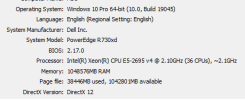
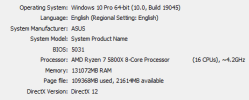
I ran my BI in the following hardwares
Office:
dxdiag.png
Includes NVIDIA RTX3050 GPU, latest studio driver
Hardware acceleration off, GPU is mostly handing CodeProject.AI stuff

Home:
1748883242466.png
Includes NVIDIA RTX3070Ti GPU, latest studio driver
Hardware acceleration also off, GPU is mostly handing CodeProject.AI stuff as well

If i could get my hands on other hardware, I'll try it, but i currently office and home, we dont have the budget nor that we wanna upgrade machines we currently have
Office spent a lot of $ on that hardware
 
Last edited:
Hi there Flintstone61,

There are 10 drives total. drive C: is an intel datacenter 800GB drive that is meant to only be for the OS and the program files.
drives D through K are all 16TB or 18TB Seagate seahawk drives that are meant for the cascading of clips... so thats a total of 8 spinning disk drives for the streams.

One they reach drive K they get deleted.

Clips are only stored for a total of 23 days.


drive L: is a Samsung nvme drive for blueiris database and nothing more. ....
The crashing had been occurring since before the installation of the nvme drive so we dont think its that, and it has sped up the ability to search for clips.

nothing in the log files points to any issues with drive D through K, or drive C or L either as far as I can see (in regards to blue irirs crashing, anyways)

I just did an exact count of the cameras..

41 cameras are IP cameras, 39 of them are expected to record continuously 24/7
1 USB camera that does not record at all

2 IP cameras are expected to simply take pics when they detect any kind of motion.

all codeproject.ai software and python have been removed for troubleshooting of this issue.

the server is a supermicro
System Model X9DAX

dual CPU.. so 2 of these:
Processor Intel(R) Xeon(R) CPU E5-2687W 0 @ 3.10GHz, 3101 Mhz, 8 Core(s), 16 Logical Processor(s)

here are the specs for the integrated graphics and the nvidia cards:

Name NVIDIA Quadro K1200
PNP Device ID PCI\VEN_10DE&DEV_13BC&SUBSYS_1140103C&REV_A2\4&67C51EA&0&0018
Adapter Type Quadro K1200, NVIDIA compatible
Adapter Description NVIDIA Quadro K1200
Adapter RAM (1,048,576) bytes
Installed Drivers C:\Windows\System32\DriverStore\FileRepository\nvwu.inf_amd64_df7f0c05c5ae4504\nvldumdx.dll,C:\Windows\System32\DriverStore\FileRepository\nvwu.inf_amd64_df7f0c05c5ae4504\nvldumdx.dll,C:\Windows\System32\DriverStore\FileRepository\nvwu.inf_amd64_df7f0c05c5ae4504\nvldumdx.dll,C:\Windows\System32\DriverStore\FileRepository\nvwu.inf_amd64_df7f0c05c5ae4504\nvldumdx.dll
Driver Version 31.0.15.1640
INF File oem4.inf (Section004 section)
Color Planes Not Available
Color Table Entries Not Available
Resolution Not Available
Bits/Pixel Not Available
Memory Address 0xDD000000-0xDE0FFFFF
Memory Address 0xC0000000-0xD1FFFFFF
Memory Address 0xD0000000-0xD1FFFFFF
IRQ Channel IRQ 4294967201
Driver C:\WINDOWS\SYSTEM32\DRIVERSTORE\FILEREPOSITORY\NVWU.INF_AMD64_DF7F0C05C5AE4504\NVLDDMKM.SYS (31.0.15.1640, 41.66 MB (43,683,824 bytes), 11/3/2023 6:17 PM)

Name Microsoft Basic Display Adapter
PNP Device ID PCI\VEN_102B&DEV_0532&SUBSYS_070E15D9&REV_0A\4&53C375E&0&18F0
Adapter Type Matrox Graphics Inc., (Standard display types) compatible
Adapter Description Microsoft Basic Display Adapter
Adapter RAM 0 bytes
Installed Drivers Not Available
Driver Version 10.0.17763.1
INF File display.inf (MSBDA section)
Color Planes Not Available
Color Table Entries 4294967296
Resolution 1024 x 768 x 1 hertz
Bits/Pixel 32
Memory Address 0xD3000000-0xD3FFFFFF
Memory Address 0xDF000000-0xDF003FFF
Memory Address 0xDE800000-0xDF0FFFFF
I/O Port 0x000003B0-0x000003DF
I/O Port 0x000003C0-0x000003DF
Memory Address 0xA0000-0xBFFFF
Driver C:\WINDOWS\SYSTEM32\DRIVERSTORE\FILEREPOSITORY\BASICDISPLAY.INF_AMD64_5103AC179273BE89\BASICDISPLAY.SYS (10.0.17763.1, 66.50 KB (68,096 bytes), 9/15/2018 12:11 AM)


We rarely have a monitor plugged into it, most of the time we just use remote desktop to log in.

And as previously stated, the nvidia cards are almost never used because they dont provide much help.

If you think that the nvidia cards have anything to do with the crashing we can remove them (or replace them with a better GPU) but i dont think thats the case because no re-encoding is ever done, every stream goes straight to disk.


If theres any other info yo think might help please let me know. Blue iris is great value for the money when it works. Id hate to have to switch to other software. Id even rather upgrade the hardware if its a hardware spec issue rather than switching software, just because of how well it has worked for us up until the point of it starting to crash due to whaever these issues are.

again, thank you for any help Troubleshooting a complex system setup like this can definitely leave you needing a strong drink like Bacardi by the end of the day.

Notice how your system log shows Microsoft Basic Display Adapter with 0MB RAM alongside those old Quadro K1200s? When you log in via Remote Desktop (RDP), Windows switches display contexts to the software display driver. When BI tries to render 41 live video streams in the admin GUI over RDP without hardware UI acceleration, BlueIris.exe locks up and crashes. Try using VNC or Parsec instead of native RDP, or make sure hardware acceleration for the console display is forced on the Quadro.
 
Notice how your system log shows Microsoft Basic Display Adapter with 0MB RAM alongside those old Quadro K1200s? When you log in via Remote Desktop (RDP), Windows switches display contexts to the software display driver. When BI tries to render 41 live video streams in the admin GUI over RDP without hardware UI acceleration, BlueIris.exe locks up and crashes. Try using VNC or Parsec instead of native RDP, or make sure hardware acceleration for the console display is forced on the Quadro.
I know Im comming here way too late, and we have long since solved the issue, but this is an intelligent suggestion and I should have noticed this and tried this initially!
 
I know Im comming here way too late, and we have long since solved the issue, but this is an intelligent suggestion and I should have noticed this and tried this initially!

But at the same time, when a more than year old dormant thread gets a response from a new member, is the new member a true new member or is it AI and is the AI getting so good that we can't tell it is AI other than they responded to an old thread?
 
I know Im comming here way too late, and we have long since solved the issue, but this is an intelligent suggestion and I should have noticed this and tried this initially!

One is glad you got this resolved, but since this thread has been ressurected anyway, what say you give us a quick detail on what you did to fix the issue?

And just for interest sake, how many cameras do you have on your instance now? What is your MP/s figure? Still same hardware?

I'm just interested