Static Objects Triggering with BI AI turned on

CCTVnewbie810

Getting the hang of it
Sep 30, 2025
124
44
USA
I recently switch to the built in AI confirmation and started using it in conjunction with my IVS on my Dahua cameras as I was having a lot of false triggers even with sensitivity turned down on the IVS. However, now with the new BI/AI, the periodic scan is gone and I am getting some triggers on static objects. Usually at night, a bug may fly past the camera quick, triggers it, then the AI confirms a static vehicle in driveway and sends the alert. Anything I can do about this?
 
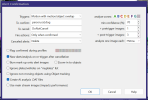
Periodic scanning was replaced by Object Tracking, so in addition to the "Ignore non-moving objects using object tracking" do you have Object Tracking enabled on the AI tab? That extends the static object tracking beyond that done per trigger.

I had many issues with static objects in v5.x where car head lights and rain were a nightmare, along with more than one static object as BI assumed the order was always the same from AI analysis and it wasn't. I had quite a few emails with Ken in the early v6.x days and it's now way better than it was but you need Object Tracking enabled and the shorter times it now defaults to (10/0.8 secs) compared to the couple of minutes it was in v5.x days.
 
Periodic scanning was replaced by Object Tracking, so in addition to the "Ignore non-moving objects using object tracking" do you have Object Tracking enabled on the AI tab? That extends the static object tracking beyond that done per trigger.

I had many issues with static objects in v5.x where car head lights and rain were a nightmare, along with more than one static object as BI assumed the order was always the same from AI analysis and it wasn't. I had quite a few emails with Ken in the early v6.x days and it's now way better than it was but you need Object Tracking enabled and the shorter times it now defaults to (10/0.8 secs) compared to the couple of minutes it was in v5.x days.
The Help buttons are not launching to matching PDF documentation. Is this dialog currently undocumented? Could you paste a few screenshot examples?
 
The Help buttons are not launching to matching PDF documentation. Is this dialog currently undocumented? Could you paste a few screenshot examples?

It's basically the old periodic analysis renamed object tracking and on page 99 and later of the current help at
The logic behind it has changed over time and from what I gleaned from Ken over about 6 months of discussing static object issues and updates, I believe the current system is:

If the "Ignore non-moving objects using Object tracking" is on in the AI tab then BI tries to identify static objects over the images sent to AI during alert confirmation. This can work fairly well if there are a number of images over several seconds. However in my case although I analyse 5 images the spacing is tighter as I use triggers for automations such as audible announcements, triggering lights at various points around the house at night etc and these need to be quite quick to be effective. The shorter time (just over a second) meant that passing car headlights and rain could make static objects cause triggers.

This is where the separate object tracking option comes in an unlike the old default periodic scanning 120 second interval, it now defaults to 10 seconds and down to 0.8 when motion is detected. This makes static object analysis work well and AI alert confirmation can use this information even with the tighter alert confirmation timings. The downside is this can be a lot of AI load and in my case with around 14 cameras when it rains the AI can be doing 17+ checks per second (fine for my 3060 but not ideal for CPU). I haven't tried changing these timings in case that renders it ineffective.

For me these changes since late v5.9x versions to v6.0.7.7 and bug fixes for multiple static objects in one view have greatly improved ignoring static objects. At one point this did lead to missing genuine triggers (I posted about in another thread) but Ken reduced the 'new to moving' object determination timing to fix that.

The result is I no longer have to mask out my cars on my driveway at night for passing cars or rain. I've asked Ken about the exact timings and logic and whether some settings could be added to the UI, but didn't get an answer with the replies and I appreciate he wants to keep the internals opaque to avoid maintenance and doc changes.
 
  • Like
Reactions: jaydeel