


Всі прошивки перепробував нічого не допомогло....Кто-нибудь решил эту проблему? Снижение уровня прошивки не помогает(((
You are using an out of date browser. It may not display this or other websites correctly.
You should upgrade or use an alternative browser.
You should upgrade or use an alternative browser.
Hola, tengo esta camara y tengo varios problemas.
La camara fija no detecta el movimiento.
Otro problema que tengo es que no tiene subida por FTP. Otras camaras que tengo diferentes si que traen por defecto esta opción y solo hay que configurarla, pero en esta no trae la pestaña habilitada.
Hay alguna forma de resolver estos problemas?
Edit.
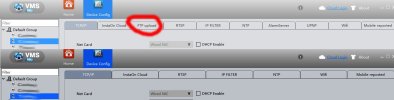
Actualizo con una imagen comparando las opciones de otra camara, esta es una X3-WQ-B (la que si que trae ftp upload) y la que no es la XM535D1-X6E-WEQ
La camara fija no detecta el movimiento.
Otro problema que tengo es que no tiene subida por FTP. Otras camaras que tengo diferentes si que traen por defecto esta opción y solo hay que configurarla, pero en esta no trae la pestaña habilitada.
Hay alguna forma de resolver estos problemas?
Edit.
Actualizo con una imagen comparando las opciones de otra camara, esta es una X3-WQ-B (la que si que trae ftp upload) y la que no es la XM535D1-X6E-WEQ
Attachments
Last edited:


Boa noite galera. Consegui resolver o meu caso: "erro de reprodução (353)" Icsee - amanha postarei a solução detalhada se continuar em funcionamento, estou indo dormir agora, depois de mais de 6h tentando descobrir uma solução.
EDITADO 27/01/26: Ela funciona uns 5 minutos depois aparece o mesmo erro. Reparei que a versão do software que muda, e sempre que muda ela para de funcionar. Antes estava com os codigos finais da "versão do software" em 346732, com ele funciona perfeitamente, porem, parece que ela atualiza sozinha e fica com a versão 34ff32, e para de funcionar. Se alguem tiver a ultima atualização pra gente e conseguir disponibilizar para dowload.
EDITADO 27/01/26: Ela funciona uns 5 minutos depois aparece o mesmo erro. Reparei que a versão do software que muda, e sempre que muda ela para de funcionar. Antes estava com os codigos finais da "versão do software" em 346732, com ele funciona perfeitamente, porem, parece que ela atualiza sozinha e fica com a versão 34ff32, e para de funcionar. Se alguem tiver a ultima atualização pra gente e conseguir disponibilizar para dowload.
Last edited:
???? какое решения то?Боа ноите галера. Ответьте на мой вопрос: "ошибка воспроизведения (353)" Я вижу - я написал подробное решение, которое позволит продолжить работу, пока я сплю в агоре, после того, как в течение 6 часов будет найдено решение.

I've the same problem with my cameraI have upgraded the camera to firmware version V5.05.R02.000A07F3.10010.346732.0000000 (original source). Now it seems like SD card recording is not working properly. After 5–10 minutes of recording, it shows a "Recording partition error - Please format the SD card". I’ve tried with a couple of new SD cards and formatted and tested them several times, but the issue remains the same. I suspect this could be a firmware bug.
I have downloaded every single firmware put here in this thread:
V5.00.R02.20240418_all.bin
V5.00.R02.20240523_all.bin
V5.01.R02.20240914_all.bin
V5.02.R02.bin
V5.04.R02.bin
I've tested them all, and the only version that worked for me was V5.04.R02. The live feed works, but there's another issue. I have a 128GB SD Card (max allowed in the specs), but for some reason, it stops working after recording for about 3 days (or about ~30GB). I tried downloading the video file using the python-dvr library (GitHub - OpenIPC/python-dvr: python-dvr - library for configuring a wide range of IP cameras that use the NETsurveillance ActiveX plugin XMeye SDK), but it seems after some times, the files keep getting recorded with zeroes (I hexdumpped the file). Has anyone contacted the developers or is there any new firmware that fixes this? I believe the latest firmware version is 5.07.R02 (I can use the update version in the ICSee app), but I have the same issue with recorded files.
V5.00.R02.20240418_all.bin
V5.00.R02.20240523_all.bin
V5.01.R02.20240914_all.bin
V5.02.R02.bin
V5.04.R02.bin
I've tested them all, and the only version that worked for me was V5.04.R02. The live feed works, but there's another issue. I have a 128GB SD Card (max allowed in the specs), but for some reason, it stops working after recording for about 3 days (or about ~30GB). I tried downloading the video file using the python-dvr library (GitHub - OpenIPC/python-dvr: python-dvr - library for configuring a wide range of IP cameras that use the NETsurveillance ActiveX plugin XMeye SDK), but it seems after some times, the files keep getting recorded with zeroes (I hexdumpped the file). Has anyone contacted the developers or is there any new firmware that fixes this? I believe the latest firmware version is 5.07.R02 (I can use the update version in the ICSee app), but I have the same issue with recorded files.

Where did U find theses firmwareI have downloaded every single firmware put here in this thread:
V5.00.R02.20240418_all.bin
V5.00.R02.20240523_all.bin
V5.01.R02.20240914_all.bin
V5.02.R02.bin
V5.04.R02.bin
I've tested them all, and the only version that worked for me was V5.04.R02. The live feed works, but there's another issue. I have a 128GB SD Card (max allowed in the specs), but for some reason, it stops working after recording for about 3 days (or about ~30GB). I tried downloading the video file using the python-dvr library (GitHub - OpenIPC/python-dvr: python-dvr - library for configuring a wide range of IP cameras that use the NETsurveillance ActiveX plugin XMeye SDK), but it seems after some times, the files keep getting recorded with zeroes (I hexdumpped the file). Has anyone contacted the developers or is there any new firmware that fixes this? I believe the latest firmware version is 5.07.R02 (I can use the update version in the ICSee app), but I have the same issue with recorded files.
They are all in this thread, just look up the previous posts.Where did U find theses firmware

Pessoal, para mim essa versão funcionou. Para atualizar eu conectei a câmera na mesma rede do meu PC. Localizei o IP dela e acessei pelo navegador. Após acessar o IP da câmera no navegador, aparece o botão para baixar o app de visualização, instalei. É tipo um plug-in. Na aba de configuração remota, é possível selecionar o arquivo e fazer upload dele. Aguardei alguns segundos e a câmera reiniciou. Após tudo isso abri o aplicativo e estava funcionando normalmente.Após pesquisar no diretório do meu computador, acho que encontrei o firmware e espero que seja o mesmo que usei anteriormente para resolver este problema. Por favor, dê-me um feedback (se funciona ou não) após atualizar o firmware da câmera. A versão correta do firmware é v5.01.R02.000A07F3.10010.346732.0000010. Se, após a instalação, uma versão do firmware diferente (não v5.01.R02.000A07F3.10010.346732.0000010), então provavelmente instalei o firmware errado e terei que procurar novamente.
Detalhe, o arquivo é "zipado" (.zip), então antes vocês têm que extrair o arquivo porque o navegador não abre o .zip e sim o seleciona e isso causa erro no procedimento.
Clique na opção Configuração Remota

Depois clique em Avançado>Melhoria
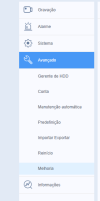
Depois é só escolher o arquivo e "mandar".
Espero ter ajudado.
Attachments


Anderson Brogni
n3wb
Conseguiu resolver? Estou com o mesmo problemaBoa noite galera. Consegui resolver o meu caso: "erro de reprodução (353)" Icsee - amanha postarei a solução detalhada se continuar em funcionamento, estou indo dormir agora, depois de mais de 6h tentando descobrir uma solução.
EDITADO 27/01/26: Ela funciona uns 5 minutos depois aparece o mesmo erro. Reparei que a versão do software que muda, e sempre que muda ela para de funcionar. Antes estava com os codigos finais da "versão do software" em 346732, com ele funciona perfeitamente, porem, parece que ela atualiza sozinha e fica com a versão 34ff32, e para de funcionar. Se alguem tiver a ultima atualização pra gente e conseguir disponibilizar para dowload.
Anderson Brogni
n3wb
Como você fez para ela ficar nessa versão "temporária"?Boa noite galera. Consegui resolver o meu caso: "erro de reprodução (353)" Icsee - amanha postarei a solução detalhada se continuar em funcionamento, estou indo dormir agora, depois de mais de 6h tentando descobrir uma solução.
EDITADO 27/01/26: Ela funciona uns 5 minutos depois aparece o mesmo erro. Reparei que a versão do software que muda, e sempre que muda ela para de funcionar. Antes estava com os codigos finais da "versão do software" em 346732, com ele funciona perfeitamente, porem, parece que ela atualiza sozinha e fica com a versão 34ff32, e para de funcionar. Se alguem tiver a ultima atualização pra gente e conseguir disponibilizar para dowload.


Orlando Freitas
n3wb
Consegue compartilhar essa versão amigo ?Boas notícias.
Uma nova versão de firmware está disponível para o modelo XM535_X6E-WEQ_8M.
V5.05.R02.000A07F3.10010.346732.0000010
Atualizei o meu no ICSee.
Boa tarde, eu fiz o downgrade usando o software disponibilizado pelo site icsee o VMS, e o firmware que tem ai nas mensagens anteriores o V5.04.R02.
Depois disso voltou a funcionar como gravação no cartão USB. Resolvido o problema, da atualização que tinha feito antes na câmera, no gerenciamento de armazenamento ficava a mensagem. "Erro de partição de gravação, formato ou cartão SD"
Essas câmeras Icsee A28b não pode ser atualizada para a versão do software recente, porque depois o cartão SD não grava fica com erro de partição de gravação, mesmo que você formate o cartão ou reset a câmera, pelo menos a minha ficou assim.
Depois disso voltou a funcionar como gravação no cartão USB. Resolvido o problema, da atualização que tinha feito antes na câmera, no gerenciamento de armazenamento ficava a mensagem. "Erro de partição de gravação, formato ou cartão SD"
Essas câmeras Icsee A28b não pode ser atualizada para a versão do software recente, porque depois o cartão SD não grava fica com erro de partição de gravação, mesmo que você formate o cartão ou reset a câmera, pelo menos a minha ficou assim.
furik
n3wb
Всем доброго времени суток после обновления этот камеры ошибка 353 постоянно выходит и не работает я откатал назад камера сработала гдето 30 мин и не подклюсается пишет тайм аут какой прошивка лучше мой камера 2024 года выпуска