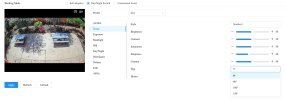
google chrome...
can You put here a screenshot where that function is located?
OK.. I found..
Google chrome under Windows - I see this menu...
Google chrome under Mac - it's hidden by Dahua...
the same browser, only different OS...
google chrome...
can You put here a screenshot where that function is located?

Thank you!!!!!I've had two mounted up outside for over a year now in Florida. Several tropical storms, countless afternoon rain storms all without getting rain inside of it.

I'm thinking about buying the EmpireTech IPC-Color4K-T180 camera, but I've seen Amazon/Google reviews that say it has an issue with water getting inside. Some of these post are old.. But it seems like a frequently listed issue.
Wonder if this issue has been resolved? Seem like a great camera.
Wow, that has me stumped. I looked at my other cameras, and there is a flip command in the GUI under camera settings. I'm not seeing the same command on either of my 180 cameras. Since I didn't see the image rotation screen under the GUI, I checked my NVR, and it again is missing for the 180 camera. I remembered in the DMSS app that there is an image flip when the camera is selected and then the gear icon is selected. Nope, missing there too. I'll keep trying. Must be a way to flip it with the software, but I am not seeing it. Which firmware do you have installed on your camera? Sometimes firmware updates cause missing menu items, unless a factory reset is initiated.We just installed this on a mast / pole on top of a building and we HAD to do it a the way we did, And I cannot find a way to flip the image !!!
Does anyone know a way to flip it?????
Heeeeellllllllppppppppp
180 cameras do not tend to have an image rotation option.We just installed this on a mast / pole on top of a building and we HAD to do it a the way we did, And I cannot find a way to flip the image !!!
Does anyone know a way to flip it?????
Heeeeellllllllppppppppp
I had the stock (not there) and I updated to: General_IPC-HX5(4)XXX-Taurus_MultiLang_PN_Stream3_V3.140.0000000.62.R.260114 ..Wow, that has me stumped. I looked at my other cameras, and there is a flip command in the GUI under camera settings. I'm not seeing the same command on either of my 180 cameras. Since I didn't see the image rotation screen under the GUI, I checked my NVR, and it again is missing for the 180 camera. I remembered in the DMSS app that there is an image flip when the camera is selected and then the gear icon is selected. Nope, missing there too. I'll keep trying. Must be a way to flip it with the software, but I am not seeing it. Which firmware do you have installed on your camera? Sometimes firmware updates cause missing menu items, unless a factory reset is initiated.
Auh, now that seems logical, me, I don't care about the speakers in this instance however I can see how the other 90% does lol I wish there was another firmware I could put on it but it's just going to be a big job to get back up there / on there and flip in over as it's hard to access..180 cameras do not tend to have an image rotation option.
The camera should be installed facing upwards, to avoid water sitting in the speaker holes.
That explanation makes perfect sense. I wonder why other cameras that also have speakers, like the Color4M-T have the rotation option in their software, when they would also have the problem with the speaker facing upward and collecting water. Probably laziness when they were writing the software and copying from another camera.180 cameras do not tend to have an image rotation option.
The camera should be installed facing upwards, to avoid water sitting in the speaker holes.
That's what I was thinking also. I wonder if there is any other firmware options ??That explanation makes perfect sense. I wonder why other cameras that also have speakers, like the Color4M-T have the rotation option in their software, when they would also have the problem with the speaker facing upward and collecting water. Probably laziness when they were writing the software and copying from another camera.

Not that I’m aware of.That's what I was thinking also. I wonder if there is any other firmware options ??
YA, I got it all set up then was going to web interface into it.. I put (hot glued) two thin black plastic rubber on the cut the angle of the camera and trimmed them so they are not ((just out of) the field of view to help block rain and sun from the lenses lol works great but ya I flipped it over so the one on the top stick out a bit more lol .. Going back up/out soon the flip it right side up LOL , but .ya good question heheheNot that I’m aware of.
I gotta ask. Why did y’all leave the installation site before looking at the video feed to determine if there was a problem. I mean, how did you even know you had it pointed properly?