


That does not in itself mean a sharper image. It could just mean that the length of the blur/ghost images are shorter. I am hoping that it does improve the focus of the object.Does highlight "reduced motion blur", especially at the end.
That does not in itself mean a sharper image. It could just mean that the length of the blur/ghost images are shorter. I am hoping that it does improve the focus of the object.Does highlight "reduced motion blur", especially at the end.


"Significantly more light-sensitive than the 5442-LED (including less noise and motion blur at dusk or when running white illumination at night), sharper than the Color4M-T (without all its contrast, detail, color, fractal/AI image issues), and on par with the Color4K-T (just lower resolution and better contrast management)" should have been enough for you to place the camera. I am not at liberty to share just any security footage from customers' sites, nor have I the time or interest to set up multiple cameras for a proper comparison here just to satisfy your curiosity (which I have to do because of dishonesty—y'all will just claim "See, look at all that motion blur!" when it's doing better than most other cameras, and on par with the Color4K-T—you'd have to be reminded how bad the 5442 is without its super bright IR LEDs). I have already run multiple comparisons when the camera first came out and am more than satisfied—in fact, I feel sorry to have to move old 5442 inventory when the Color4M-TL exists, cheaper, and better for most scenarios (the main exception being when white light from the camera is undesirable).Yep I am still waiting for the 4MTL example.....
Just make sure to adjust its settings as follows to start with—its defaults out of the box provide a disappointing picture: Camera -> Image -> Style=Standard (Soft causes saturation issues, pushing slightly colored objects to gray), Saturation=55, Sharpness=20, Gamma=45; LDC -> LDC=Off (causes blurriness and resolution issues); Exposure -> 2D NR=20 (remember you'll probably need to reboot the camera to make this setting stick due to firmware bug on all Dahua cameras—it reverts as soon as you close the page otherwise, resulting in a fuzzy image). If you want the white LED to come on sooner, you can use the Manual exposure mode and limit the maximum Gain setting (settings of 50-70 work well). If you want to reduce motion blur, you can limit the maximum Shutter time (note that there is a tradeoff; as the shutter gets faster and the AI brightens the image, the 3D NR gets more aggressive). I also like to set Illuminator -> Illumination Overexposure Remover=Number Plate Priority to darken the nighttime image a bit (note that it will also cause the camera to flash in the presence of moving vehicles at night; while I don't care for this behavior, it does allow the camera to capture license plates very well).Mine is supposed to arrive tomorrow.
"Significantly more light-sensitive than the 5442-LED (including less noise and motion blur at dusk or running white illumination at night), sharper than the Color4M-T (without all its contrast, color, fractal/AI image issues), and on par with the Color4K-T (just lower resolution and better contrast management)" should have been enough for you to place the camera. I am not at liberty to share just any security footage from customers' sites to satisfy your curiosity, nor have I the time to set up multiple cameras for a proper comparison here (which I have to do because of the dishonesty here—y'all will just claim "See, look at all that motion blur!" when it's doing better than most other cameras, and on par with the Color4K-T—you have to be reminded how bad the 5442 is without its super bright IR LEDs). I have already run multiple comparisons when the camera first came out and am more than satisfied—in fact, I feel sorry to have to move old 5442 inventory when the Color4M-TL exists, cheaper, and better for most scenarios (the main exception being when white light from the camera is undesirable).
Just make sure to adjust its settings as follows to start with—its defaults out of the box provide a disappointing picture: Camera -> Image -> Style=Standard (Soft causes saturation issues, pushing slightly colored objects to gray), Saturation=55, Sharpness=20, Gamma=45; LDC -> LDC=Off (causes blurriness and resolution issues); Exposure -> 2D NR=20 (remember you'll probably need to reboot the camera to make this setting stick due to firmware bug on all Dahua cameras—it reverts as soon as you close the page otherwise, resulting in a fuzzy image). If you want the white LED to come on sooner, you can use the Manual exposure mode and limit the maximum Gain setting (settings of 50-70 work well). If you want to reduce motion blur, you can limit the maximum Shutter time (note that there is a tradeoff; as the shutter gets faster and the AI brightens the image, the 3D NR gets more aggressive). I also like to set Illuminator -> Illumination Overexposure Remover=Number Plate Priority to darken the nighttime image a bit (note that it will also cause the camera to flash in the presence of moving vehicles at night; while I don't care for this behavior, it does allow the camera to capture license plates very well).
In Camera -> Encode, I like the following settings: Compression=H.265, Smart Codec=On (extends the keyframe interval a bit beyond the maximum of 150 to 200 for better storage efficiency), Dynamic Compression=Off (causes severe compression/blocking artifacts), Resolution=1440p (1520p results in interpolation which will cause grid-like sharpness artifacts and drop your max FPS), FPS=30 (more frames increases the chance of you having a clear one for a snapshot of a moving object), Bit Rate Type=VBR, Quality=5 (good starting point, but adjust according to your scene/quality/bitrate needs), Max Bit Rate=Max (6144 Kb/s). Add I Frame Interval=150, Smooth Stream=100/Max clear where applicable (i.e. Sub Stream 1, or if you turn off Smart Codec). If you don't like the delay switching to HD in Blue Iris and don't care about storage efficiency, you can turn off Smart Codec and lower I Frame Interval.
In Camera -> Audio, you'll get the clearest sound with Audio Encoding=PCM, Sampling Rate=Max (16000), Noise Filter=Off. I am being unnecessarily verbose here because in another thread where I was discussing camera settings, someone intentionally set other settings I did not specify (which should have been obvious to anyone with knowledge) to bad values just to prove their faulty point.
Here's a before/after pixel-peeping (i.e. cropped) example of the camera on a nearly full moon lit night showing the difference between the factory default settings and mine (above):
View attachment 242062
View attachment 242063
That gets the image into a much better place—significantly improved detail and colors. After that, motion blur is just a matter of illumination and shutter speed, and this camera already demolishes the competition there (except for the Color4K-T, which it's on par with). To quantify performance in the scene above with the 5442: The 5442 would be very dark (maybe 25%) with poor color, details all blurred out into darkness, and while a moving person above would have modest motion blur, they'd be completely pixelating and fading in and out on the 5442 every time they moved. This camera isn't magic, but I don't know anything that comes close at its price point.


"Significantly more light-sensitive than the 5442-LED (including less noise and motion blur at dusk or when running white illumination at night), sharper than the Color4M-T (without all its contrast, detail, color, fractal/AI image issues), and on par with the Color4K-T (just lower resolution and better contrast management)" should have been enough for you to place the camera. I am not at liberty to share just any security footage from customers' sites, nor have I the time or interest to set up multiple cameras for a proper comparison here just to satisfy your curiosity (which I have to do because of dishonesty—y'all will just claim "See, look at all that motion blur!" when it's doing better than most other cameras, and on par with the Color4K-T—you'd have to be reminded how bad the 5442 is without its super bright IR LEDs). I have already run multiple comparisons when the camera first came out and am more than satisfied—in fact, I feel sorry to have to move old 5442 inventory when the Color4M-TL exists, cheaper, and better for most scenarios (the main exception being when white light from the camera is undesirable).
Just make sure to adjust its settings as follows to start with—its defaults out of the box provide a disappointing picture: Camera -> Image -> Style=Standard (Soft causes saturation issues, pushing slightly colored objects to gray), Saturation=55, Sharpness=20, Gamma=45; LDC -> LDC=Off (causes blurriness and resolution issues); Exposure -> 2D NR=20 (remember you'll probably need to reboot the camera to make this setting stick due to firmware bug on all Dahua cameras—it reverts as soon as you close the page otherwise, resulting in a fuzzy image). If you want the white LED to come on sooner, you can use the Manual exposure mode and limit the maximum Gain setting (settings of 50-70 work well). If you want to reduce motion blur, you can limit the maximum Shutter time (note that there is a tradeoff; as the shutter gets faster and the AI brightens the image, the 3D NR gets more aggressive). I also like to set Illuminator -> Illumination Overexposure Remover=Number Plate Priority to darken the nighttime image a bit (note that it will also cause the camera to flash in the presence of moving vehicles at night; while I don't care for this behavior, it does allow the camera to capture license plates very well).
In Camera -> Encode, I like the following settings: Compression=H.265, Smart Codec=On (extends the keyframe interval a bit beyond the maximum of 150 to 200 for better storage efficiency), Dynamic Compression=Off (causes severe compression/blocking artifacts), Resolution=1440p (1520p results in interpolation which will cause grid-like sharpness artifacts and drop your max FPS), FPS=30 (more frames increases the chance of you having a clear one for a snapshot of a moving object), Bit Rate Type=VBR, Quality=5 (good starting point, but adjust according to your scene/quality/bitrate needs), Max Bit Rate=Max (6144 Kb/s). Add I Frame Interval=150, Smooth Stream=100/Max clear where applicable (i.e. Sub Stream 1, or if you turn off Smart Codec). If you don't like the delay switching to HD in Blue Iris and don't care about storage efficiency, you can turn off Smart Codec and lower I Frame Interval.
In Camera -> Audio, you'll get the clearest sound with Audio Encoding=PCM, Sampling Rate=Max (16000), Noise Filter=Off. I am being unnecessarily verbose here because in another thread where I was discussing camera settings, someone intentionally set other settings I did not specify (which should have been obvious to anyone with knowledge) to bad values just to prove their faulty point.
Here's a before/after pixel-peeping (i.e. cropped) example of the camera on a nearly full moon lit night showing the difference between the factory default settings and mine (above):
View attachment 242062
View attachment 242063
That gets the image into a much better place—significantly improved detail and colors. After that, motion blur is just a matter of illumination and shutter speed, and this camera already demolishes the competition there (except for the Color4K-T, which it's on par with). To quantify performance in the scene above with the 5442: The 5442 would be very dark (maybe 25%) with poor color, details all blurred out into darkness, and while a moving person above would have modest motion blur, they'd be completely pixelating and fading in and out on the 5442 every time they moved. This camera isn't magic, but I don't know anything that comes close at its price point.
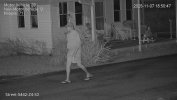
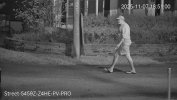

 ossible ratios.
Excellent tool, been waiting for this for ages. Really helpful. Thanks for you good work.@bigredfish is working on a color lighting flowchart. (in Metric Shit tons)
It will hopefully make things clear to the IPcamtalk community.
it will be depicting the " Metric Shit ton" column on the left and the equivalent lumens across the bottom.
Then in the middle of the graph find your sensor size.
Plot your findings on the graph.
This will give you your Shit ton lighting requirements in both Lumens and shit tons.
Then go to the lighting department at Home Depot and have a store associate find you the correct bulb for your calculated Metric Shit ton requirement in Lumens.
Thank you for your attention to this matter.
here are some
View attachment 242094ossible ratios.
To be fair I left out one important thing:
“Good enough”
I’m admittedly hard core when it comes to image quality. Frankly only a few of my cameras in certain scenes are imho “great”. Most are “pretty good”.
It’s partially about the camera but more about how it’s setup and the available light vs distance vs speed of target.
I’m retired so pissing away 4 hours 2-3 nights in a row tweaking settings is a form of entertainment. Often when I’m done I’m disgusted that it isn’t “perfect”. My goal being great forensic evidence. And honestly my efforts often fall short of that.
It’s the reason I don’t play golf.
Face it, We’re dealing with $200 cameras. They aren’t “the best” , they’re more like “pretty good”
And for many “pretty good” may be “Good enough”
I get that and have to remind myself that “Good enough” might just be all the homeowner wants. Enough to be able to make out that it’s a person vs a moose and with the bonus that that person was wearing a red shirt.
That’s perfectly valid and there’s nothing wrong with that.
Just be sure to make the distinction
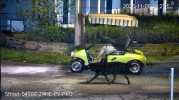

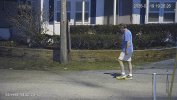
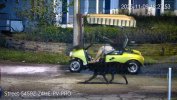
Sadly, many people, including everyone in the Reolink Reddit LOL, would think this image is good enough! The still image is pretty nice though.
View attachment 242097
But this forum isn't like a reddit sub.
For most of us, we want to get a camera that will perform with an object in motion at our location for the worse situation, which for most of us is at night when it is dark and there is little to no light. If a camera performs at night, it is easier to tweak settings to make it work during the day than it is the other way around.
I am not looking for a nice bright static image to enter in the photo contest at the county fair - my mobile phone will beat any of these in that category. I want the ability to freeze frame an object in motion.
Now for those that don't know any better, or for those that are using it as an OVERVIEW camera, then I suspect installing the 2.8 or 3.6mm fixed lens 4MTL up on a 2nd floor will be fine like the PRO line examples because nothing is going to be IDENTIFY quality at the distances stuff is at, so a brighter image for OVERVIEW is great and for that purpose/goal, then yes go with a cheaper camera than the 5442.
But in that critical IDENTIFY distance of 15 feet, I cannot see the lower priced 4MTL doing better than the higher priced 5442 and probably will perform closer to the PRO series we have seen.
Maybe someone soon will get one and post some pics in that critical 15 foot ID zone.

I hate the new website.When your new website sucks so bad you have to put out the option to return to the old version
View attachment 242096
I know from many sources that there is big firmware upgrade in development for 54PRO.. Latest version is from 01 April.
there are many new firmware subversions visible in internal Dahua firmware website, but my Polish Dahua people can't download it - it is limited by permissions for some internal testing group.
I hope that they will fix many problems with 54PRO..
Just to clarify @steve1225 since you said "01 April" ... are you "messing" with us ... or is this legit?


