Why does the BI iOS app look so horrible and pixelated?

bfollowell

Young grasshopper
Dec 11, 2015
87
28
Evansville, IN
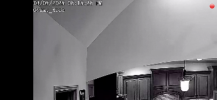
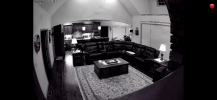
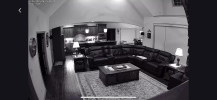
I've noticed lately, and I'm fairly certain that it wasn't always this way, but the BI iOS app looks absolutely horrible. It's about the nastiest looking, pixelated mess that I've seen in many years, and I'm fairly certain that it hasn't always looked this way. When I look at recorded video or a live feed from home, they look fine. It's only when I look at them through the iOS mobile app that they look so bad. I've attached some screenshots below for comparison.

These first two images are from the BI app.
IMG_4844.PNG

IMG_4845.PNG


These next two images are from my camera manufacturer's app taken about 15 seconds after the first two.

IMG_4846.PNG

IMG_4847.PNG
 
I looked around a little more at some of my other cameras. I have at least two more identical cameras in my home, also recording and viewable through BI, and these look great through the BI iOS app, so whatever the problem is, it doesn't necessarily appear to be the app itself. It's likely something about the way I have this one setup or something. I'll have to dig down a little deeper and compare my cameras to determine the root cause of this issue, but it's likely me!
 
I’ve noticed the same thing, and it really seems like the iOS app is aggressively downscaling the UI and preview stream. Since the recordings and live view look fine elsewhere, it doesn’t feel like a camera or BI server issue. My guess is a recent app or iOS update changed how scaling or rendering is handled and it hasn’t been properly optimized yet.
 
I’ve noticed the same thing, and it really seems like the iOS app is aggressively downscaling the UI and preview stream. Since the recordings and live view look fine elsewhere, it doesn’t feel like a camera or BI server issue. My guess is a recent app or iOS update changed how scaling or rendering is handled and it hasn’t been properly optimized yet.

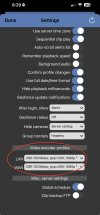
Have you checked your video encoder profiles in the app settings? Mine seemed to have changed when I updated to BI6.

IMG_4050.jpg