Why did they remove the "show disabled cameras" menu button??? How to get back a disabled camera.

Shadeth

Getting the hang of it
Sep 19, 2019
75
47
Texas
OK, I recently paid to upgrade BI since I hadn't upgraded it in about a year or more. Previously, when I was tinkering with a new IP camera but it wasn't mounted where I wanted it, I would disable that camera to hide it from my normal view list, then right click on the screen or a camera and there was a "show disabled cameras" option I could select to see all my disabled cameras.

Now, they removed that option! So if you right click a camera, you can still disable it, but GOOD LUCK getting it re-enabled! The only way I was able to re-enable was by right clicking an old clip and accessing the camera setting from there and setting it back to enabled. BUT, some of my older cameras don't have clips saved, so how the heck am I supposed to access them? Where can I access all my cameras even the disabled ones? I really don't get why they removed this option. And no, the Layout "show hidden cameras" doesn't help, since it seems that "hidden" is different than "disabled".

If someone can help me out I'd really appreciate it, this new version is driving me nuts, first I had to rebuild my database since the clips were jacked and not recording and now this which is making it hell to add a new camera I had previously configured but not physically mounted. Yeah, I could "add a new camera" but I don't want to do that when I already have this one configured but it is just disabled and I can't see it. I hope someone can help!
 
Of course, I had to bitch about this and THEN I found the solution in one of the last places I looked. If you click on the "status" icon that looks like a stock market graph, then you can see all the cameras you ever set up, including the disabled ones, and get to their menus that way. I'm still salty they removed the "show disabled cameras" from the main camera view menu though. But maybe this post will help someone else who has the same issue.
 
  • Like
Reactions: Flintstone61
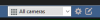
In the top bar there is a dropdown list where you select a group, and to the right of it is a button that is a pencil on a box.

1663960846697.png

If you click that thing, you get the "Edit layout" mode, and then you'll find the ability to show disabled cameras again.
 
Basically some time ago Blue Iris enhanced the group layout capabilities and they figured it warranted having an "Edit layout" mode so you couldn't accidentally mess up your layout as easily. Side-effect of course is that everyone has to learn the new way of doing things.

I don't really like the extra steps but it is what it is.
 
In the top bar there is a dropdown list where you select a group, and to the right of it is a button that is a pencil on a box.

View attachment 140778

If you click that thing, you get the "Edit layout" mode, and then you'll find the ability to show disabled cameras again.

Thank you! For some reason, just one of those days, I wasn't seeing that option in there. I guess they moved it there. That does help and is better than having to find and mess with the settings of the cameras in the Status > Cameras window.
 
  • Like
Reactions: bp2008
Rather than disable, you can make it hidden, create a group called "hidden" and put it in that group. It will only be visible if you view that group, no need to enable/disable at all this way.
 
  • Like
Reactions: Wen
There are cases where disabling is still better. Hidden cameras still cost energy to pull a video stream, decode it, etc.
I have 4 Poe cams set up in a Blue Iris group which is being displayed on my 4k 65" LG TV. All of this works great. A problem arose recently one of my PIR motion sensors in my 'Hubitat' home security system triggered, causing multiple lights to go on in my backyard. This motion sensor is in an area not covered by my 4 outdoor IP cameras. This has gone on for several week now. When these lights go on, I scramble out to my backyard. When I get there, I see nothing.
This caused me to get a 5th camera to cover that area. The camera works great but is not yet mounted.
Here is my dilemma: The 4 outdoor cameras are all visible at the same time on this 65" 4k screen and I am reluctant to give that up. Therefore I installed this as an additional hidden camera. This made for a messy display therefore I made it hidden.

Questions:
1. Can a hidden camera still function by motion triggering and record clips?
2. How do I set this up?
3. What is the best layout to quickly check 5 cameras, preferably 2 or more at a time?
 
Each camera can be assigned to several "groups" so you could quickly select any particular group from the group menu on the toolbar.
 
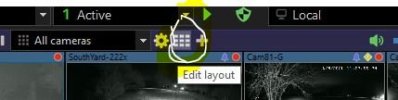
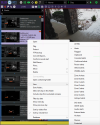
click the edit layout button on the top center, looks like little tiled square. Once clicked then right click for menu and you will see the option.
edit layout button.JPG
 
You could also click on the status button and look on the camera tab, it show all hidden and disabled cameras, double click on a camera and the setup window will open and you can change the camera status!
That's a new one on me......and I like it!
 
  • Like
Reactions: walkjp1
That's a new one on me......and I like it!
FYI - The Status button option has always been in Blue Iris.

Speaking of changes in BI 6, there used to be an option to display Cancelled Alerts on the left side, where normally the Confirmed Alerts are displayed. I've been looking all week for this and just cannot find it. It was easy to do analysis on Cancelled alerts from this listing. Anyone?
 
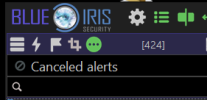
Yes, just click on the circle with the three dots "Special Views", for me it shows my cancelled alerts, if they do not show, then long press on this icon and you will get a drop down list to select from!
Screenshot 2026-01-10 071029.png
 
Yes, just click on the circle with the three dots "Special Views", for me it shows my cancelled alerts, if they do not show, then long press on this icon and you will get a drop down list to select from!
View attachment 236074
That's one of the first things I tried, but the only option is Confirmed Alerts. I'm running 6.0.1, so maybe it's not available? Or, I am just not saving or recording them.

Edit: So, it REALLY helps to read the FULL response from someone on the Forum. Long press does it, and I had no idea this option even existed. Thank you, @Bruce_H
 
Last edited:
That's one of the first things I tried, but the only option is Confirmed Alerts. I'm running 6.0.1, so maybe it's not available? Or, I am just not saving or recording them.

Edit: So, it REALLY helps to read the FULL response from someone on the Forum. Long press does it, and I had no idea this option even existed. Thank you, @Bruce_H
Yes the last selected view is what will show with a single click, since I look at the the Cancelled alerts frequently, that is what is the default for me!
 
  • Like
Reactions: weigle2