That video looks damn good. better than anything i have.
Good enough for what I need in a security cam.
I see what your talking about, If it were my system, I wouldn't sweat the small stuff.
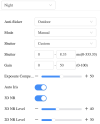
I think it may be the overexposure control on illumination or the cameras built in exposure control. I see it on a number of zooomed Dahua cameras from Z12s to Z4s
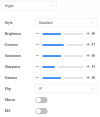
Try fixing the exposure at 1/120 (or better using Custom, 8.33 - 8.33)
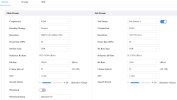
Thanks for the replies everyone. I'm going to max the bitrate and drop the FPS to 15. Also going to lock in the exposure to 8.33. I think part of my problem is that I view alerts using UI3 in a web browser. The macro blocking is much worse watching the clip there than from the console. Which of these quality profiles provides the best playback in UI3?