Weird image ghosting

Jun 13, 2024
5
3
Florida, USA
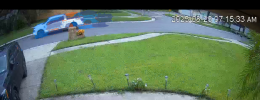
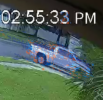
Hello recently I've been noticed that some of my cameras has this ghosting issue. I've tried to change resolution, FPS, etc but Im still seen this. Can anyone advice possible causes?

Thanks

Alain
1756062098723.png
 
:cool: Consider this => Troubleshooting Streaming Problems
 
  • Like
Reactions: looney2ns
Can't tell anything from that image.

Post a full resolution image from the camera or NVR

What model camera is it?
 
  • Like
Reactions: looney2ns
Like I said, that blue/orange is the BI motion detection analyzer turned on and isn't image ghosting.

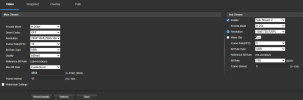
But that picture has much bigger issues. Bitrate too low among other things.

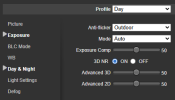
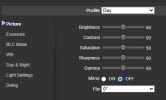
What camera model and post screenshots of your settings (encoding, bitrate, exposure/shutter, etc.)
 
  • Like
Reactions: bigredfish
Auto exposure, VBR, low max bitrate

Start there
 
Yep Bitrate needs upped and change to CBR. Those two are why the image itself looks so bad.

You need to match codec for mainstream and substream and ideally the FPS should match in both.

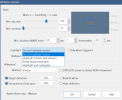
But the blue/orange "ghosting" you complained about needs to be turned off in BI.
 
To get rid of the blue/orange you need to change the highlight to "Do not highlight motion". Right now you have one of the others turned on.

1756125253675.png