


Version 6
- Thread starter Blue Iris Update Bot
- Start date
You are using an out of date browser. It may not display this or other websites correctly.
You should upgrade or use an alternative browser.
You should upgrade or use an alternative browser.
greg_mitch
Pulling my weight
- Mar 27, 2017
- 189
- 129
For some reason I had to drag over the UI3 folder and the UI3.htm file to get that working in the new install directory. Anyone else have that issue? Otherwise, the directions from this thread worked perfectly. Thanks!

I was seeing an issue with UI3 after the system had been up for awhile. However, today's release seems to have resolved this issue.Anyone else have that issue?

Cool. Just completed a smooth Ver.6 upgrade. I queried your chatbot for some info...worked great.I created an Blue Iris Help Chatbot using the current Blue Iris help pdf file. The link to the Chatbot is below, let me know what you think of it, is it helpful.
Blue Iris AI Help Chatbot
I did have my current extended maint. license on hand but didn't need it.
I did Export my ver. 5 config but it wasn't needed.
I did have a dead end loop on the reboot about the Microsoft Visual C+ V14 or whatever, 2nd time it wanted a reboot to continue I hit cancel and installation proceeded. It shows up in Programs as an installed program.
Finding my Admin Password for the PC was kind of like Cobwebs in an attic...I did find that though. ( been using the Login Pin code so long)
Appears to have loaded up everything normally.
Whoo hoo



Tim_Ettinger
n3wb

yeah after going through a few installs, do not restart the computer until the BI install has completely finished. The MS Visual install tries to make you reboot the computer before BI is done....that needs to be fixed. Not a huge issue but will confuse many.

Bruce_H
Getting comfortable
My guess is that you will need to do a full install, based upon what I have read! It uses a different install path, I have done the separate install of the new BI 6 Beta and it went very well, but it is still listed as 5.9.9.99 which is essentially still a beta, if you are nervous about the process I would suggest that you should wait for the official 6.0 release install file!I use the software update built into Blue Iris. Is version 6 going to be listed as a critical or highly stable update in the future for automatic update?
No, the active license carries over, even across this version number change. Ken did bump up the initial new license and annual maintenance plan costs however.

I also had same... ui3 stopped, but the latest update fixed it.. No clue why....I was seeing an issue with UI3 after the system had been up for awhile. However, today's release seems to have resolved this issue.

Ssayer
BIT Beta Team
I've tried a number of things with the chatbot and it's been pretty good. Does anyone know (the chatbot doesn't) if we can still zoom all the images in the side panel (make ALL the images larger or smaller) in version 6? In version 5, there was a box to specifically do so.
If you mean the clips list, yes, CTL + scroll the mouse will change the size of the thumbnails.. Ken changed it, but the info hasn't made it to the help file (yet) I think. I also asked about making the clips list less wide, but that's a wish list item.I've tried a number of things with the chatbot and it's been pretty good. Does anyone know (the chatbot doesn't) if we can still zoom all the images in the side panel (make ALL the images larger or smaller) in version 6? In version 5, there was a box to specifically do so.

Smilingreen
Known around here


CrazyAsYou
Getting comfortable
For some reason the first install didn't add/install the all the ui3 directory, running the same installer/version again (2nd time) added/unpacked it.I was seeing an issue with UI3 after the system had been up for awhile. However, today's release seems to have resolved this issue.
CrazyAsYou
Getting comfortable
It's an installer bug or sorts, running the installer a 2nd time works (see my above post)I also had same... ui3 stopped, but the latest update fixed it.. No clue why....


bob2701
Known around here
Same here, reactivated service and all good.Just installed the official 5.9.9.99 version 6 release, all I did is run the installer, it removed the old BI5 service, I then had to activate the service in BI 6 and everything is as it was, no drama it just worked! At some point I will Uninstall BI5 and remove the old BI5 install directory
I've just discovered that Ken is no longer packaging the changelog.pdf file with the installer. Perhaps this is just temporary until V6 is live.
For now, the only way to see the changelog is to go online (note the filename change):
Or click the View changelog link on the Update dialog.
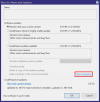
Anyway, here are the entries for the last three 5.9.9.99 updates...
[5.9.9.99 r10] – 2025-12-1
Fixed
• Now an automatic switch to new default WWW and backup folders when old folder paths are detected
• A forever-bug where the viewer window would not return the main window to a non-maximized state following a temporary full-screen display
• Many timeline playback inconsistencies regarding use of the Esc key, single-camera "scale to fill", and black playback windows when the clips list was set to solo by camera when the viewer window was not.
• An issue with the viewer open where sometimes the "minimized" live camera view header would have show image corruption.
Changed
• Logging of Trigger/Alert states to combine them (roll-up) more appropriately
• The status/log shows a rolling 24-hour view
Added
• A more generous hit area for resizing the main window from the status bar area, especially bottom/right corner
[5.9.9.99 r9] – 2025-11-30
Fixed
• Windows socket code for improved shutdown and re-use of sockets. This should improve stability when cameras are often going offline or AI services become unresponsive.
[5.9.9.99 r8] – 2025-11-24
Changed
• New full installer for 6.0 pre-release
• References to version 6 specific web server files and updates
For now, the only way to see the changelog is to go online (note the filename change):
Or click the View changelog link on the Update dialog.
Anyway, here are the entries for the last three 5.9.9.99 updates...
[5.9.9.99 r10] – 2025-12-1
Fixed
• Now an automatic switch to new default WWW and backup folders when old folder paths are detected
• A forever-bug where the viewer window would not return the main window to a non-maximized state following a temporary full-screen display
• Many timeline playback inconsistencies regarding use of the Esc key, single-camera "scale to fill", and black playback windows when the clips list was set to solo by camera when the viewer window was not.
• An issue with the viewer open where sometimes the "minimized" live camera view header would have show image corruption.
Changed
• Logging of Trigger/Alert states to combine them (roll-up) more appropriately
• The status/log shows a rolling 24-hour view
Added
• A more generous hit area for resizing the main window from the status bar area, especially bottom/right corner
[5.9.9.99 r9] – 2025-11-30
Fixed
• Windows socket code for improved shutdown and re-use of sockets. This should improve stability when cameras are often going offline or AI services become unresponsive.
[5.9.9.99 r8] – 2025-11-24
Changed
• New full installer for 6.0 pre-release
• References to version 6 specific web server files and updates



Yes. I noticed this change earlier in the 5.9.9.9x series of updates but for some reason I thought it got reverted it back to splitting them out by color. I am not entirely sure if this change is intentional or if it would be considered a bug. But it is there for me too.anyone seeing only one or two colors for different cameras on timeline? UI3 looks normal, but 12/1 v6 update doesn't show the separate camera colors for me now. ui3:View attachment 233598
console:
View attachment 233599
UI3 will continue splitting out the timeline view by color for as long as Blue Iris continues providing the data that way.
MachAF
Young grasshopper
Yes. Mine went from 35% to 95%..Went back to 5 until this gets cleaned up. should have known better.I upgraded and everything was running fine but I noticed that my cpu increased at least 7%-8% more with ver6.. reverted back and now back to where it was. anybody else notice this?