Version 6

Aug 11, 2014
722
706
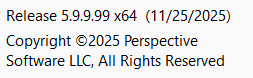
Version 5.9.9.99 is now the official release for all new installations. The version number will be bumped to 6.0.0.00 once a bit more work has been completed on the documentation. When upgrading from version 4 or 5 (only requiring active maintenance, no new license) you should do a new full installation in order to use the new install folder (now more simply C:\Program Files\Blue Iris) and to insure that you have the latest Microsoft redistributable libraries installed (v145).
 
  • Like
Reactions: Flintstone61
.Could someone who knows how, post the steps for this?
Not sure if this is the right way to do this, but here's what I did.
  1. From the about page in BI5 exported the settings to a backup directory
  2. Used BI Tools to capture my current license
  3. Downloaded the install file from the BI website:
  4. Shutdown BI5 and stopped the service
  5. Ran the install file downloaded in step 3
  6. Checked the old BI5 service and made sure it was set to manual startup
  7. Rebooted PC
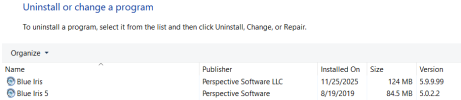
  8. After the reboot there were two BI icons on my desktop. One said Blue Iris and the other was Blue Iris 5. I started the new install using the Blue Iris icon and to my surprise all my cameras and settings were intact so I didn't need to import the settings from step 1 or the license key from step 2.
  9. Verified everything was working including UI3 and the mobile app
  10. Setup the new instance to run as a service and autostart
  11. Uninstalled BI5 via Windows control panel
  12. Deleted the old BI5 directory (C:\Program Files\Blue Iris 5)
Screen Shot 2025-11-25 at 9.41.16 PM.png
 
Last edited:
Could someone who knows how, post the steps for this?
After doing it independently of the steps outlined above by @Vettester, I can confirm his process.

I'm up and running, except I've not yet uninstalled Blue Iris 5 and its folder...

1764134515880.png

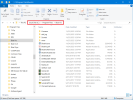
After Step 3, the installer created the following new install folder... so you'll want to make sure you see it too.

1764130817449.png

In step 10, I made sure the service pointed to the new install folder (it did).
Then I changed the account to my PC login account.
And for the 'startup type', I changed it to 'Automatic (Delated Start)' - because I'm using CPAI.

I also noticed that the backup folder was not changed from Blue Iris 5, so I changed it manually

1764134349953.png

This caused me to also search the registry for more bad pointers to the old install folder -- and I found and fixed the following reg keys:
  • HKLM\SOFTWARE\Perspective Software\Blue Iris\servicePath
  • HKLM/Perspective Software\Blue Iris\Cameras\Gate_clone2\Watchdog\OnLoss\0\run_path
  • HKLM/Perspective Software\Blue Iris\Cameras\Gate_clone2\Watchdog\OnRestore\0\run_path
  • HKLM\Perspective Software\Blue Iris\Cameras\Backyard-PTZ\Alerts\OnTrigger\0\soundPath
    NOTE: there were numerous instances of the soundPath key that required editing
 
Last edited:
I downloaded the install file. Ran it and I am now on 5.99.99. Did not have to do anything else. All cameras and settings are the same.
 
Response from Ken...

The sound paths should update as they are used ... it will use the old one as it still exists, then if you delete the Blue Iris 5 folder, it will autoamtically look in the Blue Iris folder.
This should hold true for the auto-export path and WWW default folder as well.
Thanks for the heads-up, but hopefully it will be OK with these methods in place.
 
  • Like
Reactions: samplenhold
I may have accidentally triggered the update without doing the full install method - what should be my next step? Thanks
 
Got it, so I should obtain the full version install file from the BI website right?
That's correct, it may want you to restart pc during set up....let the setup finish completely and then restart. If you use it as a service you will also need to select that again.

 
  • Like
Reactions: Arjun
Just installed the official 5.9.9.99 version 6 release, all I did is run the installer, it removed the old BI5 service, I then had to activate the service in BI 6 and everything is as it was, no drama it just worked! At some point I will Uninstall BI5 and remove the old BI5 install directory
 
if you already have an active license do you have to buy a new one?