

I'm trying to do two different BI alerts from one t180 camera: The first is a "normal" IVS tripwire Onvif trigger that makes BI record mainstream, alerts Pushover, etc. All good there. The second is I'd like a different area of the same camera to trigger, causing a recording of main stream, but NO alerts. I assume best way is a clone, and I set that up. But I can't seem to figure out how to tell BI that there are different IVS Tripwires...and how to set them up to make them unique... (I guess one could be tripowire, one intrusion, but rather both be tripwire for my use) I'm thinking in BI's onvif configure I can tell it to look for something that is different in the Dahua camera's setup of IVS so it knows. But what? I tried to examine the onvif xml that shows in BI's onvif events/Most recent event, but on mine there seems to be no reference to the IVS onvif output that I would expect to see there and might lead me to an idea.... So anyone know?
Use a clone to have two different IVS areas alert differently?
- Thread starter rdxny
- Start date
You are using an out of date browser. It may not display this or other websites correctly.
You should upgrade or use an alternative browser.
You should upgrade or use an alternative browser.


No reason to clone and will likely cause issues.
Set up one IVS you want to alert with a memo field of "alert" and tell it to send the alert for that one and set up the 2nd IVS with a memo of some other one word maybe "movement" and then dont set it to send an alert for that one.
Set up one IVS you want to alert with a memo field of "alert" and tell it to send the alert for that one and set up the 2nd IVS with a memo of some other one word maybe "movement" and then dont set it to send an alert for that one.
hmmm, simplicity always rules? I'll try that! ThanksNo reason to clone and will likely cause issues.
Set up one IVS you want to alert with a memo field of "alert" and tell it to send the alert for that one and set up the 2nd IVS with a memo of some other one word maybe "movement" and then dont set it to send an alert for that one.

Thanks wittaj, OK, not as simple as I thought (for me!)No reason to clone and will likely cause issues.
Set up one IVS you want to alert with a memo field of "alert" and tell it to send the alert for that one and set up the 2nd IVS with a memo of some other one word maybe "movement" and then dont set it to send an alert for that one.
I created another rule for that cam as below: (with "road being the added rule I dont want alerts on)
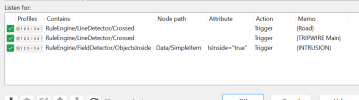
Then set BI Onvif
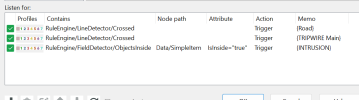
But where do I tell BI to listen only to Road or Main? and where do I setup the alerts for one or the other, not all (they both "Trigger", and Triggers mean Alert also or not , but individually??
Clearly I am not getting this!
Half of this setup needs to be done in the camera GUI: you need to first create names for the IVS rules "in-camera". In my case, they start with the word "Sidewalk" for zones that I want the camera to record on (officially, these still technically result in an "Alert" in BI terms, which is what I want, but here you could chose to Ignore, or Trigger, or consider it an Confirmed Alert in the ONVIF Events box), but I don't need an Action Set notification for these (ie: a push/Pushover), so I don't add the word Sidewalk in the "Required AI objects" in the push/Pushover Action Set run action. Conversely, for any named IVS zone called "Driveway" (closer to the house), I DO add the word Driveway to the Required AI Objects in the Action Set run action.
Best to illustrate:
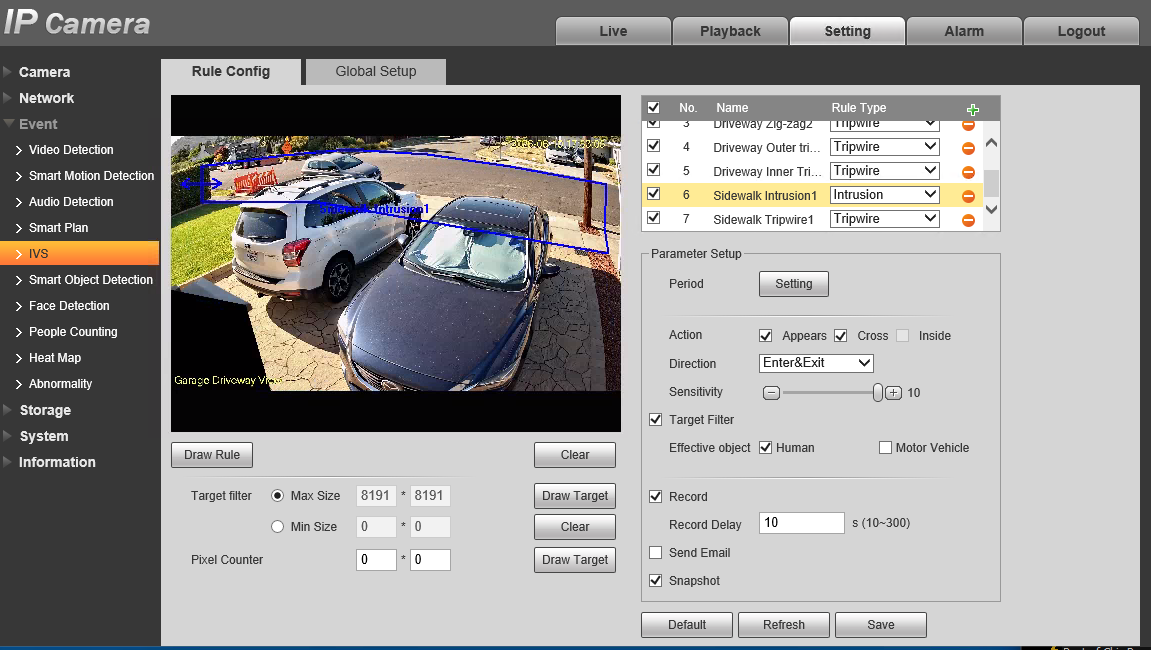
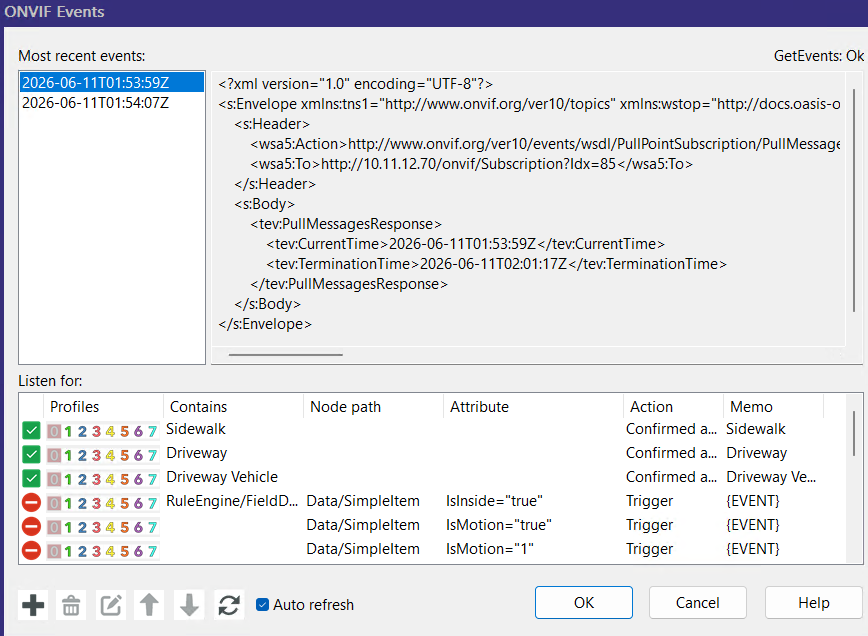
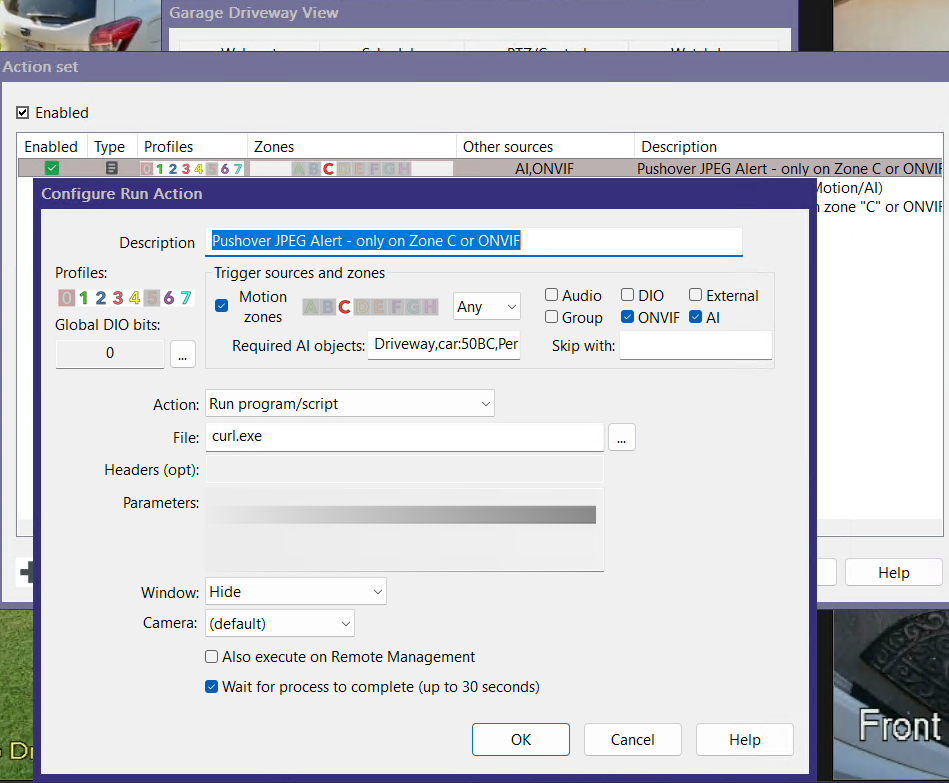
Best to illustrate:
Thanks jrbeddow, I'm not using nvr, just the cameras IVS.. I think I'm ok with setting two different IVS rules, and having BI see them on onvif config. I'm simply trying to have both Tripwires record, but only one alert. I cant seem to see where I can tell alerts to pay attention to one onvif rule, not the other. Both IVS cause a trigger, and Alerts respond to both triggers.
And Wittaj, I can set one IVS to trigger, one to ignore. But how can I get that ignored IVS to record mainstream on an IVS alert (but not alert in BI) , which is my aim?
And Wittaj, I can set one IVS to trigger, one to ignore. But how can I get that ignored IVS to record mainstream on an IVS alert (but not alert in BI) , which is my aim?
Not sure why you mentioned an nvr: I don't use one either (just the cameras directly to BI). The IVS rules are named and created in the camera GUI directly.Thanks jrbeddow, I'm not using nvr, just the cameras IVS.. I think I'm ok with setting two different IVS rules, and having BI see them on onvif config. I'm simply trying to have both Tripwires record, but only one alert. I cant seem to see where I can tell alerts to pay attention to one onvif rule, not the other. Both IVS cause a trigger, and Alerts respond to both triggers.
And Wittaj, I can set one IVS to trigger, one to ignore. But how can I get that ignored IVS to record mainstream on an IVS alert (but not alert in BI) , which is my aim?
From the top:
1) Configure your IVS rules in the camera GUI, and be sure to re-name them to something useful and recognizable (DO NOT use "Tripwire1", "Tripwire2", "IntrusionBox1", etc....).
2) In BlueIris, go to the camera's properties Motion/Trigger tab, then use the checkbox for ONVIF/camera events (checked), then under Configure, you can turn OFF (disable) all the existing (difficult to decipher) triggers. Now start adding back (the + symbol in lower left) new event/triggers as needed: in the "Contains" box, add the name of each IVS rule that you used (one per rule here), the default action is "Trigger" but you can also set this to other things like "Confirmed Alert", and (very important) in the Memo/label box make sure to also match the name here to the "Contains" name (aka: the IVS rule name).
3) Now, go to the Alerts tab: Open the "On alert" button. Open the rule that you may already be using to send a push/Pushover alert notification: here, add the same name that you used above in Memo/label to the "Required AI objects" box for the Alerts that you DO want to receive notifications for (but obviously leave out those that you don't need notifications for).
4) You are done, Enjoy.
EDIT: Note in my first image that you can have several IVS rules of each "category", as long as they are named consistently starting with the appropriate names for the important vs. unimportant regions. See how I have several that start with "Driveway" and a couple that start with "Sidewalk".
Last edited:
Thanks I had the first two parts down ok, but I couldn't see a way to differentiate the two IVS rules in the Alert tab, I was missing #3, the "required AI objects" part, thinking that was only for the built-in BI AI or other external AI. That's the missing part that should allow me to separate the IVS rules. Perfect! (I mentioned NVR because the camera GUI you show is way different than my GUI, I guess older or different camera or firmware? I just assumed it was the NVR version...just different ) Again, thanks for the detailed help!
I had the first two parts down ok, but I couldn't see a way to differentiate the two IVS rules in the Alert tab, I was missing #3, the "required AI objects" part, thinking that was only for the built-in BI AI or other external AI. That's the missing part that should allow me to separate the IVS rules. Perfect! (I mentioned NVR because the camera GUI you show is way different than my GUI, I guess older or different camera or firmware? I just assumed it was the NVR version...just different ) Again, thanks for the detailed help!No problem, and I agree that the solution is less than obvious. The key is knowing that every Alert has one or more associated labels (aka: Memos in BI terms), and that you can "manually" manipulate those Memos in this manner and control what takes place with them in the Alert, Action set dialog via the "Required AI objects" box.Thanks
BlueIris documentation is terse and minimal, clearly written by the developer himself, Ken. It could use some expansion, with use case scenarios/examples, but that would easily double or triple the length of an already long document.
This has been working great, thanks guys. One additional question:
Since both the main and secondary IVS triggers end up in the clip list in BI at left, when using the "Alerts" filter, is there a way to assign something like "Flagged" automatically to the "main" IVS triggers so I only see them in the clip list? (unless I select all?) Thanks again..
Since both the main and secondary IVS triggers end up in the clip list in BI at left, when using the "Alerts" filter, is there a way to assign something like "Flagged" automatically to the "main" IVS triggers so I only see them in the clip list? (unless I select all?) Thanks again..
Hmm...I haven't tried this, as I rarely use the filters for Alerts, but it could work. In the ONVIF details/classifications continue to setup the "outer" (less important) events as "Triggers" (the default), but in the same dialog reclassify the more important (closer) events as "Confirmed Alerts". I'm pretty certain you can later filter based on this "Confirmed Alert" classification, at least you can in UI3.
makes sense, and yes, you can filter for confirmed alerts in the console. I will try, see if it plays nice with my alerts (pushover) for main... thanksHmm...I haven't tried this, as I rarely use the filters for Alerts, but it could work. In the ONVIF details/classifications continue to setup the "outer" (less important) events as "Triggers" (the default), but in the same dialog reclassify the more important (closer) events as "Confirmed Alerts". I'm pretty certain you can later filter based on this "Confirmed Alert" classification, at least you can in UI3.
add: I think I would have to make the other cameras confirmed alerts also tho...