
So not sure why I did this and now I'm regretting it. I've been running version 5 for four years and I figured I should upgrade and support the company and maybe there will be new features, etc. So I bought version 6 and upgraded. Installed it and uninstalled version 5. Picked up all my cameras and that all seems to be working fine. But using the web interface from any computer or phone either local on the LAN or remote has constant errors when trying to play any clips.
Trying to correct this following everything I could possibly find online. Can't think of everything I tried but here's just some of the things I did.
Downloaded the latest ui3 from GitHub.
Try using a self signed cert for https.
Ran the DB repair.
Deleted everything in the c:\Blueiris\db Folder and let it rebuild everything.
Changed every setting that AI suggested both on the server and in the settings in the web browser.
Changed it to JavaScript viewing. Try to lower resolutions of viewing.
And probably a dozen other things that I found online.
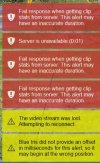
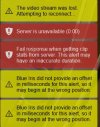
Nothing but problems since I upgraded. Here are some screenshots of the kind of errors I get trying to play any clips.
It's not server issue... CPU runs under 30%, RAM used 3.2 out of 32 gigs. Running seven cameras
BI v6.0.4.8 x64
I'm very close to uninstalling this and putting v5 back on the system.
Any suggestions would be greatly appreciated.
Trying to correct this following everything I could possibly find online. Can't think of everything I tried but here's just some of the things I did.
Downloaded the latest ui3 from GitHub.
Try using a self signed cert for https.
Ran the DB repair.
Deleted everything in the c:\Blueiris\db Folder and let it rebuild everything.
Changed every setting that AI suggested both on the server and in the settings in the web browser.
Changed it to JavaScript viewing. Try to lower resolutions of viewing.
And probably a dozen other things that I found online.
Nothing but problems since I upgraded. Here are some screenshots of the kind of errors I get trying to play any clips.
It's not server issue... CPU runs under 30%, RAM used 3.2 out of 32 gigs. Running seven cameras
BI v6.0.4.8 x64
I'm very close to uninstalling this and putting v5 back on the system.
Any suggestions would be greatly appreciated.
Last edited:
