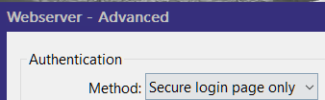
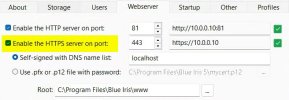
I installed v6 about 12 days ago.
With the the last update 6.0.1.23 (and previous one) I am getting an error when starting UI3 on another PC using Firefox/Windows 11.
Other previous updates to v6 were ok.
The box that comes up has this to copy
"Please COPY this text to share with support. Error in UI3 (v 315 / 6.0.1.23) ResizeObserver loop completed with undelivered notifications. at [0:0] Mozilla/5.0 (Windows NT 10.0; Win64; x64; rv:147.0) Gecko/20100101 Firefox/147.0"
Anyone else see this?
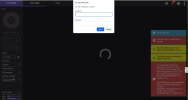
screenshot if I cancel first warning. I can close this window and try again and then it works. But later on can get this come up again if I try again, but not always.
----------------------------------
I just tried Chrome and it worked the first time but on the 2nd attempt to start it gave an error again.
Please COPY this text to share with support. Error in UI3 (v 315 / 6.0.1.23)
ResizeObserver loop completed with undelivered notifications.
at http://censored_hostname/ui3.htm?t=live&group=index [0:0]
Mozilla/5.0 (Windows NT 10.0; Win64; x64) AppleWebKit/537.36 (KHTML, like Gecko) Chrome/144.0.0.0 Safari/537.36
Same again with MS Edge browser. Worked firs time but not 2nd.
Please COPY this text to share with support. Error in UI3 (v 315 / 6.0.1.23)
ResizeObserver loop completed with undelivered notifications.
at http://censored_hostname/ui3.htm?t=live&group=index [0:0]
Mozilla/5.0 (Windows NT 10.0; Win64; x64) AppleWebKit/537.36 (KHTML, like Gecko) Chrome/144.0.0.0 Safari/537.36 Edg/144.0.0.0
---------------------------
I went back to v6.0.1.13 and seems a touch better but did get the error twice out of 10 starts I tried entering UI3 on other PC.
The first screenshot is when I click cancel on the error box that firsts comes up.
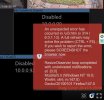
If I click ok on that box it loads up and see all my cameras but still has the red box in the bottom left corner.
With the the last update 6.0.1.23 (and previous one) I am getting an error when starting UI3 on another PC using Firefox/Windows 11.
Other previous updates to v6 were ok.
The box that comes up has this to copy
"Please COPY this text to share with support. Error in UI3 (v 315 / 6.0.1.23) ResizeObserver loop completed with undelivered notifications. at [0:0] Mozilla/5.0 (Windows NT 10.0; Win64; x64; rv:147.0) Gecko/20100101 Firefox/147.0"
Anyone else see this?
screenshot if I cancel first warning. I can close this window and try again and then it works. But later on can get this come up again if I try again, but not always.
----------------------------------
I just tried Chrome and it worked the first time but on the 2nd attempt to start it gave an error again.
Please COPY this text to share with support. Error in UI3 (v 315 / 6.0.1.23)
ResizeObserver loop completed with undelivered notifications.
at http://censored_hostname/ui3.htm?t=live&group=index [0:0]
Mozilla/5.0 (Windows NT 10.0; Win64; x64) AppleWebKit/537.36 (KHTML, like Gecko) Chrome/144.0.0.0 Safari/537.36
Same again with MS Edge browser. Worked firs time but not 2nd.
Please COPY this text to share with support. Error in UI3 (v 315 / 6.0.1.23)
ResizeObserver loop completed with undelivered notifications.
at http://censored_hostname/ui3.htm?t=live&group=index [0:0]
Mozilla/5.0 (Windows NT 10.0; Win64; x64) AppleWebKit/537.36 (KHTML, like Gecko) Chrome/144.0.0.0 Safari/537.36 Edg/144.0.0.0
---------------------------
I went back to v6.0.1.13 and seems a touch better but did get the error twice out of 10 starts I tried entering UI3 on other PC.
The first screenshot is when I click cancel on the error box that firsts comes up.
If I click ok on that box it loads up and see all my cameras but still has the red box in the bottom left corner.
Last edited: