SV3C Resolution 2560x1440 in Blue Iris

Killer Kool

Getting the hang of it
Mar 27, 2015
127
3
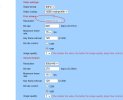
The camera software shows the following:


Does not show this resolution in the dropdown...
It goes from 2048x1526 to 2688x1520...

The RTSP BI setup auto-sets the resolution. to 800x448 @16fps...

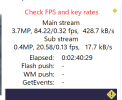
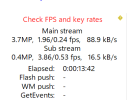
The streams seem "happy" so far besides the dreaded "check FPS and Key rate" messages .

Any suggestions on changing the "Image format" box?

Thanks
 

Attachments

  • svc.jpg
    svc.jpg
    59.4 KB · Views: 7
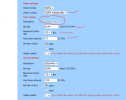
For both the first and second stream; to fix the FPS key rate issue, you need to set the key frame interval to 15 so that is the same as your maximum frame rate of 15, next change the bit rate control from VBR to CBR, next change the Video Coding to be H264 (BI is much happier that way) If the resolution box for your first stream is not changeable I have no idea how to change that, If we had the make and model of the camera someone might have some suggestions. It is remotely possible that the changes I am suggesting may have some effect!
 
  • Like
Reactions: TonyR
...and set the bit rate to the max at 6144 for the main stream and 2048 for the sub stream.
 
Ok thank you.

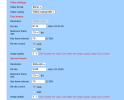
So I believe I have set this up correctly (or recommended)......

Any other suggestions?
Thanks
.
 
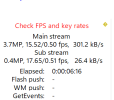
The number should be "15/1.00 FPS" if you set the camera properly as was suggested, can you post a screen shot of the updated camera settings again, something is not right!
 
  • Like
Reactions: TonyR
Thank you

C15 SV3c

SV3C PTZ WiFi Security Camera Outdoor Dual Lens Wireless IP 4MP​

 
Last edited:
@Bruce_H 's correct: the sub stream key frame interval is still at 120, set to 15..

Then re-start (unplug/plug back in) the camera. If still not right, res-start BI.
 
Ok yes I did miss that. Trying now.....

Yes that fixed it!?!!

Explain how the "bit rate" factors in? do we always want to run that at max?
 
So is it now showing as 15/1.0 on the BI status window on the camera tab?
 
Is this camera connect via wireless or ethernet? How many cameras total on your system, how many wireless vs ethernet? Are all of the cameras connected through your internet router?
 
Is this camera connect via wireless or ethernet? How many cameras total on your system, how many wireless vs ethernet? Are all of the cameras connected through your internet router?
Yes they are thru Router. 8 or so with 5 wireless
 
Going through the router would be the problem (unless the camera itself is altering it which we do see with many cheaper cameras).

Cameras connected to Wifi routers (whether wifi or not) are problematic for surveillance cameras because they are always streaming and passing data. And the data demands go up with motion and then you lose signal. A lost packet and it has to resend. It can bring the whole network down if trying to send cameras through a wifi router. At the very least it can slow down your entire system.

Unlike Netflix and other streaming services that buffer a movie, these cameras do not buffer up part of the video, so drop outs are frequent, especially once you start adding distance. You would be amazed how much streaming services buffer - don't believe me, start watching something and unplug your router and watch how much longer you can watch NetFlix before it freezes - mine goes 45 seconds. Now do the same with a camera connected to a router and it is fairly instantaneous (within the latency of the stream itself)...

The same issue applies even with the hard-wired cameras trying to send all this non-buffer video stream through a router. Most consumer grade wifi routers are not designed to pass the constant video stream data of cameras, and since they do not buffer, you get these issues. The consumer routers are just not designed for this kind of traffic, even a GB speed router.

So the more cameras you add, the bigger the potential for issues.

 
Something is still not right the numbers should be 15/1.00!
Can you try disconnecting some of the wireless cameras and possibly some of the wired cameras to see if there is a bottleneck on your wireless network and or router, most consumer grade WIFI routers will have trouble handling the amount of traffic from multiple streaming cameras. What is the make and model of your WIFI router? I am just starting to look at the specs for you camera, but supper is taking priority at the moment!