


We have a big snow storm coming, and I am streaming my West Sky Cam to Youtube. How do I get the quality higher than 480? Is that possible? If I streamed from the camera, would it be better? I would prefer to stream from BI so I can keep the weather info overlay, but if direct from the camera increases quality, I will take that instead of the overlay.
Streaming to Youtube? Quality/Resoution settings?
- Thread starter Ri22o
- Start date
You are using an out of date browser. It may not display this or other websites correctly.
You should upgrade or use an alternative browser.
You should upgrade or use an alternative browser.

Can you adjust this higher?Well, I just remembered I can't stream direct from the camera because it can't see the internet... So it looks like I am stuck with the crappy 480p resolution.
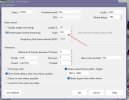
Ooh, that could help, but I also found the setting on Youtube that was set to VBR, which made a huge difference. I just bumped my streaming bitrate from 1024 to 10240.

I didn't realize there was also a setting in the camera's settings. Youtube kept alarming saying it was at 514kbps and should be higher (23500kbps). I looked at the camera settings and it was 512. I turned off the limit, and it is much better now with way less dithering.
Looks very cool! I tried to play around with YouTube and BI streaming, but I never could get a stream or at least YouTube see the stream. BI would say it had a successful FML connection but that was about it. I put in the RTMP URL and the key, but no go. If you don't mind sharing how you got yours up and running, just curious. BTW I am running 6.0.0.1
I am on a 5.9 version.
It wasn't difficult. Click Go Live, then create a Stream Key (and make sure to adjust the resolution accordingly before saving it). If you have been live before, then just select the appropriate Stream Key from the drop down. Then in Blue Iris, from the camera's settings, you will add the RTMP URL, Stream Key, and your login credentials; make sure you check enable before closing out. If you want to adjust the bit rate and other settings, you will do that by clicking the ... button in the bottom left of that menu page.
I am still getting a warning that the bitrate is much lower than Youtube wants (23500), but I have no clue where the limitation is coming from.
It wasn't difficult. Click Go Live, then create a Stream Key (and make sure to adjust the resolution accordingly before saving it). If you have been live before, then just select the appropriate Stream Key from the drop down. Then in Blue Iris, from the camera's settings, you will add the RTMP URL, Stream Key, and your login credentials; make sure you check enable before closing out. If you want to adjust the bit rate and other settings, you will do that by clicking the ... button in the bottom left of that menu page.
I am still getting a warning that the bitrate is much lower than Youtube wants (23500), but I have no clue where the limitation is coming from.
Ah, I never filled in the login credentials. I assume these are the YouTube account credentials. Thanks for the tip!I am on a 5.9 version.
It wasn't difficult. Click Go Live, then create a Stream Key (and make sure to adjust the resolution accordingly before saving it). If you have been live before, then just select the appropriate Stream Key from the drop down. Then in Blue Iris, from the camera's settings, you will add the RTMP URL, Stream Key, and your login credentials; make sure you check enable before closing out. If you want to adjust the bit rate and other settings, you will do that by clicking the ... button in the bottom left of that menu page.
I am still getting a warning that the bitrate is much lower than Youtube wants (23500), but I have no clue where the limitation is coming from.
Well, I gave it my best shot. Even tried it on my demo and just no stream detected. Both Bi's report FME connection established but YouTube fails to show anything. I tried both of my Youtube accounts as well. Like you said, it shouldn't be this hard. I tried it on 6.0.0.1 and on 5.9.9.99 Its possible its version related. No big deal, just one of those things to play with and it keeps picking at you LOL
I just went back to 5.9.9.98 on my demo and gave it a shot. Same settings and it crashes BI. I have to go in the registry and disable that cam to get it back up. So wasn't sure exactly what 5.9.x.x you are running, but may be a issue on newer versions. I do NOT get any thing in log that states FME connection established like I do in 6.0.0.1