
Smartpss lite window size?
- Thread starter exarkun
- Start date

You are using an out of date browser. It may not display this or other websites correctly.
You should upgrade or use an alternative browser.
You should upgrade or use an alternative browser.

bigredfish
Known around here

bigredfish
Known around here


press alt+ specebar, then select size and then with the arrows of the keyboard you can make it smaller or bigger. After resize close the app by clicking in the x, that will save the possition. note that if you minimize or full screen you will loose the size again. (windows 11). i have tried this software and it worked fine, you just program the resolution to a short cut and it sizes with a click. Sizer 4.0 by Brian Apps. has to be a way to do it on the registry..... if i find a way i will post it here.
Last edited:
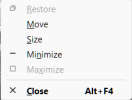
It does not =(Worked, thanks. Hopefully it will stay the size I made it.
indigolite
n3wb
DahuaTechnicalMan
Getting the hang of it
Dahua's website Dahua Technology - World Leading Video-Centric AIoT Solution & Service ProviderI had a version 1.004 that could resize but I cant find the instaler files anymore.
Service & Support > Tools.
This opens to support
Scroll down and you'll find SmartPSS Lite download. support
Along with Configtool and designer tool.
The Dahua Wiki one was very out of date and did not support P2P of 'NVR 5 NEXT OS'.

Pantheon
n3wb
I could resize the window using the Atl-space. But it would not stay when re-opened. In fact, I could not get any of my settings to re-open after I saved them. It kept opening to the default settings.
Pantheon
n3wb
I uninstalled the Smartpsslite app and reinstalled. I sized my window and closed it with the "shift key + X" and that seems to have worked for now.