Review- EmpireTech IPC-T54IR-ZE-S3 4mp Varifocal Turret

Yes plus the other issue is the larger the sensor, the larger the lens required, the larger the housing etc and that equals more cost. Also, more capable sensors will probably need more capable chipsets, another expense. I believe it can be done, but it probably needs some kind of deal between someone like Dahaua / Hik and Sony for sensors / processor packages and lenses. The problem atm I believe is they're just too expensive for CCTV, hence the $10k camera of 2016 - Sony A7SII sensor package and lens I believe but way beyond any mainstream users budget. Tech 101 (not sure if he's still around these forums) had one on here and the results were sublime, but nearly $10k all in with the housing, heater, lens and camera!!!! If they can make that $350 they might have a mass market!


Last edited:
From his post, a back to back comparison:

1/1.18" PTZ:


Sony SNC VB770:


Hopefully that's a preview of a $350 future. Not holding my breath though.
 
Hi guys,

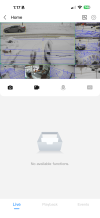
I have 5 T54ir connected to a Dahua NVR (5216 4ks2) and the target box overlay is not appearing anywhere, so when it triggers I've to identify what triggered it manually. Any idea of wha config can be missing or it's simply that my NVR is too old? If I open the camera webui I can see the target overlay when I enter in the image. Thanks
 
Then I really believe I have something misconfigured cause I don't see anything...

View attachment 237743


If you go to playback @cpd5215 you also have the target box?
I really wish I could help more at this point, but I’m away from my computer and I’m just on my phone but like others have mention you definitely configure in the camera interface directly. I just can’t remember what setting it is.
 
I guess my NVR is messing things up, I just have everything configured in the cameras, NVR just to trigger the alarm ports and record, I connect the apps to the NVR but no boxes. It's frustrating
 
On your NVR
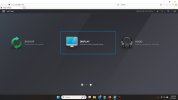
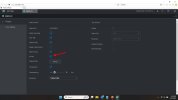
For Displaying IVS rules on the Live View, go to DISPLAY and check the AI rule box
DisplayIVS1.jpg DisplayIVS.jpg


On the NVR Playback, you have to toggle the IVS/AI rule icon

View attachment Recording 2026-02-06 152930.mp4


On the iPhone DMSS App I'm not certain. I have an older version 2.1 July 2025 and dont see how to activate it.
Possible newer versions allow it as shown by @cpd5215
 
Last edited:
  • Like
Reactions: tigerwillow1
Hi, i'm looking for some advice regarding the Day/Night profile management on my two IPC-T54IR-ZE-S3 cameras.

My goal is to maintain Color view 24/7 without using IR, as there is plenty of ambient light at my location to support the Starlight sensor. However, I would like to use different exposure settings for day and night (e.g., a faster shutter during the day and a fixed 1/50s at night) to optimize image quality.

The issue: In the 'Profile Management' menu, I only see the options: Normal, Full Time, and Schedule. The option to switch profiles automatically based on the built-in light sensor (Day/Night switch) is missing in my current firmware. Using a 'Schedule' isn't ideal due to changing sunrise/sunset times, and 'Normal' doesn't allow for separate day/night exposure tuning.

My questions:
  1. Is there a way to unlock the sensor-based profile switching in the current settings?
  2. If not, is this a feature that could be added in a future firmware update?
  3. Does anyone have a workaround to trigger a profile change based on the actual light levels without manually adjusting a schedule every month?
I really love the performance of these 1/1.8" sensors and would like to get the most out of them!

Thanks in advance for the help!
 
Hi, i'm looking for some advice regarding the Day/Night profile management on my two IPC-T54IR-ZE-S3 cameras.

My goal is to maintain Color view 24/7 without using IR, as there is plenty of ambient light at my location to support the Starlight sensor. However, I would like to use different exposure settings for day and night (e.g., a faster shutter during the day and a fixed 1/50s at night) to optimize image quality.

The issue: In the 'Profile Management' menu, I only see the options: Normal, Full Time, and Schedule. The option to switch profiles automatically based on the built-in light sensor (Day/Night switch) is missing in my current firmware. Using a 'Schedule' isn't ideal due to changing sunrise/sunset times, and 'Normal' doesn't allow for separate day/night exposure tuning.

My questions:
  1. Is there a way to unlock the sensor-based profile switching in the current settings?
  2. If not, is this a feature that could be added in a future firmware update?
  3. Does anyone have a workaround to trigger a profile change based on the actual light levels without manually adjusting a schedule every month?
I really love the performance of these 1/1.8" sensors and would like to get the most out of them!

Thanks in advance for the help!
1/60 is the minimum at night. I would go atleast for a 1/120.
 
@LF.

Are you certain that isnt a S2 variant?

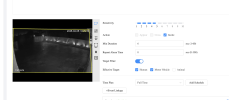
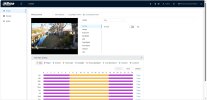
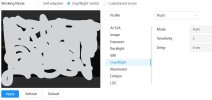
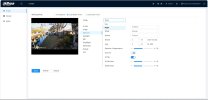
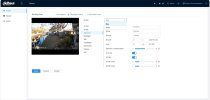
The S3 interface has these choices
Supposedly the Day/Night works as you wish, I find that the sensor isnt a good decison maker in all scenes, like this one with heavy late day shadows.
I use schedule and change it 3-4 times per year based on what I see, not what the camera decides.
It takes a few minutes

S35442b.jpg S35442.jpg