@danimal86 first of all.........breathe

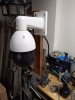
For most people you want need to adjust any DIP switches. First get the camera mounted (bench mount good idea for initial testing and setup), apply power (from POE switch / injector etc depending on how you intend to power). Once powered on and connected to you network you can then connect to the camera using configtool OR if you want to connect directly to configure then adjust your network settings on your chosen machine (windows running IE etc) to 192.168.1.x and point your web browser to 192.168.1.108 (default Dahua IP) where you will then be promoted to setup your login and can go about configuring the camera.
Let me know with any questions to this point and we’ll pickup after you get there.