REVIEW- Dahua SD1A404XB-GNR 4MP AI mini PTZ

Both good ideas. Weather is a bit chilly still around here, :), but hopefully take a look at it tomorrow morning.
If the distortion is the same inside, taking the dome off.. is that just screwed on or ?? I don't see anything in the manual I found online.

Thanks for all the help/information. Really like this site... shame I didn't find it sooner.
 
  • Like
Reactions: EMPIRETECANDY
We tested the cam on various ethernet cables. Some regular indoor cat5s, as well the direct burial cat5 (24awg) going to a Hikvision. We also specifically bought a cat6 outdoor 24awg cable with the same result. I don't think it's the wire, but if it is, it might be something specific to Dahua cams? Either way the return window just passed so I'm stuck with it. I'm going to wire it via the extension 12v and switch off PoE for that port (which is a huge waste of a PoE cable lol).
Hi, Just installed a pair of these cameras using cat5e cable to both power and communicate but am experiencing some challenges, tried using the 24v POE from one of my WIFI radios which didn't work, doesn't it work with just the use of the ethernet cable? Thx
 
As an Amazon Associate IPCamTalk earns from qualifying purchases.
Ok bought this from amazon (Empiretech) and it worked fine at initial setup (plugged straight into TP-Link PoE switch). Initial install was easy (BI). After that however, it won't power up again with just PoE. Seller suggested testing with 12v 2a plug, and yes, that works. Removing the 12v after successful power-on works too and it can sustain itself on PoE just fine. But it won't start up with PoE alone for some reason (actually, sometimes it does, after 10-20 minutes). Tried upgrading to PoE+ switch (even though the specs for cam don't require that), and same result. Neither cat5 or cat6 make a difference.

I don't have much experience with this brand (mostly have Hikvisions), but I really like it so far (from when I got it working). Seller also suggested using Dahua-branded NVR to connect... surely that's not necessary..?

Edit: found a 12v extension cable and "jump started" the camera.
Hi, Just installed a pair of these cameras using cat5e cable to both power and communicate but am experiencing some challenges, tried using the 24v POE from one of my WIFI radios which didn't work, doesn't it work with just the use of the ethernet cable? Thx
 
Can someone with this camera model confirm with me if they are able to see the algorithm version in their Web UI settings?
 
Can someone with this camera model confirm with me if they are able to see the algorithm version in their Web UI settings?
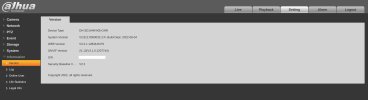
I've attached a screen shot of what I believe you're asking for. There hasn't been a new firmware release in years, I believe because these cameras have been discontinued. I have a few of these and so far things are stable but I was having a problem with memory card errors using the Samsung pro endurance 256GB micro SD card, the latest was I removed them and using a PC I formatted them with FAT32 and since then have only had one disc full error, even though there haven't been any errors in weeks I suspect that the Samsung pro endurance may not be compatible with this firmware, which brand card are you using?

Thanksdahua firmware info.jpg
 
Last edited:
  • Like
Reactions: Arjun
I've attached a screen shot of what I believe you're asking for. There hasn't been a new firmware release in years, I believe because these cameras have been discontinued. I have a few of these and so far things are stable but I was having a problem with memory card errors using the Samsung pro endurance 256GB micro SD card, the latest was I removed them and using a PC I formatted them with FAT32 and since then have only had one disc full error, even though there haven't been any errors in weeks I suspect that the Samsung pro endurance may not be compatible with this firmware, which brand card are you using?

Thanks
Using a Sandisk Extreme 32gb (since Day 1)

Device TypeSD1A404XB-GNR
System VersionV2.812.0000047.2.R, Build Date: 2024-07-23

Life Statistics
Total Working Time1596day(s)5hour(s)0minute(s)

Upgrade Times3time
Last Upgrade Date2026-01-15 18:32:51

My question is though - do you see an Algorithm version in your Web UI, I don't see your screenshot
 
Using a Sandisk Extreme

Device TypeSD1A404XB-GNR
System VersionV2.812.0000047.2.R, Build Date: 2024-07-23

Life Statistics
Total Working Time1596day(s)5hour(s)0minute(s)

Upgrade Times3time
Last Upgrade Date2026-01-15 18:32:51
How long is the camera up-time to test that memory card brand compatibility?
 
How long is the camera up-time to test that memory card brand compatibility?
1596 days, but it has only written 130mb ever since Day 0. My suspicion is that it was never writing to SD card to begin with. However, that is not my concern, my concern is whether or not IVS was ever working on this camera, because I don't see an algorithm version anywhere under information.

Do you have a screenshot of your version number?
 
1596 days, but it has only written 130mb ever since Day 0. My suspicion is that it was never writing to SD card to begin with. However, that is not my concern, my concern is whether or not IVS was ever working on this camera, because I don't see an algorithm version anywhere under information.

Do you have a screenshot of your version number?
Yes, I've attached it to one of my previous posts above. These seem to be quality cameras, the specific type of video capture must be manually set, I don't recall whether it is set by default, scene change is different from motion, etc. there are many capture options.
 
Yes, I've attached it to one of my previous posts above. These seem to be quality cameras, the specific type of video capture must be manually set, I don't recall whether it is set by default, scene change is different from motion, etc. there are many capture options.
Found it

EDIT: Picture deleted
 
Last edited:
My firmware is from 2024 by the way,

System VersionV2.812.0000047.2.R, Build Date: 2024-07-23
 
My firmware is from 2024 by the way,

System VersionV2.812.0000047.2.R, Build Date: 2024-07-23
I believe they've discontinued further firmware support for this model however I was told that their technical support is excellent, I purchased from aliexpress to USA and because of this technical support will not support my purchase, where are you located?
 
It's not a smart AI model why it has to have the AI Algorithm?
For some reason I thought IVS required an algorithm to work. I wasn’t aware that the algorithm was specific to AI; some of my older 5442 turrets from 2019 have an algorithm version under information
 
My firmware is from 2024 by the way,

System VersionV2.812.0000047.2.R, Build Date: 2024-07-23
This is indeed the most recent public release.


For some reason I thought IVS required an algorithm to work. I wasn’t aware that the algorithm was specific to AI; some of my older 5442 turrets from 2019 have an algorithm version under information
Yes...
But it wasn't until a little later on that the algorithm started showing a version number in the interface.
On the most recent cameras you can upgrade the algorithm without upgrading the whole firmware. Very useful for the IVD box too!


Did you buy this camera through EmpireTech? The serial number shows a different entity than Andy's normal OEM channel.
 
This is indeed the most recent public release.


Yes...
But it wasn't until a little later on that the algorithm started showing a version number in the interface.
On the most recent cameras you can upgrade the algorithm without upgrading the whole firmware. Very useful for the IVD box too!


Did you buy this camera through EmpireTech? The serial number shows a different entity than Andy's normal OEM channel.
This wasn't my camera - it was someone else's
 
I've attached a screen shot of what I believe you're asking for. There hasn't been a new firmware release in years, I believe because these cameras have been discontinued. I have a few of these and so far things are stable but I was having a problem with memory card errors using the Samsung pro endurance 256GB micro SD card, the latest was I removed them and using a PC I formatted them with FAT32 and since then have only had one disc full error, even though there haven't been any errors in weeks I suspect that the Samsung pro endurance may not be compatible with this firmware, which brand card are you using?

ThanksView attachment 236615
Good you hid your serial number
 
One of the things that Ive noticed with multiple Dahua cameras is the sensitivity of WDR. It seems you get very little change from 10%-44% and then at 45% it all of a sudden intensifies.
Not unique to the SD1A404XB-GNR. See attached at 10%, 25%, 40%, 44% and finally 45%

View attachment 50980View attachment 50981View attachment 50982View attachment 50983View attachment 50984
which SDmini brand card did you use? I installed the Samsung Proendurance 256GB and it seems that the Dahua firmware doesn't like them as I've gotten a few errors over the months, last month I decided to remove them and format them using a laptop to FAT32 and got one error since then which was disc full which seems better than before as errors were appearing weekly