Replacing a Dahua 5231R-Z — G6 Turret vs T54IR-ZE-S3 vs T58IR-ZE-S3 (front of house + street)

RROONNBB

Young grasshopper
Nov 14, 2017
63
6
REDONDO BEACH, CA
(Cross-posting to Dahua and UniFi Protect forums)

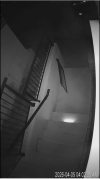
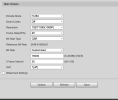
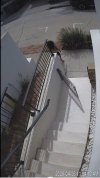
Looking for opinions on replacing my aging Dahua IPC-HDW5231R-Z. It's mounted on the front of my house covering my front steps, with the street also in view. I'd love to be able to catch license plates on cars passing by when possible. Night vision performance is important — there's some street lighting but it's not a brightly lit area. (attached photos of day vs night)

I don't us the zoom on my current camera - always running at widest FOV (and would actually prefer a slightly wider FOV than what the 5231R-Z has).

My main NVR is Scrypted, but since I've got a Dream Machine Pro I also run all my cameras through UniFi Protect as raw ONVIF).

Tempted to try the UniFi G6 (I don't currently have any UniFi cameras) but I've seen a fair number of comments here about how the sensor just isn't as good as the Dahua's.

Current setup:
  • Scrypted as primary NVR
  • Dream Machine Pro running UniFi Protect since I already had it set up for my home network and the only thing it cost me was adding an HDR into it.
  • Current camera: IPC-HDW5231R-Z (2MP Starlight, 2.7-13.5mm varifocal)
  • Distance from camera to street: roughly 50-60 feet
Cameras I'm considering:
  1. UniFi G6 Turret ($199) — 4K, 1/1.8" sensor, 110° fixed FOV, built-in LPR/face recognition, native Protect integration. No varifocal but I don't need it. Widest FOV of the three.
  2. IPC-T54IR-ZE-S3 (~$230) — 4MP, 1/1.8" sensor, 2.7-12mm varifocal, Starlight. The community gold standard. Best night performance of the three from what I've read, and apparently surprisingly good at LPR.
  3. IPC-T58IR-ZE-S3 (~$260) — 8MP/4K, 1/1.8" sensor, same varifocal lens. Better daytime detail and has 4 streams which is nice for Scrypted, but from what I've read the 4MP beats it at night due to larger pixel size on the same sensor.
Main questions:
  • For my use case (front steps overview + opportunistic LPR on passing cars at ~50-60 ft), is the 4MP S3 really enough resolution or would the 8MP make a meaningful difference for plates?
  • How much am I giving up in night performance going 8MP over 4MP on the same 1/1.8" sensor with the S3 chipset?
 

Attachments

  • SCR-20260406-kbvl.jpeg
    SCR-20260406-kbvl.jpeg
    195.1 KB · Views: 21
  • SCR-20260406-kcsd.png
    SCR-20260406-kcsd.png
    427.4 KB · Views: 20
  • Like
Reactions: mat200
The 5442 4MP all the way. not even close. At night, the 4MP will show an identifiable image where the 8MP will show an unidentifiable blob. And when the 4MP is showing an unidentifiable blob, the 8MP won't know anything is there at all.

At 50-60 feet, the Z4E would be a better choice. Based on that field of view, you are trying to do too much with one camera.

You would have to set the camera up specifically to read plates. You need the proper camera with OPTICAL zoom for the distance you are covering and the angle to get plates.

Regarding plates, keep in mind that this is a camera dedicated to plates and not an overview camera also. It is as much an art as it is a science. You will need two cameras. For LPR we need to OPTICALLY zoom in tight to make the plate as large as possible. For most of us, all you see is the not much more than a vehicle in the entire frame. Now maybe in the right location during the day it might be able to see some other things, but not at night.

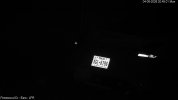
At night, we have to run a very fast shutter speed (1/2,000) and in B/W with IR and the image will be black. All you will see are head/tail lights and the plate. Some people can get away with color if they have enough street lights, but most of us cannot. Here is a representative sample of plates I get at night of vehicles traveling about 45MPH at 175 feet from my 2MP 5241-Z12E camera (that is all that is needed for plates):

1773534381956.png


See the LPR subforum for more details.

And you will need a better angle for LPR.
 
The 5442 4MP all the way. not even close. At night, the 4MP will show an identifiable image where the 8MP will show an unidentifiable blob. And when the 4MP is showing an unidentifiable blob, the 8MP won't know anything is there at all.

At 50-60 feet, the Z4E would be a better choice. Based on that field of view, you are trying to do too much with one camera.

You would have to set the camera up specifically to read plates. You need the proper camera with OPTICAL zoom for the distance you are covering and the angle to get plates.

Regarding plates, keep in mind that this is a camera dedicated to plates and not an overview camera also. It is as much an art as it is a science. You will need two cameras. For LPR we need to OPTICALLY zoom in tight to make the plate as large as possible. For most of us, all you see is the not much more than a vehicle in the entire frame. Now maybe in the right location during the day it might be able to see some other things, but not at night.

At night, we have to run a very fast shutter speed (1/2,000) and in B/W with IR and the image will be black. All you will see are head/tail lights and the plate. Some people can get away with color if they have enough street lights, but most of us cannot. Here is a representative sample of plates I get at night of vehicles traveling about 45MPH at 175 feet from my 2MP 5241-Z12E camera (that is all that is needed for plates):

1773534381956.png


See the LPR subforum for more details.

And you will need a better angle for LPR.
Yeah, I'm probably hoping for too much thinking I might get some LP reading with the same camera. Don't really want two cameras since it's the front of my house and even the one camera feels a little intrusive to me. (Particularly since I'd also have to put a POE splitter on the wall there too if I wanted to run 2 cameras).

Unless someone knows of a dual camera setup in a single housing where I can do LPR with one and general wide surveillance with the other?

Apologies for not keeping up with the terminology - is the 5442 4MP the same as the IPC-T54IR-ZE-S3? Or are you recommending an entirely different camera?
 
How long until you give up and throw a Z12E up there? This is 120ft to the street from my house

1775613317019.jpeg
 
Hi pizza, you can share all your night settings? I reset mine and have a hard time getting good plate images. Thanks
 
The 5442 4MP all the way. not even close. At night, the 4MP will show an identifiable image where the 8MP will show an unidentifiable blob. And when the 4MP is showing an unidentifiable blob, the 8MP won't know anything is there at all.

At 50-60 feet, the Z4E would be a better choice. Based on that field of view, you are trying to do too much with one camera.

You would have to set the camera up specifically to read plates. You need the proper camera with OPTICAL zoom for the distance you are covering and the angle to get plates.

Regarding plates, keep in mind that this is a camera dedicated to plates and not an overview camera also. It is as much an art as it is a science. You will need two cameras. For LPR we need to OPTICALLY zoom in tight to make the plate as large as possible. For most of us, all you see is the not much more than a vehicle in the entire frame. Now maybe in the right location during the day it might be able to see some other things, but not at night.

At night, we have to run a very fast shutter speed (1/2,000) and in B/W with IR and the image will be black. All you will see are head/tail lights and the plate. Some people can get away with color if they have enough street lights, but most of us cannot. Here is a representative sample of plates I get at night of vehicles traveling about 45MPH at 175 feet from my 2MP 5241-Z12E camera (that is all that is needed for plates):

1773534381956.png


See the LPR subforum for more details.

And you will need a better angle for LPR.
We should just rename this forum to the 5442 Forum - is there really anything else that is comparative - the answer is no - the rest is trash
 
  • Like
Reactions: StevenFromTexas
We should just rename this forum to the 5442 Forum - is there really anything else that is comparative - the answer is no - the rest is trash

Right. WTF happens when they are gone and nothing compares?
 
  • Sad
Reactions: Arjun
Right. WTF happens when they are gone and nothing compares?
We build our own IP cameras sourcing components from China and using 3D printers to assemble the shell enclosures ;)
We just need a universal blueprint and replace sensors as camera technology progresses in the years ahead
We don't need the AI bullshit when we have Blue Iris which is robust enough

We need something like a Framework Laptop, but for IP cameras exclusively
 
By the way, these Horn speakers are an absolute POS based on design and limited placement
1775650999065.png I'd rather strap one on the end of my @$$
 
We should just rename this forum to the 5442 Forum - is there really anything else that is comparative - the answer is no - the rest is trash
Dahua should fire (or is it execute in China?) all of its marketing morons, reduce its product line to around ten cameras, and just call it a day. They don't have a clue how to do even simple product improvements. :poop::poop::poop::poop::poop:
 
  • Exclamation
Reactions: Arjun
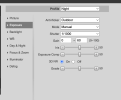
Hi pizza, you can share all your night settings? I reset mine and have a hard time getting good plate images. Thanks

Sorry, I thought I posted already!

1776224651379.png

1776224671767.png
 
  • Like
Reactions: oknoob
Don't forget about DahuaSunriseSunset, essential for LPR IMO

 
With the newer GUI they do if you set it up that way, but many prefer to use the schedule.
I've got mostly older Dahua's (Dahua IPC-HDW5231R-Z) and haven't updated firmware within the last many years so I'm assuming that I've got 'old' GUI?
But how does scheduling work - are people explicitly setting times for it to switch on/off? What happens when the daylight hours shift? And what about DST/etc?

I'm about to set up a new IPC-T54IR-ZE-S3 for one location though - It looks like it's got a pretty new setup page at least.

Is there a good place with recommendations for ALL the settings I should put on a Dahua? I honestly don't remember what all I set when I did the old cameras 7ish years ago. Whatever was recommended for Blue Iris at the time...
 
I've got mostly older Dahua's (Dahua IPC-HDW5231R-Z) and haven't updated firmware within the last many years so I'm assuming that I've got 'old' GUI?
But how does scheduling work - are people explicitly setting times for it to switch on/off? What happens when the daylight hours shift? And what about DST/etc?

I'm about to set up a new IPC-T54IR-ZE-S3 for one location though - It looks like it's got a pretty new setup page at least.

Is there a good place with recommendations for ALL the settings I should put on a Dahua? I honestly don't remember what all I set when I did the old cameras 7ish years ago. Whatever was recommended for Blue Iris at the time...
I'll say this about Dahua (or any video camera settings):
if you leave things at default from factory, might as well of bought a $25 IP camera off Amazon as they will look & work the same (ok... over-exaggeration).
It should be mandatory to fine tune every individual camera for the various settings (contrast, FPS, shutter speed, gain, etc).
When I first started down the road of IP cameras, 4231's (not the 5231's) were the first batch of 4 I purchased. Left at factory default values, thinking "IP cameras make me safe". Had security event. The cameras failed miserably at telling me if the perp was Elvis or Big Foot. Not because of the camera but because it was not fine-tuned at all. HUGE difference when you go through each individual video settings of a camera and setup for your environment.

I have internal network clock on my Home Assistant that all network devices talk to for atomic clock timing, for the NTP service.
Scheduling changes video fine tuning parameters based on the schedule you input. General, Day, Night... I believe. Example: could have higher shutter speed on "NIGHT". Also, if you do email notifications from the cameras GUI themselves, you can dabble with the scheduling of notifications.
 
  • Like
Reactions: bigredfish
I'll say this about Dahua (or any video camera settings):
if you leave things at default from factory, might as well of bought a $25 IP camera off Amazon as they will look & work the same (ok... over-exaggeration).
It should be mandatory to fine tune every individual camera for the various settings (contrast, FPS, shutter speed, gain, etc).
When I first started down the road of IP cameras, 4231's (not the 5231's) were the first batch of 4 I purchased. Left at factory default values, thinking "IP cameras make me safe". Had security event. The cameras failed miserably at telling me if the perp was Elvis or Big Foot. Not because of the camera but because it was not fine-tuned at all. HUGE difference when you go through each individual video settings of a camera and setup for your environment.

I have internal network clock on my Home Assistant that all network devices talk to for atomic clock timing, for the NTP service.
Scheduling changes video fine tuning parameters based on the schedule you input. General, Day, Night... I believe. Example: could have higher shutter speed on "NIGHT". Also, if you do email notifications from the cameras GUI themselves, you can dabble with the scheduling of notifications.
Agreed, and although I sort of tuned things when I first put up the system I definitely didn't get it working as well as it could have been and in fact part of the reason I'm now revisiting it all is because I had someone steal a power washer from the alley behind my house. Have wonderful footage of what should be a clear license plate but is instead a blown-out and blurry mess. Sigh.

But I also don't want to spend hours trying to figure out camera settings... so I'm hoping someone could give me a summary of best settings, including how to switch easily between day and night mode without having to resort to 3rd party applications.
 
In terms of getting the most out of the camera, here is my "standard" post that many use as a start for dialing in day and night that helps get the clean captures and help the camera recognize people and cars.

Start with:

H264H
8192 bitrate
CBR
15FPS and iframes if using 3rd party VMS (30 if using NVR is ok)


Every field of view is different, but I have found you need contrast to usually be 6-8 higher than the brightness number at night.

We want the ability to freeze frame capture a clean image from the video at night, and that is only done with a shutter of 1/60 or faster. At night, default/auto may be on 1/12s shutter or worse to make the image bright.

In my opinion, shutter (exposure) and gain are the two most important parameters and then base the others off of it. Shutter is more important than FPS. It is the shutter speed that prevents motion blur, not FPS. 15 FPS is more than enough for surveillance cameras as we are not producing Hollywood movies. Match iframes to FPS. 15FPS is all that is usually needed.

Many people do not realize there is manual shutter that lets you adjust shutter and gain and a shutter priority that only lets you adjust shutter speed but not gain. The higher the gain, the bigger the noise and see-through ghosting start to appear because the noise is amplified. Most people select shutter priority and run a faster shutter than they should because it is likely being done at 100 gain, so it is actually defeating their purpose of a faster shutter.

Go into shutter settings and change to manual shutter and start with custom shutter as ms and change to 0-8.3ms and gain 0-50 (night) and 0-4ms exposure and 0-30 gain (day)for starters. Auto could have a shutter speed of 100ms or more with a gain at 100 and shutter priority could result in gain up at 100 which will contribute to significant ghosting and that blinding white you will get from the infrared or white light.

Now what you will notice immediately at night is that your image gets A LOT darker. That faster the shutter, the more light that is needed. But it is a balance. The nice bright night static image results in Casper blur and ghost during motion LOL. What do we want, a nice static image or a clean image when there is motion introduced to the scene?

In the daytime, if it is still too bright, then drop the 4ms down to 3ms then 2ms, etc. You have to play with it for your field of view.

Then at night, if it is too dark, then start adding ms to the time. Go to 10ms, 12ms, etc. until you find what you feel is acceptable as an image. Then have someone walk around and see if you can get a clean shot. Try not to go above 16.67ms (but certainly not above 30ms) as that tends to be the point where blur starts to occur. Conversely, if it is still bright, then drop down in time to get a faster shutter.

You can also adjust brightness and contrast to improve the image. But try not to go above 70 for anything and try to have contrast be at least 7-10 digits higher than brightness.

You can also add some gain to brighten the image - but the higher the gain, the more ghosting you get. Some cameras can go to 70 or so before it is an issue and some can't go over 50.

But adjusting those two settings will have the biggest impact. The next one is noise reduction. Want to keep that as low as possible. Depending on the amount of light you have, you might be able to get down to 40 or so at night (again camera dependent) and 20-30 during the day, but take it as low as you can before it gets too noisy. Again this one is a balance as well. Too smooth and no noise can result in soft images and contribute to blur.

Do not use backlight features until you have exhausted every other parameter setting. And if you do have to use backlight, take it down as low as possible.

After every setting adjustment, have someone walk around outside and see if you can freeze-frame to get a clean image. If not, keep changing until you do. Clean motion pictures are what we are after, not a clean static image.
 
  • Like
Reactions: oknoob and Holbs
Agreed, and although I sort of tuned things when I first put up the system I definitely didn't get it working as well as it could have been and in fact part of the reason I'm now revisiting it all is because I had someone steal a power washer from the alley behind my house. Have wonderful footage of what should be a clear license plate but is instead a blown-out and blurry mess. Sigh.

But I also don't want to spend hours trying to figure out camera settings... so I'm hoping someone could give me a summary of best settings, including how to switch easily between day and night mode without having to resort to 3rd party applications.

Sorry but if you want them to perform optimally you’ll have to put in the time.
Magic is not a listed feature

Each scene is different, some very different.
There is no universal set of settings
 
  • Like
Reactions: looney2ns