
[Release] OpenVINO for BI
- Thread starter mpl
- Start date

You are using an out of date browser. It may not display this or other websites correctly.
You should upgrade or use an alternative browser.
You should upgrade or use an alternative browser.

TheDogee
n3wb

I5 6500t igpu with a medium yolov11 model is average 270ms.
The times are on par with a gtx1660 (AI server was hosted on another pc) running blue onyx with the largest ONNX model.
However I find the accuracy significantly better. No false positives in over 3 days of running (>10000 requests)
Gpu benchmark:
L: 170.52 ms (5.9 FPS)
T: 7.1 FPS (req 4)
The times are on par with a gtx1660 (AI server was hosted on another pc) running blue onyx with the largest ONNX model.
However I find the accuracy significantly better. No false positives in over 3 days of running (>10000 requests)
Gpu benchmark:
L: 170.52 ms (5.9 FPS)
T: 7.1 FPS (req 4)
Last edited:

Also started working on openvino integration, but differently: based on
Preliminary results show that inference with yolo26n is about 20% faster than yolo11n (on CPU, without any GPU).
openvino/model_server container images, using the latest models from ultralytics (26). It will allow spreading the load over multiple servers/devices (Jetson Nano should in theory work as well), and will allow deploying to the OS of your liking. Will update here if I get it working properly.Preliminary results show that inference with yolo26n is about 20% faster than yolo11n (on CPU, without any GPU).
Last edited:
Hello again, had a question, with code project AI when using custom models, it was possible to enter objects:0 in custom models (AI options in each camera) and this would limit object detection to the desired object types in 'to confirm'. Is there a way to configure the openvino server this way ?.
I am still using the initial release and it hasn't missed a beat !. I'm just checking if there is a way to further optimise CPU/GPU utilisation.
I am still using the initial release and it hasn't missed a beat !. I'm just checking if there is a way to further optimise CPU/GPU utilisation.

I just upgraded to BI v6 to utilize the built AI and see if it utilizes QuickSync better only to have AI tell me that since I have an NPU I should be running OpenVINO instead. Well, that was the hardest thing I've ever installed. AI was useless and kept insisting I can download from links that don't work.
I think I've got it installed correctly, but now to configure?
Which of these do I want set to NPU, and which should be GPU? I want to utilize the Intel GPU instead of the Nvidia since they are more power efficient. Now to figure out LPR...
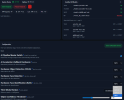
I think I've got it installed correctly, but now to configure?
Which of these do I want set to NPU, and which should be GPU? I want to utilize the Intel GPU instead of the Nvidia since they are more power efficient. Now to figure out LPR...
TheDogee
n3wb
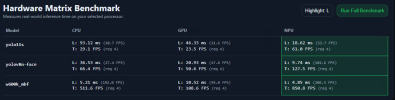
Just discovered the Hardware Matrix Benchmark which seems to have answered my prior question. NPU is crushing it for all models. Still trying to figure out the face recognition thing. I created a name for every regular person at the house and put some photos into those names, but not sure how it actually gets used, or what the utility of learning faces is.
Very impressed with the triggers and categorization in the alerts now. Seems to be picking up more alerts than before.
Next I want to start playing around with LPR.
Thanks to the OP for putting this together.
Very impressed with the triggers and categorization in the alerts now. Seems to be picking up more alerts than before.
Next I want to start playing around with LPR.
Thanks to the OP for putting this together.

I just upgraded to BI v6 to utilize the built AI and see if it utilizes QuickSync better only to have AI tell me that since I have an NPU I should be running OpenVINO instead. Well, that was the hardest thing I've ever installed. AI was useless and kept insisting I can download from links that don't work.
I think I've got it installed correctly, but now to configure?
Which of these do I want set to NPU, and which should be GPU? I want to utilize the Intel GPU instead of the Nvidia since they are more power efficient. Now to figure out LPR...
View attachment 242638
I have not been able to get the built in AI to work on my system. How did you get to this screen?

TheDogee
n3wb
That screen with the web dashboard from the OpenVino from this thread, not the built-in AI. Built in AI works pretty much out of the box, just slower, depending on hardware.
Holy crap, that was by far the hardest thing I've ever done with a computer.
I went wrong on step 1. Install Python 3.11.9, and everything after was a hack job with AI clumsily getting me to the next error. Since I have an Intel CPU and not AMD, I didn't use the link for the Python installer, but instead got a stale link that redirected me to the Python Installation Manager, which I installed, but that installs the latest Python, not the 3.11, so the commands don't work and the endless errors begin as I hack that version into submission.
Then I restart the PC and it doesn't auto-start because it isn't running as a service. Couldn't figure out where it had been running from as it's not the OBF\OBF-Vision folder, so I deleted the folder and started over from scratch, skipping the Python install step thinking it's already installed (just the wrong version).
On top of that my DNS got messed up so the Github command was failing. Spent an hour fixing that. Took hours more to finally figure out I have the wrong Python version installed and that's why I can't just copy/paste the commands.
Moral of the story- get step 1 right and the rest should go more smoothly.
Now to figure out if I want this to run as a service or launch with task scheduler. Maybe delayed start service.
... upgraded to an Intel Ultra 7 270k processor this morning since Newegg had a great combo deal and trade-in credit for the "old" 245k.
EDIT: Installing as a service was simple.
Interesting thing is the 270k benchmark shows NPU best for yolo11s, GPU for yolov8n-face, and CPU for w600k_mbf. The 245k I was running previously showed NPU dominating everything.
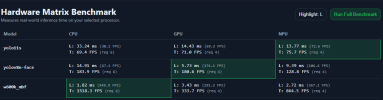
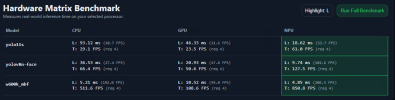
GPU and NPU results should be very similar, so something was wrong in my previous config with the GPU. CPU should really be the only major improvement from the upgrade.
How do you like them apples (RAID 1 is resyncing)?
I went wrong on step 1. Install Python 3.11.9, and everything after was a hack job with AI clumsily getting me to the next error. Since I have an Intel CPU and not AMD, I didn't use the link for the Python installer, but instead got a stale link that redirected me to the Python Installation Manager, which I installed, but that installs the latest Python, not the 3.11, so the commands don't work and the endless errors begin as I hack that version into submission.
Then I restart the PC and it doesn't auto-start because it isn't running as a service. Couldn't figure out where it had been running from as it's not the OBF\OBF-Vision folder, so I deleted the folder and started over from scratch, skipping the Python install step thinking it's already installed (just the wrong version).
On top of that my DNS got messed up so the Github command was failing. Spent an hour fixing that. Took hours more to finally figure out I have the wrong Python version installed and that's why I can't just copy/paste the commands.
Moral of the story- get step 1 right and the rest should go more smoothly.
Now to figure out if I want this to run as a service or launch with task scheduler. Maybe delayed start service.
... upgraded to an Intel Ultra 7 270k processor this morning since Newegg had a great combo deal and trade-in credit for the "old" 245k.
EDIT: Installing as a service was simple.
Interesting thing is the 270k benchmark shows NPU best for yolo11s, GPU for yolov8n-face, and CPU for w600k_mbf. The 245k I was running previously showed NPU dominating everything.
GPU and NPU results should be very similar, so something was wrong in my previous config with the GPU. CPU should really be the only major improvement from the upgrade.
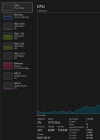
How do you like them apples (RAID 1 is resyncing)?
Last edited: