

You might want to check the global (overall) AI settings, including reducing the number of simultaneous connections: oftentimes this carries over as the previously recommended setting of 40, now Ken has said either in the help file or release notes that 2 to 4 works far better for many systems, and will dramatically bring down RAM and CPU spikes and overall usage. Also, go into every camera's settings: AI may be turned on for each camera unintentionally, including facial recognition, license plates, etc...disable as needed.
Reducing CPU Usage
- Thread starter Arjun
- Start date
You are using an out of date browser. It may not display this or other websites correctly.
You should upgrade or use an alternative browser.
You should upgrade or use an alternative browser.

You said BI is shut down when you are still seeing roughly 20% CPU usage, but is it still potentially running as a service in the background? Go the the Windows "Services" tab/plugin/panel and double-check from there that BI is truly shut down fully.

Only if the CPU temperature is high. Then it wouldn't hurt to clean off the old and add new as long as the new paste isn't old and dried out. I have a tube of this.. You don't need to apply much, but if in doubt, it is okay to add too much. The worst it will do is squirt out the edges of the heatsink and make a bit of a goopy mess. It shouldn't cause any short circuits or anything like that.Thanks, do you think it might be necessary to repaste the thermal paste on the CPU?

I ensured the service was completely stopped, followed by checking overall CPU usageYou said BI is shut down when you are still seeing roughly 20% CPU usage, but is it still potentially running as a service in the background? Go the the Windows "Services" tab/plugin/panel and double-check from there that BI is truly shut down fully.
Squirt tube - got it. I will try that and report back, lolOnly if the CPU temperature is high. Then it wouldn't hurt to clean off the old and add new as long as the new paste isn't old and dried out. I have a tube of this.. You don't need to apply much, but if in doubt, it is okay to add too much. The worst it will do is squirt out the edges of the heatsink and make a bit of a goopy mess. It shouldn't cause any short circuits or anything like that.
If you want to try one more thing before going through the hassle of a full OS reinstallation, you might want to try this out to essentially do an "in-place" debloat, it allows you turn off many unwanted services in Windows (10 or 11).

Will try that and report back - funny thing is that the developer is a Microsoft Partner, lolIf you want to try one more thing before going through the hassle of a full OS reinstallation, you might want to try this out to essentially do an "in-place" debloat, it allows you turn off many unwanted services in Windows (10 or 11).
I applied the recommended settings, restarted the computer, stopped the Blue Iris Service and immediately saw CPU usage go down to single digits and as low as "0" zero % percent (even with Chrome still on as I type) with the occasional spike to 12% and soIf you want to try one more thing before going through the hassle of a full OS reinstallation, you might want to try this out to essentially do an "in-place" debloat, it allows you turn off many unwanted services in Windows (10 or 11).
I'm convinced due to updates being made to Windows around the clock, majority users here are likely running a "lite" debloated version of Windows which explains the very minimum CPU usage.
So now with Blue Iris running (after disabling the bloated crap in the background), the CPU % usage is ranging between 5% and 35% - spikes do still occur but are very intermittent especially when motion / detections occur
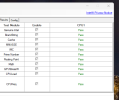
--- Genuine Intel Test ---
...
Version 1.0.26.64b.W
...
Expected -- GenuineIntel
Detected -- GenuineIntel
Genuine Intel CPU Module Success
--- Brand String Test ---
...
Version 1.0.28.64b.W
...
IntelR CoreTM i5-9500 CPU 3.00GHz
Brand String Module Success....
--- Cache Test ---
...
Version 1.0.24.64b.W
...
--- Reading Cache Size ---
- Detected L1 Data Cache Size -- 32
- Detected L1 Inst Cache Size -- 32
- Detected L2 Cache Size -- 256
- Detected L3 Cache Size -- 9216
Cache Module Success
--- MMXSSE Test ---
...
Version 1.0.30.64b.W
...
..DetectUtils64 DLL Version - 1.1.9
--- Determining MMX - SSE capabilities ---
..MMX is supported on this CPU..
..SSE is supported on this CPU..
..SSE2 is supported on this CPU..
..SSE3 is supported on this CPU..
..SSSE3 is supported on this CPU..
..SSE4.1 is supported on this CPU..
..SSE4.2 is supported on this CPU..
Testing MMX
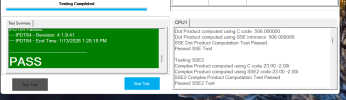
Dot Product computed using C code 506.000000
Dot Product computed using MMX intrinsics 506
MMX Dot Product Computation Test Passed
Passed MMX Test
Testing SSE
Dot Product computed using C code 506.000000
Dot Product computed using SSE intrinsics 506.000000
SSE Dot Product Computation Test Passed
Passed SSE Test
Testing SSE2
Complex Product computed using C code 23.00 -2.00i
Complex Product computed using SSE2 code 23.00 -2.00i
SSE2 Complex Product Computation Test Passed
Passed SSE2 Test
Testing SSE3
Complex Product using C code 23.00 -2.00i
Complex Product using SSE3 code 23.00 -2.00i
SSE3 Complex Product Computation Test Passed
Passed SSE3 Test
Testing SSSE3
SSSE3 Absolute Value Tests Passed
SSSE3 Arithmetic Tests Passed
SSSE3 Dot Product Test Passed
Passed SSSE3 Test
Testing SSE4.1
SSE4.1 Blend Tests Passed
SSE4.1 Min Max Tests Passed
SSE4.1 Insert Bit Tests Passed
SSE4.1 Extract Bit Tests Passed
SSE4.1 Bitwise Comparison Tests Passed
SSE4.1 Dot Product Test Passed
SSE4.1 Arithmetic Tests Passed
SSE4.1 Bit Conversion Tests Passed
SSE4.1 Bit Compare Test Passed
Passed SSE4.1 Test
Testing SSE4.2
SSE4.2 Bit Compare Test Passed
SSE4.2 Calculate Bit Set to 1 Test Passed
SSE4.2 CRC Test Passed
Passed SSE4.2 Test
MMXSSE Module Success
--- Integrated Memory Controller Test ---
...
Version 1.0.26.64b.W
...
--- Reading Memory Size ---
Detected Memory Size is -- 32.00GB
--- Subtest - Memory Size Test Passed ---
--- Integrated Memory Controller Stress Test ---
Memory to be allocated 1048576 bytes
Memory Allocated.
Test 1 Ones and Zeros Moving Inversions write operations - Passed
Test 1 Ones and Zeros Moving Inversions verification operations - Passed
Test 2 32Bits Sliding Ones write operations - Passed
Test 2 32Bits Sliding Ones verification operations - Passed
Test 3 32Bits Sliding Zero write operations - Passed
Test 3 32Bits Sliding Zero verification operations - Passed
Memory Deallocated.
--- Subtest - Memory Stress Test Passed ---
--- Integrated Memory Controller Test Passed ---
Parallel_PrimeNum
Version - 1.0.0.13
Parsing Parallel_PrimeNum.xml
Running Module GraphicsW.exe -s 45 -resultName GraphicsW_Parallel_PrimeNum_1_Results.txt
Running Module Math_PrimeNum.exe -s 45 -resultName Math_PrimeNum_Parallel_PrimeNum_1_Results.txt
--- Prime Number Generation Test ---
...
Version 1.0.29.64b.W
...
..DetectUtils64 DLL Version - 1.1.9
AVX is supported in your OS
Max AVX supported AVX2
Ops Per Sec CycleRun Error Timesec
55181 2 0 1
52721 4 0 2
25798 5 0 3
50970 7 0 4
25199 8 0 5
24970 9 0 6
24967 10 0 7
24921 11 0 8
12407 12 0 10
24807 13 0 11
24525 14 0 12
14575 15 0 13
29252 17 0 14
14532 18 0 15
124221 19 0 16
248433 21 0 17
124242 22 0 18
248426 24 0 19
124266 25 0 20
248386 27 0 21
124242 28 0 22
248392 30 0 23
124226 31 0 24
248377 33 0 25
124210 34 0 26
124208 35 0 27
248446 37 0 28
124209 38 0 29
248398 40 0 30
124221 41 0 31
248452 43 0 32
124212 44 0 33
248406 46 0 34
124186 47 0 35
248475 49 0 36
124212 50 0 37
248482 52 0 38
124207 53 0 39
248410 55 0 40
384710 60 0 41
769687 70 0 42
769637 80 0 43
846792 91 0 44
769971 101 0 45
Operation Per Second -- 769971
Error -- 0
Prime Number Generation Test Passed
Module Math_PrimeNum.exe Completed - Pass
...
Version 1.0.10.64b.W
...
GL_VERSION 4.6.0 - Build 30.0.100.9864
GraphicsW Module Success
Module GraphicsW.exe Completed - Pass
Result - Pass
Parallel_FP
Version - 1.0.0.13
Parsing Parallel_FP.xml
Running Module GraphicsW.exe -s 45 -resultName GraphicsW_Parallel_FP_1_Results.txt
Running Module Math_FP.exe -s 45 -resultName Math_FP_Parallel_FP_1_Results.txt
Running Module AVX.exe -s 45 -resultName AVX_Parallel_FP_1_Results.txt
--- AVX Test ---
...
Version 2.0.31.64b.W
...
..DetectUtils64 DLL Version - 1.1.9
--- CPU Features Detection ---
..AVX is supported by this CPU..
..AVX2 is supported by this CPU..
..AVX512BW is NOT supported by this CPU..
..AVX512CD is NOT supported by this CPU..
..AVX512DQ is NOT supported by this CPU..
..AVX512ER is NOT supported by this CPU..
..AVX512F is NOT supported by this CPU..
..AVX512IFMA52 is NOT supported by this CPU..
..AVX512PF is NOT supported by this CPU..
..AVX512VBMI is NOT supported by this CPU..
..AVX512VL is NOT supported by this CPU..
..AES is supported by this CPU..
..PCLMULQDQ is supported by this CPU..
..AVX is supported by this Operating System..
Most Advanced AVX Feature Detected.. AVX2
Testing Most Advanced AVX Feature - AVX2....
AVX2 Test Result --- PASS
Testing AES
AES Test Result --- PASS
Testing PCLMULQDQ
PCLMULQDQ Test Result --- PASS
AVX Module Success
--- Floating Point Test ---
...
Version 1.0.28.64b.W
...
..DetectUtils64 DLL Version - 1.1.9
AVX is supported in your OS
Max AVX supported AVX2
FMA3 supported
MFLOPS CycleRun Error Timesec
8.19 126 0 1
26.585 535 0 2
6.045 628 0 3
8.385 757 0 4
5.915 848 0 5
5.655 935 0 6
6.76 1039 0 7
6.175 1134 0 8
5.915 1225 0 9
5.59 1311 0 10
6.305 1408 0 11
5.59 1494 0 12
7.02 1602 0 13
6.565 1703 0 14
9.035 1842 0 15
6.24 1938 0 16
5.915 2029 0 17
6.045 2122 0 18
6.11 2216 0 19
5.655 2303 0 20
5.46 2387 0 21
5.72 2475 0 22
5.135 2554 0 23
5.46 2638 0 24
5.59 2724 0 25
5.98 2816 0 26
5.525 2901 0 27
5.655 2988 0 28
5.395 3071 0 29
5.59 3157 0 30
5.395 3240 0 31
5.59 3326 0 32
5.46 3410 0 33
5.395 3493 0 34
5.85 3583 0 35
5.2 3663 0 36
5.135 3742 0 37
5.655 3829 0 38
5.33 3911 0 39
5.135 3990 0 40
5.98 4082 0 41
5.135 4161 0 42
5.395 4244 0 43
5.33 4326 0 44
5.07 4404 0 45
Million Floating Points per Second MFLOPS -- 5.07
Error -- 0
Floating Point Test Passed
Module AVX.exe Completed - Pass
Module Math_FP.exe Completed - Pass
...
Version 1.0.10.64b.W
...
GL_VERSION 4.6.0 - Build 30.0.100.9864
GraphicsW Module Success
Module GraphicsW.exe Completed - Pass
Result - Pass
Parallel_Math
Version - 1.0.0.13
Parsing Parallel_Math.xml
Running Module GraphicsW.exe -s 45 -resultName GraphicsW_Parallel_Math_1_Results.txt
Running Module FMA3.exe -s 45 -resultName FMA3_Parallel_Math_1_Results.txt
Running Module Math_PrimeNum.exe -s 45 -resultName Math_PrimeNum_Parallel_Math_1_Results.txt
--- FMA3 Test ---
...
Version 1.0.29.64b.W
...
..DetectUtils64 DLL Version - 1.1.9
--- CPU Features Detection ---
..FMA3 is supported by this CPU..
..FMA3 is supported by this Operating System..
Testing FMA3....
FMA3 Test Result --- PASS
FMA3 Module Success
--- Prime Number Generation Test ---
...
Version 1.0.29.64b.W
...
..DetectUtils64 DLL Version - 1.1.9
AVX is supported in your OS
Max AVX supported AVX2
Ops Per Sec CycleRun Error Timesec
55174 2 0 1
52713 4 0 2
51415 6 0 3
25354 7 0 4
25198 8 0 5
24967 9 0 6
49880 11 0 7
24815 12 0 8
12402 13 0 10
24527 14 0 11
29257 16 0 12
14572 17 0 13
14532 18 0 14
28920 20 0 15
124194 21 0 16
124243 22 0 17
248449 24 0 18
124198 25 0 19
248403 27 0 20
124254 28 0 21
248443 30 0 22
124264 31 0 23
248467 33 0 24
124239 34 0 25
248496 36 0 26
124249 37 0 27
248446 39 0 28
124237 40 0 29
248441 42 0 30
124246 43 0 31
124247 44 0 32
248461 46 0 33
124212 47 0 34
248464 49 0 35
124231 50 0 36
248475 52 0 37
124217 53 0 38
248475 55 0 39
124236 56 0 40
615925 64 0 41
769708 74 0 42
769945 84 0 43
769948 94 0 44
769807 104 0 45
Operation Per Second -- 769807
Error -- 0
Prime Number Generation Test Passed
Module Math_PrimeNum.exe Completed - Pass
Module FMA3.exe Completed - Pass
...
Version 1.0.10.64b.W
...
GL_VERSION 4.6.0 - Build 30.0.100.9864
GraphicsW Module Success
Module GraphicsW.exe Completed - Pass
Result - Pass
Parallel_GPUStressW
Version - 1.0.0.13
Parsing Parallel_GPUStressW.xml
Running Module GPUStressW.exe -s 30 -resultName GPUStressW_Parallel_GPUStressW_1_Results.txt
Running Module Math_FP.exe -s 30 -resultName Math_FP_Parallel_GPUStressW_1_Results.txt
Running Module Math_PrimeNum.exe -s 30 -resultName Math_PrimeNum_Parallel_GPUStressW_1_Results.txt
--- Floating Point Test ---
...
Version 1.0.28.64b.W
...
..DetectUtils64 DLL Version - 1.1.9
AVX is supported in your OS
Max AVX supported AVX2
FMA3 supported
MFLOPS CycleRun Error Timesec
0.325 5 0 1
0.39 11 0 2
0.325 16 0 3
0.585 25 0 4
0.65 35 0 5
0.715 46 0 6
0.65 56 0 7
0.65 66 0 8
0.715 77 0 9
0.585 86 0 10
0.65 96 0 11
0.65 106 0 12
0.65 116 0 13
0.65 126 0 14
0.715 137 0 15
0.715 148 0 16
0.65 158 0 17
0.65 168 0 18
0.65 178 0 19
0.65 188 0 20
0.715 199 0 21
0.65 209 0 22
0.65 219 0 23
0.585 228 0 24
0.65 238 0 25
0.845 251 0 26
0.845 264 0 27
0.91 278 0 28
0.91 292 0 29
0.91 306 0 30
Million Floating Points per Second MFLOPS -- 0.91
Error -- 0
Floating Point Test Passed
--- Prime Number Generation Test ---
...
Version 1.0.29.64b.W
...
..DetectUtils64 DLL Version - 1.1.9
AVX is supported in your OS
Max AVX supported AVX2
Ops Per Sec CycleRun Error Timesec
124320 1 0 1
248574 3 0 2
124273 4 0 3
248599 6 0 4
124284 7 0 5
248539 9 0 6
124299 10 0 7
124289 11 0 8
248562 13 0 9
124292 14 0 10
248543 16 0 11
124242 17 0 12
124315 18 0 13
248550 20 0 14
124287 21 0 15
248597 23 0 16
124281 24 0 17
124269 25 0 18
248579 27 0 19
124312 28 0 20
248601 30 0 21
124271 31 0 22
248552 33 0 23
124284 34 0 24
124281 35 0 25
694730 44 0 26
694977 53 0 27
772077 63 0 28
694605 72 0 29
772039 82 0 30
Operation Per Second -- 772039
Error -- 0
Prime Number Generation Test Passed
Module Math_FP.exe Completed - Pass
Module Math_PrimeNum.exe Completed - Pass
...
Version 1.0.22.64b.W
...
IntelR CoreTM i5-9500 CPU 3.00GHz
... Querying GPU Information ...
..DetectUtils64 DLL Version - 1.1.9
..
..found GPU ID 0 8086 3E92 IntelR UHD Graphics 630
..
..Intel GPU detected and Intel graphics drivers are installed
..IPDT Graphics Tests can be enabled and executed
..
..Level-Zero API Loader found
..Found Brand ID - i5
..Found Gen ID 9
... Loading GPU ...
Level-Zero API Loader found
Initialize Gravity Simulation
nPart 160000 nSteps 100000 dt 0.1
------------------------------------------------
s dt kenergy time s GFLOPS
------------------------------------------------
GPUStressW Module Success
Module GPUStressW.exe Completed - Pass
Result - Pass
--- DGEMM Stress Test ---
...
Version 1.0.17.64b.W
...
..DetectUtils64 DLL Version - 1.1.9
--- CPU Features Detection ---
..AVX is supported by this Operating System..
Most Advanced AVX Feature Detected.. AVX2
maxMatrixSize 1024
minMatrixSize 512
Testing Most Advanced AVX Feature - AVX2....
DGEMM AVX2 Test Result --- PASS
DGEMM Module Success
--- Frequency Check ---
...
Version 1.0.7.64b.W
...
..........
..Measured frequency -- 2.999283
..Expected Frequency -- 3.00
..
FrequencyCheck Passed....
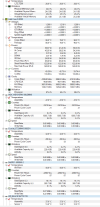
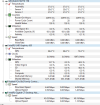
Yes, those CPU temps are pretty high, but they seem to have been polled when the CPU utilization was also quite high (first column typically). Either way, it warrants further investigation: at a minimum, a full interior of computer case cleaning, particularly the CPU fan and cooler. Compressed air is your friend here (outdoors preferably), but don't use it on fans without manually holding/stopping the rotation, as the high velocity air can ruin the bearings by spinning the fan too fast if unrestrained.
Obviously, renewing the thermal paste is also advised, but oftentimes a simple "cleanout" will do wonders.
Windows does have a lot of bloat, but I struggle to accept that a 'healthy' clean install of Windows would use 20% CPU doing nothing. It's interesting.
Yes, the i5-9500 max temperature is 100°C, so having it at 90°C is rather hot but also not hot enough that I would expect major performance loss due to throttling. The CPU frequency is up around 4000-4200 MHz which is near its turbo boost limit of 4400 MHz. Definitely check for dust buildup, fans not spinning, and if you've got fresh thermal paste go ahead and use itSeems like my CPU is hot @bp2008 What do you think?


Windows does have a lot of bloat, but I struggle to accept that a 'healthy' clean install of Windows would use 20% CPU doing nothing. It's interesting.
In the past (and maybe still now but we don't see many posts about it anymore), it used to be the manufactures version of the graphics driver that would cause it and because of the manufacturer version, you couldn't change the graphics driver to a clean one without a clean install of Windows.

Bruce_H
Getting comfortable
Do not spin the fans on GPU cards with compressed air it has been known to generate voltage spikes and blowup the cards! In any case best not to use excess air on any cooling fan, keep the nozzle well away!Yes, those CPU temps are pretty high, but they seem to have been polled when the CPU utilization was also quite high (first column typically). Either way, it warrants further investigation: at a minimum, a full interior of computer case cleaning, particularly the CPU fan and cooler. Compressed air is your friend here (outdoors preferably), but don't use it on fans without manually holding/stopping the rotation, as the high velocity air can ruin the bearings by spinning the fan too fast if unrestrained.
Obviously, renewing the thermal paste is also advised, but oftentimes a simple "cleanout" will do wonders.
Err...yes, that was mentioned in my post as well, the fan should remain fixed/stationary, both to preserve the bearings and to avoid turning the fan into a (voltage) generator.Do not spin the fans on GPU cards with compressed air it has been known to generate voltage spikes and blowup the cards! In any case best not to use excess air on any cooling fan, keep the nozzle well away!