


Reducing CPU Usage
- Thread starter Arjun
- Start date
You are using an out of date browser. It may not display this or other websites correctly.
You should upgrade or use an alternative browser.
You should upgrade or use an alternative browser.
Molbo
Pulling my weight
I would start with completely disabling BI motion detection (and AI if you have it) just to check if it's affecting CPU usage.


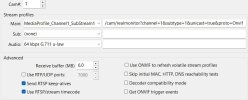
I got it to work - not sure why mine appears differently than yours as far as options go
View attachment 236163
No, now you have the substream as your mainstream and the video quality won't be the mainstream.

It's not what you think, lol (joking)That is still way to high for a 9th gen. People run 30+ cameras on a 4th gen at way less CPU% than you are.
Anything else running on that computer?
Currently, I have running Chrome running in the background with several tabs, but that's all
I never got to debloat my copy of Windows 11
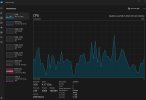
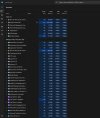
But, here is my status
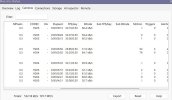
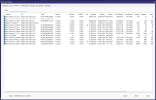
Yeah, you are still not correct. There is nothing shown in the sub columns.

Incorrect as in substream settings? Or something else?Yeah, you are still not correct. There is nothing shown in the sub columns.
I have hardware acceleration fully disabled despite using a 9th gen Intel CPU
Last edited:
Why is there no bitrate listed under substream?
BI interprets it as a mainstream - is it solely based on those previous options selected?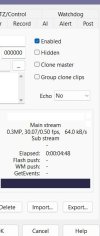
BI interprets it as a mainstream - is it solely based on those previous options selected?
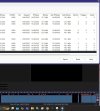

You have the substream in the mainstream - the bitrate for mainstream should be a lot higher.
If you are going to use BI motion, then you should make iframes that same as the FPS.
That is still a high CPU
If you are going to use BI motion, then you should make iframes that same as the FPS.
That is still a high CPU

NOShouldn't hardware acceleration be turned on so that the onboard Intel Chipset is utilized to reduce CPU utilization?
Can you please post screenshots?
Also if I use substreams, how will recording quality be affected?
I am only using the built-in Windows Defender Antivirus

Bruce_H
Getting comfortable
No Unfortunately, turning on hardware acceleration might improve things if you were only using the main stream, but when using the sub stream it actually use more CPU cycles than it saves, at least that is my understanding!
You would have to verify on your own system to see what effect it has!
You would have to verify on your own system to see what effect it has!
You need to login to each cameras settings, and surf the menus and fix the 30 fps, drop down to 12 and double check you have substreams enabled at the same FPS.
for the time being if available, lower your bitrate in Mainsteams to something like 4096 Kbps and see how it behaves.
If it becomes normal ( 7% to 20 %) then you can retweak your bitrates on cameras that look crappy.
for the time being if available, lower your bitrate in Mainsteams to something like 4096 Kbps and see how it behaves.
If it becomes normal ( 7% to 20 %) then you can retweak your bitrates on cameras that look crappy.
Last edited:
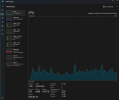
I matched the I-Frame Interval with 15 fps for each camera and fixed the bit rate to 4096 kbps for the mainstream. It made zero difference in CPU usage. I even closed Google Chrome. The CPU usage as per Task Manager still shows Blue Iris 40-50% percent CPU usage on average. Mind you, this is a clean install as well.
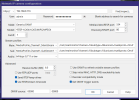
My suspicion still has to do with how the mainstream / substream is set on Blue Iris, but I have not been able to get a clear answer on this yet - if anyone can shed more light on this what I may configured incorrectly, that would be greatly appreciated!
I will admit that there have been at times I have been persuaded to shift focus on UniFi Protect because the damn thing just works. HOWEVER, I don't want to rely on just one ecosystem and that is where Blue Iris shines leaps and bounds regardless. There really is no such thing as perfect picture quality as we are talking about surveillance products here. The myriad of Dahua cameras and recent UniFi cameras all outperform the crap sold by big-box stores. Even with photography as one of many hobbies of mine, sometimes it feels like we are pushing these IP cameras to the extreme limits for optimal picture quality when in fact there are too many factors that come into play when specifying settings for each and every camera in a setup.
My suspicion still has to do with how the mainstream / substream is set on Blue Iris, but I have not been able to get a clear answer on this yet - if anyone can shed more light on this what I may configured incorrectly, that would be greatly appreciated!
I will admit that there have been at times I have been persuaded to shift focus on UniFi Protect because the damn thing just works. HOWEVER, I don't want to rely on just one ecosystem and that is where Blue Iris shines leaps and bounds regardless. There really is no such thing as perfect picture quality as we are talking about surveillance products here. The myriad of Dahua cameras and recent UniFi cameras all outperform the crap sold by big-box stores. Even with photography as one of many hobbies of mine, sometimes it feels like we are pushing these IP cameras to the extreme limits for optimal picture quality when in fact there are too many factors that come into play when specifying settings for each and every camera in a setup.