Rapid switching between IR and Color

EagleEye7

Getting the hang of it
Jul 29, 2024
151
52
UK
This is on a B54IR model, telephoto, I forget the exact model.

The IR switching sensitivity is set quite high, e.g it's switches to IR early in the evening and back to color late in the morning. Which is fine in this case, I would rather it's spent more time in black and white, than staying in colour for longer and possibly getting a poor image in dim conditions.

However, I have noticed that when it's partially dark, the camera rapidly switches between BW and color mode for a while. It'll switch one way, then maybe 2-3s later switch back, and so forth. This is not exactly a problem in itself, however I don't know, does this sort of behavior wear out the IR filter mechanism quickly?

Of course I would welcome any suggestions to stop this happening but in the main I just want to make sure the camera is not wearing out faster than it should.
 
Do these Dahuas support autoswitching between day / night profiles? I think the reason it's in auto not forced is so it switches between day / night shutter values automatically (same time it goes Color <> BW).
 
Depends on which GUI you have - the older cams with orange/black/Grey day/night button doesn't work the way we want.

The blue/white GUI day/night profile button will work as expected.

The big thing is not to be on auto settings.
 
It depends on a lot of factors
On dark overcast or rainy days its more apt to do that as the difference in light is less
It can also depend on your night settings, esp exposure.

I have two I run Auto Day/Night on as I need them to switch to color when the flood lights kick in at night.
I also run separate day and night profiles which coincide close to actual sunset. So they're switching exposure settings at about the same time.

I've seen it do that a few times, So I checked it regularly after the first time because it bothered me like the OP, but I've found it to be rare


Most (95%+) of the time I get a smooth transition.
Certain times of the year I let it run day profile a little too long

View attachment 192.168.1.110_ch10_20260127182130_20260127182147.mp4
 
  • Like
Reactions: tigerwillow1
Thanks all.

PI will have to familiarize myself with the exact settings again. I do have the new GUI.

I'm definitely not using auto settings in general, EG for exposure times, but I did find auto day / night switching worked well for my needs, except for the issue described in this thread.
 
  • Like
Reactions: bigredfish
This is on a B54IR model, telephoto, I forget the exact model.

The IR switching sensitivity is set quite high, e.g it's switches to IR early in the evening and back to color late in the morning. Which is fine in this case, I would rather it's spent more time in black and white, than staying in colour for longer and possibly getting a poor image in dim conditions.

However, I have noticed that when it's partially dark, the camera rapidly switches between BW and color mode for a while. It'll switch one way, then maybe 2-3s later switch back, and so forth. This is not exactly a problem in itself, however I don't know, does this sort of behavior wear out the IR filter mechanism quickly?

Of course I would welcome any suggestions to stop this happening but in the main I just want to make sure the camera is not wearing out faster than it should.
That rapid "hunting" is a classic pain in the neck and it definitely puts extra wear on the mechanical IR cut filter. You need to find the "threshold" or "hysteresis" settings in your config to widen the gap between when it switches, or just set a hard schedule for day/night mode so the poor thing isn't clicking itself to death at twilight.
 
  • Like
Reactions: bigredfish
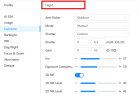
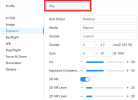
Just checked my settings.
1769806033347.png
Definitely currently using Day/Night Switch, I think I figured that changes the profile, so essentialy switches the shutter speed it uses automatically when it switches between color and IR.
1769806104169.png
1769806136388.png
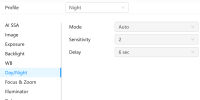
I thought there was sensitivity adjustment available, but I must be mistaken, as it is greyed out:
1769806986058.png
Still haven't figured out 100% the day / night / color / BW modes on these cameras.
 
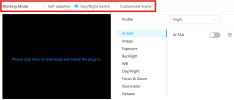
I use Customized Scene and dont rely on the camera sensor which is what really creates the problem.

It also then allows the sensitivity control to be used
 
Thanks all.

PI will have to familiarize myself with the exact settings again. I do have the new GUI.

I'm definitely not using auto settings in general, EG for exposure times, but I did find auto day / night switching worked well for my needs, except for the issue described in this thread.
Your on the right track....use that but with a slightly faster shutter. then it will go B&W more decisively. and a bit earlier. and stay B&W a bit later. which actually helps with my license plate cam. Switching too late into evening to B&W was causing missed plates. Right now I'm using the older firmware and using "schedule" with ample B&W time in the low light hours of dusk& dawn
 
Last edited:
I use Customized Scene and dont rely on the camera sensor which is what really creates the problem.

It also then allows the sensitivity control to be used
I see. Obviously all I need to do is switch between Color / BW modes, and also adjust the image settings (mainly shutter) for nighttime, because I can run a much faster shutter in the day when there is more light. I suppose it makes sense to do the two changes (Color > BW and shutter) at the same time, but with Customized Scene, what triggers the switch? Time schedule? Light level (assume not since you mentioned not using camera sensor)?

Your on the right track....use that but with a slightly faster shutter. then it will go B&W more decisively. and a bit earlier. and stay B&W a bit later. which actually helps with my license plate cam. Switching too late into evening to B&W was causing missed plates. Right now I'm using the older firmware and using "schedule" with ample B&W time in the low light hours of dusk& dawn
OK, perhaps I should play with the shutter. Do you think just adjusting the day shutter will help (not sure how much lower I can go on night shutter, before it gets too dark and starts causing other image issues, I dialled that in a while ago)? I suppose using extra BW time is ideal with an LPR, in fact I have heard of people running LPR in BW all the time, because it can still read plates fine.

In this case I would like to avoid staying in BW if (and only if) there is enough light to run color without issues, because obviously color provides more information overall.
 
In answer to your question, yes Time Schedule.

You are chasing the same solution many have chased for years.

The utopia we all desire of the camera light sensor being able to perfectly choose when to switch, given clouds, rain, streetlights and a handful of other variables, is just not realistic

There will always be a 20+/- minute period of time at dusk and dawn where the light variables will make all but manual switching a compromise
 
Makes sense. Do you manually adjust the time schedule to match seasonal light variations?

Generally yes by month, but I'm retired so spending 15 minutes 3-4 times per year adjusting to seasonal time change gives me something to do
 
  • Like
Reactions: Flintstone61
Thanks. I would rather not have to remember to adjust it every couple of months, but I will look into the per-month schedule which my GUI apparently should have!
 
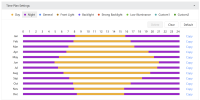
I've got setup with 'Customized Scene' mode and a monthly schedule now.

1769971381635.png

Its a great feature to be able to specify the schedule per month, but I will say, it was not too easy to configure :)

Hopefully this works well. I am hoping it will handle DST properly with the current configuration too.