
PTZ scheduled presets
- Thread starter JPmedia
- Start date

You are using an out of date browser. It may not display this or other websites correctly.
You should upgrade or use an alternative browser.
You should upgrade or use an alternative browser.

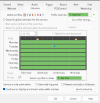
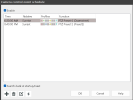
I don't use BI. Was hoping there was a way to do scheduling in the camera web GUIWith BI you can.
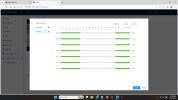
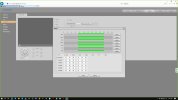
Go to the schedule tab for the PTZ and select Events Schedule
View attachment 243422
And then set it up there:
View attachment 243424

bigredfish
Known around here
I do it on my Mini PTZ. Wont be effected by the day/night switch per se, but you can set a time to have it go to a different preset and call it "Home" until the time set expires.
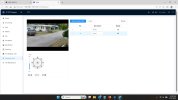
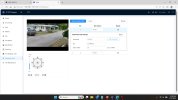
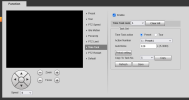
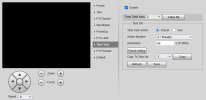
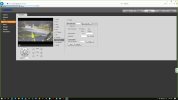
Use "Scheduled Task"
I have my mini turn away from the direct sun between 3:30-5:30 pm and treat its new position as home.
I also have a task from dusk to dawn where I have it park in another preset for dedicated LPR at night
At the end of the task time period, it returns to its "Real Home" Preset
Use "Scheduled Task"
I have my mini turn away from the direct sun between 3:30-5:30 pm and treat its new position as home.
I also have a task from dusk to dawn where I have it park in another preset for dedicated LPR at night
At the end of the task time period, it returns to its "Real Home" Preset

I have to see if the web GUI has the scheduled task option, it is the older GUII do it on my Mini PTZ. Wont be effected by the day/night switch per se, but you can set a time to have it go to a different preset and call it "Home" until the time set expires.
Use "Scheduled Task"
I have my mini turn away from the direct sun between 3:30-5:30 pm and treat its new position as home.
I also have a task from dusk to dawn where I have it park in another preset for dedicated LPR at night
At the end of the task time period, it returns to its "Real Home" Preset
View attachment 243427 View attachment 243426 View attachment 243425
bigredfish
Known around here
Time task (old gray GUI) is same as Schedule Task- (New Blue GUI)
Okey dokey. Will mess with it tomorrowTime task (old gray GUI) is same as Schedule Task- (New Blue GUI)
Ok, I tried to setup two tasks, one to move it to preset 7 between 19:45 and 7:00 and the other to preset 4 between 7:01 and 19:44. I've enabled the tasks, but it is not executing the tasks during the proper time period.
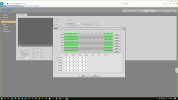
I also cannot select "All" from the schedule. If I do and hit save, when I go back into it, it shows only the current day checked.
Apparently, I'm not doing something right. Any ideas?
I also cannot select "All" from the schedule. If I do and hit save, when I go back into it, it shows only the current day checked.
Apparently, I'm not doing something right. Any ideas?

Mark_M
Known around here
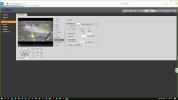
You're on the right track. When the task number is selected, make sure 'enable' tick box is checked for each task.Ok, I tried to setup two tasks, one to move it to preset 7 between 19:45 and 7:00 and the other to preset 4 between 7:01 and 19:44. I've enabled the tasks, but it is not executing the tasks during the proper time period.
Periods indeed cannot overlap.
Auto home is the delay before moving back to this position. So you could make auto home to preset one after 2 minutes and another task overnight to auto home preset one after 1 minute (like mine).
Make sure when you click 'refresh that the settings seem right.
bigredfish
Known around here
Thanks. I'll try a longer value for autohomeIt always defaults to a view showing the current day checked. The lines on the other days show it took and saved as expected
Maybe your AutoHome time is messing with it. Try making your activation times 2 minutes apart instead of 60 seconds
Well, I didn't change any settings and it's working fine. It zooms into the 2 intersections from 7:01 to 19:44 and then switches back to side street overview from 19:45 to 7:00. Works perfectly