
I have an older 2MP Dahua OEM PTZ connected to Blue Iris. When accessing the PTZ via SmartPSS Lite, the "3D positioning" function seems to work - that is, I can click and drag to draw a box in the video viewport, and them the PTZ will frame up to the box I drew. Very useful for quickly and precisely framing up an object.
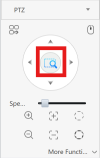
This is the button I have to use to make this work in SmartPSS Lite:
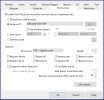
I tried to get this to work in Blue Iris UI3. BI is connected directly to the IP camera. This is the PTZ config tab in BI for this camera:
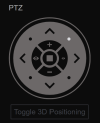
However, initially the 3D Positioning button is disabled:
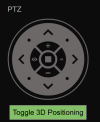
Changing the PTZ mode from Dahua / Qsee RTSP to Dahua New V4 enabled the 3D Positioning button, which I could click to enable:
At this point I can draw the boxes on the video feed in UI3 - the PTZ does not respond though. Dahua New V4 also breaks the normal PTZ controls in UI3. Tried Dahua New V5, same story, 3D positioning will enable, but the PTZ will not move whatever input method I use. I also tried both of these options:

This was interesting - with the first of the above options:
With the second of the two options, the normal PTZ controls worked fine, but the 3D Positioning button was disabled again.
Short of trying every one of the PTZ control mode options, I don't know what to try. Does this mean my PTZ does not support this feature? Or does the fact it works in SmartPSS indicate it is supported, I just need to configure it right?
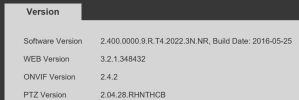
I don't have a lot of information on this camera, other than that it's an older one, has the "old Dahua" web UI, is (re)branded as "SPRO", and has this information in the web UI:
Anyone have any ideas?
This is the button I have to use to make this work in SmartPSS Lite:
I tried to get this to work in Blue Iris UI3. BI is connected directly to the IP camera. This is the PTZ config tab in BI for this camera:
However, initially the 3D Positioning button is disabled:
Changing the PTZ mode from Dahua / Qsee RTSP to Dahua New V4 enabled the 3D Positioning button, which I could click to enable:
At this point I can draw the boxes on the video feed in UI3 - the PTZ does not respond though. Dahua New V4 also breaks the normal PTZ controls in UI3. Tried Dahua New V5, same story, 3D positioning will enable, but the PTZ will not move whatever input method I use. I also tried both of these options:
This was interesting - with the first of the above options:
- Normal PTZ controls (arrows) worked.
- The 3D positioning button was enabled, I could switch it on.
- But even with 3D positioning On, I could not draw any boxes on the video (and of course the PTZ didnt move).
With the second of the two options, the normal PTZ controls worked fine, but the 3D Positioning button was disabled again.
Short of trying every one of the PTZ control mode options, I don't know what to try. Does this mean my PTZ does not support this feature? Or does the fact it works in SmartPSS indicate it is supported, I just need to configure it right?
I don't have a lot of information on this camera, other than that it's an older one, has the "old Dahua" web UI, is (re)branded as "SPRO", and has this information in the web UI:
Anyone have any ideas?