Problems archiving footage since 5.9.9.9

poohbear

n3wb
Jul 3, 2022
6
0
Seattle, WA
My Regular flow is: Blue Iris records footage to E: (SSD), and when the drive fills up it rolls it over to my much larger D: (HDD). Very simple; everything has running fine for me for years up until 5.9.9.9 (now updated to 6.0).

After some number of days though, now this flow just stops working. Clips are no longer moved from E: -> D: and so it fills up and no more footage is recorded. The system recovers after I reboot the machine and footage begins rolling over to D: drive once again.

Any ideas how to troubleshoot this? Nothing else has changed on this system, it is completely dedicated to BI and I rarely touch it. I don't see anything in the log other than the expected "Disk full" errors.

Any assistance is appreciated.
 
My Regular flow is: Blue Iris records footage to E: (SSD), and when the drive fills up it rolls it over to my much larger D: (HDD). Very simple; everything has running fine for me for years up until 5.9.9.9 (now updated to 6.0).

After some number of days though, now this flow just stops working. Clips are no longer moved from E: -> D: and so it fills up and no more footage is recorded. The system recovers after I reboot the machine and footage begins rolling over to D: drive once again.

Any ideas how to troubleshoot this? Nothing else has changed on this system, it is completely dedicated to BI and I rarely touch it. I don't see anything in the log other than the expected "Disk full" errors.

Any assistance is appreciated.
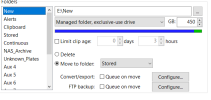
A screen shot of the storage settings for the E: drive might be useful in providing some things to check!
 
Does your SSD have anything else besides Blue Iris video on it?

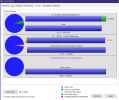
No, it's totally dedicated to BI:
1765311911535.png

1765312001645.png

Forgot that I also "deep archive" footage to my NAS (V:).

So, footage flow is:
E: (SSD) -> D: (HDD) -> V: (NAS)

I did notice my V: drive was filled up so I'm suspecting this could be the culprit, though I'm not sure I know why yet because the share is also dedicated to BI. It would make sense D: would stop rolling over if this happened, though I'd prefer it would just delete older footage instead of failing to record new.

I will keep an eye on this and see what I learn.
 
No, it's totally dedicated to BI:
View attachment 234155

View attachment 234156

Forgot that I also "deep archive" footage to my NAS (V:).

So, footage flow is:
E: (SSD) -> D: (HDD) -> V: (NAS)

I did notice my V: drive was filled up so I'm suspecting this could be the culprit, though I'm not sure I know why yet because the share is also dedicated to BI. It would make sense D: would stop rolling over if this happened, though I'd prefer it would just delete older footage instead of failing to record new.

I will keep an eye on this and see what I learn.
I thought that BI may have issues managing folders on a NAS, I would look at this section in the help file to determine if it is configured correctly, I don't use a NAS for storage so I can not confirm the correct settings!
 
V is full, yes, but D is also full and overallocated which is why E is failing to move things to D. If D is also exclusively used by Blue Iris then Blue Iris probably lost track of some of its own clips, hence the overallocation. Either way I recommend reducing the D allocation by another 100GB or so to give a Blue Iris more breathing room.