Poor AI Detection Speed

bethzur

Getting the hang of it
May 19, 2021
103
57
Pennsylvania
I have an RTX 3050 in my PC with an i7-7700. I see AI detections take 500-1300 ms. That seems longer that it should be by at least an order of magnitude. I checked the logs and it claims it's using the GPU. I'm using yolov8s for the model. I seem to recall DeepStack was 100 ms or less. Has anyone else seen this or any tips to troubleshoot. I may try 8n which I'm guessing should be faster. I am using the main stream, so the images are like 2880x1530 but Google AI thinks that should be around 100 ms.

Here is a sample from the logs. There are no refrigerators in the image.

Code:
T-767 msec  [1446 msec]   
[
    {
        "api":"primary",
        "found":{
            "success":true,
            "error":null,
            "message":"",
            "predictions":[
                {
                    "category":4,
                    "label":"refrigerator",
                    "confidence":0.718442559242249,
                    "x_min":1095,
                    "x_max":1451,
                    "y_min":411,
                    "y_max":799}
                ,
                {
                    "category":4,
                    "label":"skis",
                    "confidence":0.449722796678543,
                    "x_min":1687,
                    "x_max":2030,
                    "y_min":834,
                    "y_max":1115}
                ,
                {
                    "category":4,
                    "label":"refrigerator",
                    "confidence":0.441071748733521,
                    "x_min":640,
                    "x_max":1188,
                    "y_min":3,
                    "y_max":1125}
                ,
                {
                    "category":4,
                    "label":"refrigerator",
                    "confidence":0.415100038051605,
                    "x_min":1077,
                    "x_max":1341,
                    "y_min":772,
                    "y_max":1040}
                ]
            ,
            "count":4,
            "moduleId":"yolov8s.onnx",
            "executionProvider":"ONNXRunTime: 3 (NVIDIA GeForce RTX 3050)",
            "analysisRoundTripMs":1015}
        }
    ]
 
I have an RTX 3050 in my PC with an i7-7700. I see AI detections take 500-1300 ms. That seems longer that it should be by at least an order of magnitude. I checked the logs and it claims it's using the GPU. I'm using yolov8s for the model. I seem to recall DeepStack was 100 ms or less. Has anyone else seen this or any tips to troubleshoot. I may try 8n which I'm guessing should be faster. I am using the main stream, so the images are like 2880x1530 but Google AI thinks that should be around 100 ms.

Here is a sample from the logs. There are no refrigerators in the image.

Code:
T-767 msec  [1446 msec]  
[
    {
        "api":"primary",
        "found":{
            "success":true,
            "error":null,
            "message":"",
            "predictions":[
                {
                    "category":4,
                    "label":"refrigerator",
                    "confidence":0.718442559242249,
                    "x_min":1095,
                    "x_max":1451,
                    "y_min":411,
                    "y_max":799}
                ,
                {
                    "category":4,
                    "label":"skis",
                    "confidence":0.449722796678543,
                    "x_min":1687,
                    "x_max":2030,
                    "y_min":834,
                    "y_max":1115}
                ,
                {
                    "category":4,
                    "label":"refrigerator",
                    "confidence":0.441071748733521,
                    "x_min":640,
                    "x_max":1188,
                    "y_min":3,
                    "y_max":1125}
                ,
                {
                    "category":4,
                    "label":"refrigerator",
                    "confidence":0.415100038051605,
                    "x_min":1077,
                    "x_max":1341,
                    "y_min":772,
                    "y_max":1040}
                ]
            ,
            "count":4,
            "moduleId":"yolov8s.onnx",
            "executionProvider":"ONNXRunTime: 3 (NVIDIA GeForce RTX 3050)",
            "analysisRoundTripMs":1015}
        }
    ]
Do not use main stream, it does not improve accuracy, it just slow down the detection.
 
  • Like
Reactions: Flintstone61
It may be using the iGPU instead of your Nvidia GPU, try disabling the iGPU in the BIOS and see if that changes the speed
 
I did not. Where is that?
Read this post for location and instructions that I posted earlier!
 
  • Like
Reactions: bethzur
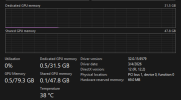
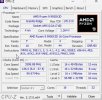
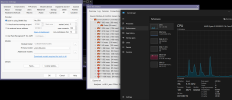
You ever figure this out? Just reinstalled W11 and was getting sub 50ms detection times with a 5090. Now it's 2-600ms with sometimes dropping to 150ms. My gpu utilization is almost non existent.
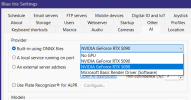
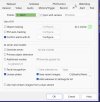
Ive disabled the onboard iGPU in bios
 

Attachments

  • Screenshot 2026-03-17 at 7.48.33 PM.png
    Screenshot 2026-03-17 at 7.48.33 PM.png
    265.5 KB · Views: 4
  • Screenshot 2026-03-17 at 7.49.15 PM.png
    Screenshot 2026-03-17 at 7.49.15 PM.png
    414 KB · Views: 4
You ever figure this out? Just reinstalled W11 and was getting sub 50ms detection times with a 5090. Now it's 2-600ms with sometimes dropping to 150ms. My gpu utilization is almost non existent.
Ive disabled the onboard iGPU in bios
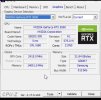
Have you tried selecting the other RTX 5090 in the drop down list, I thought I read something about 1 of them not working when there was two in the list, don't ask me where I read it since I am not sure about this at all!
 
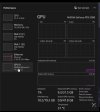
Yeah both seem to be “working” but task manager usage graph usually shows 5%.

Would expect the ms times to be significantly lower with a 5090
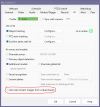
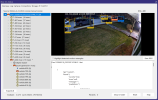
What model are you using and how many models are being used for the camera? Also make sure you uncheck Use main stream, it does not improve accuracy, it just slow down the detection. Below are the times I am getting with my RTX 5090

1773890715170.png

1773890813251.png
 
What model are you using and how many models are being used for the camera? Also make sure you uncheck Use main stream, it does not improve accuracy, it just slow down the detection. Below are the times I am getting with my RTX 5090
Sheesh…. No where close to that
 

Attachments

  • IMG_7092.jpeg
    IMG_7092.jpeg
    127.2 KB · Views: 9
  • IMG_7094.jpeg
    IMG_7094.jpeg
    230.1 KB · Views: 9
Last edited:
Then it jumps to something like this…
 

Attachments

  • IMG_7097.jpeg
    IMG_7097.jpeg
    193.9 KB · Views: 8
  • IMG_7098.jpeg
    IMG_7098.jpeg
    228.3 KB · Views: 8
  • IMG_7099.jpeg
    IMG_7099.jpeg
    191 KB · Views: 8
Last edited:
These are my speeds with GPU disabled in BI... lol
Not sure how I'm getting better speeds with CPU than a GPU @MikeLud1
I found some of the new drivers did not work well, that might be your issue, I am using the below driver