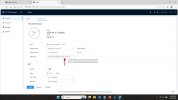
Older 5231R-Z Time issue. Can't get it right.

FlipNJ

Pulling my weight
May 3, 2016
379
139
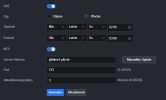
I know these cameras are old but I cannot get the time to display properly. DST is enabled just as in my other dahua cameras and whether I use the ntp server or not it is continuously off by 1 hour. I tried turning off ntp and controlling the time manually and lied to it by 1 hour in the GMT box but it still isn't right and goes back to an hour off. Anybody have this issue or remember seeing something about this? I searched and couldn't find anything.
 
I know these cameras are old but I cannot get the time to display properly. DST is enabled just as in my other dahua cameras and whether I use the ntp server or not it is continuously off by 1 hour. I tried turning off ntp and controlling the time manually and lied to it by 1 hour in the GMT box but it still isn't right and goes back to an hour off. Anybody have this issue or remember seeing something about this? I searched and couldn't find anything.
23af98551c0fee28d6c2dcaccfada1ae.png
 
You mean some guys in the Timezone coding department haven't hear the earth is round and the time zone data is not linear? or available on the Internet?
 
ok
I frequently, even on some new cameras have to trick it and set a time zone that matches the actual time even if its not my zone.

View attachment 242381
I did exactly that, then a minute later, it goes back. The camera is in Eastern, -5hrs GMT. Set it to -4hrs and it changes back. Weird since the other 5231 doesn't have the issue.
Flashed it with the FW of the other cameras FW and it loaded successfully and then I lost connection. (Did this remotely).
I know it didn't brick because at first, the feed came up and showed live view with the date needing adjustment. I'm assuming the P2P went back to un-enabled.
Going out today to resolve.
Originally seemed easy to remedy. Luckily it is in the next town over.
OCD is a pita
 
  • Like
Reactions: bigredfish
Try a different browser.
Pale Moon, or Edge in IE mode