Hi everyone,
Long-time Blue Iris user here. After upgrading to v6 and enabling the new object tracking feature, I'm running into a lot of false negatives caused by the "Not Overlapping" flag.
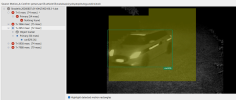
In the attached screenshot, you can see a car that was correctly detected as an object, but it's still being marked as "Not Overlapping" with the motion area — even though visually the motion highlight does seem to overlap the object.
A few things I'm trying to figure out, and wondering if anyone here has run into the same issue or has some insight:
Long-time Blue Iris user here. After upgrading to v6 and enabling the new object tracking feature, I'm running into a lot of false negatives caused by the "Not Overlapping" flag.
In the attached screenshot, you can see a car that was correctly detected as an object, but it's still being marked as "Not Overlapping" with the motion area — even though visually the motion highlight does seem to overlap the object.
A few things I'm trying to figure out, and wondering if anyone here has run into the same issue or has some insight:
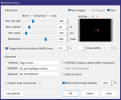
- The help docs say: "A motion icon is used to mark objects which do not overlap an area of movement following a motion trigger." Does "area of movement" refer to the configured Zones (A, B, C, etc.), or to the raw motion detection pixels? In my case the two seem to overlap visually, so I'm not sure what's triggering the mismatch.
- Does the "Object must cross Zones..." setting play into this at all, or is it unrelated to the overlap check?
- I'm running hi-res images for object detection but low-res for motion detection/zones — could a resolution/scaling mismatch between the two be causing the coordinates to not line up properly? This is my current best guess, but wanted to check before messing with settings.