
NVR with 32TB HD's need 120 days
- Thread starter wpgmig
- Start date

You are using an out of date browser. It may not display this or other websites correctly.
You should upgrade or use an alternative browser.
You should upgrade or use an alternative browser.

It all comes down to resolution, bitrate, and FPS.
The higher you run all three, the less storage you get.
The lower you run all three, the more storage you get, but too low and the quality sucks.
Then it is a matter of finding the balance between the quality you want versus the amount of storage you have and how long you want to store.
 ipcamtalk.com
The higher you run all three, the less storage you get.
The lower you run all three, the more storage you get, but too low and the quality sucks.
Then it is a matter of finding the balance between the quality you want versus the amount of storage you have and how long you want to store.
Calculating Required Hard Drive Size
We have built a calculator for you to use and save your results. Click here to use it. To calculate required storage space for cameras, you only need to know two things: The average bit rate, and the amount of time. Then multiply them together with Google, being careful to use the correct...


bigredfish
Known around here
^^^^
This
You'll likely have to crank the bitrates (quality) down to substream levels. And probably save some space though not as much as advertised, using h.265
I run high bitrate and fps and use up 16TB of drives in 12 days with 11 cameras (one is a triple sight so i think that counts as 3 streams) so 13 all together
This
You'll likely have to crank the bitrates (quality) down to substream levels. And probably save some space though not as much as advertised, using h.265
I run high bitrate and fps and use up 16TB of drives in 12 days with 11 cameras (one is a triple sight so i think that counts as 3 streams) so 13 all together

I'm getting 1 month on 10.6 TB of storage with 13 cams. Running FPS of about 10-15. Bitrate is default for 50% of cams. the rest I may have higher than average. 1 cam is motion only.
I'd need about 44 Tb to go 120 days.
I'd need about 44 Tb to go 120 days.
What should the Bitrate type be set to? Constant or variable?
I have it also set at H265+
Constant is best from a video quality standpoint, but if your main goal is maximize storage time, then variable would be the better option. Just recognize that depending on the field of view, the bitrate may not ramp up fast enough to get the clean image.

Constant bit rate is more predictable. Variable bit rate is allowed to go below the configured limit to extend the retention time in a way you will not be able to predict as well.
H.265+ is probably the best option you have for maximizing the image quality at a given bit rate.
If you have one
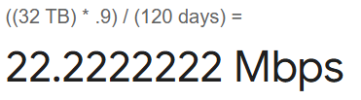
So with 12 cameras, each camera needs to average around
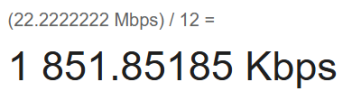
This isn't very high for modern cameras so to make the image quality better, you should reduce the frame rate as much as you can get away with. E.g.
H.265+ is probably the best option you have for maximizing the image quality at a given bit rate.
If you have one
32 TB hard drive and need 120 days of retention then you need your average bit rate to be 22.2 Mbps (megabits per second) or less shared by all cameras.So with 12 cameras, each camera needs to average around
1852 Kbps or less (a.k.a. 1.8 Mbps).This isn't very high for modern cameras so to make the image quality better, you should reduce the frame rate as much as you can get away with. E.g.
5 FPS or lower. And use a fairly long i-frame interval, e.g. have the i-frame interval at least 4x the frame rate. Frame rate 5, iframe 20 for example.
I think the i-frame interval setting is inapplicable when H265+ is enabled, so the field gets disabled or hidden. In that case, don't worry about i-frame interval.
How many of what size hard drives do you have?
Do you need to record continuously (24/7), or is recording on motion detection acceptable?
If we assume 24/7 recording to one
You could do significantly better with two
Also remember if some cameras are less important you could assign lower bit rates to them and higher bit rates to others. Just as long as it all averages out to a rate that won't fill your storage in less than 120 days.
How many of what size hard drives do you have?
Do you need to record continuously (24/7), or is recording on motion detection acceptable?
If we assume 24/7 recording to one
32 TB hard drive then like I said in my earlier post each camera needs to average around 1852 Kbps or less being recorded. This needs to account for the main stream, the sub stream (if that is recorded, I really don't know if it is or is controllable on most NVRs), the audio stream(s) if any, and a little bit of file format overhead. So you should not actually assign 1852 as the main stream's video bit rate. I would probably go with about 1500 Kbps there in the Max Bitrate box, and decrease the frame rate until 1500 Kbps falls within the recommended range. Then I'd configure the sub stream to be perhaps 128 Kbps and probably the same frame rate as the main stream. And the audio stream, if there is one, should be kept fairly small. AAC codec. 64 Kbps is probably sufficient if that is an option. Then your total bit rates would be 1500 + 128 + 64 = 1792 Kbps per camera, which leaves a little room for other overhead that I mentioned.You could do significantly better with two
32 TB hard drives because that would let you double the bit rates, and 3000 Kbps is going to be significantly better main stream video quality than 1500 Kbps.Also remember if some cameras are less important you could assign lower bit rates to them and higher bit rates to others. Just as long as it all averages out to a rate that won't fill your storage in less than 120 days.

mat200
IPCT Contributor
- Jan 17, 2017
- 19,583
- 32,665
right now there are 4 - 8TB drives and need 24/7
Do I leave the resolution at what it is or lower it?
I'll try to adjust everything and see what happens
Thanks
Hi @wpgmig
Do you have legal requirements you have to adhere to ?
I prefer to avoid reducing resolution, and I want to always attempt to run cameras at their "native" resolution.
Sometimes when reducing the resolution in the past I basically got a cropping of the full FOV image so that I only get a smaller sub-image. Very frustrating to me.
SO, I would recommend reducing fps instead, and using H265 compression if the amount of video time saved is more critical
How many fps are you planning to store ?
mat200
IPCT Contributor
- Jan 17, 2017
- 19,583
- 32,665
Yes, We need to keep 129 days at all times.
Anything about the quality of the images ?
Remember, older CCTV systems used to have low 3-5 fps
( i've seen some laws where the minimum is 15fps .. )
bigredfish
Known around here
I'd take a snapshot from a recording (on playback tab of the NVR little camera icon) and make sure the quality is what is expected with low bitrates
get a 2nd NVR with bigger drives (10-12TB) and record to both until new one hits 130 days. then phase out the 32TB one and/ or keep as back up with upgraded 12 TB drives. So if shit goes sideways you can get back in the game Stat.