Nube questions on Blue Iris

229mick

n3wb
Dec 9, 2022
9
2
Southeast PA
I've been using Smart PSS for years with an Amcrest NVR. I saw that PSS was now unsupported so I moved to DSS Express, but now that is no longer available. At this point the NVR is failing and I'm thinking about just building an nvr with a 'retired' PC.

In another thread Blue Iris was recommended by a couple folks. I installed it on one of my systems and played with it a bit. It's VERY different in interaction from what I'm used to, so I thought I'd ask a couple of quick questions before I commit to it.

Is there a 'client' for PC?

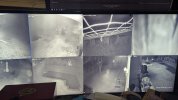
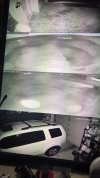
Historically I've run an NVR that just does the recording 24/7, and then have a dedicated PC at my workstation running Smart PSS and more recently DSS Express client. That system has one 'ultra wide' monitor with 8 cameras on it, and another 32" monitor setup in 'portrait' mode (tall rather than wide) with the other 4 cameras on it.

Assuming there is a client, either dedicated app or client mode in the main program, is there the ability to use multiple monitors, and arrange the live cameras on them as desired?

Aside from that the app, while different from PSS or DSS, seems very handy, so I'm hopeful I can make the move and gain some of it's AI functions etc.

Thanks for any thoughts or input!
 
Remote monitoring (remote as in on another PC) of cameras on a Blue Iris installation is usually done through the Blue Iris Web interface, Ui3, which can be accessed through a browser on another PC (or mobile device).
 
I suppose for multiple monitors, you could run two instances of Ui3 (in two browser windows), with different cameras or camera groups configured on each, and then move these browser windows to the desired monitor.
 
  • Like
Reactions: anijet
What part of his response said you can't monitor it full screen on multiple monitors?

BI has way more flexibility in number of cameras to display and what order, etc.
 
Bummer, it seemed like a great product, but If I can't monitor it full screen on multiple monitors it's useless.

Thanks for the response though.

Launch two instances of a web browser
Place one in each monitor (full screen)
Login to BI on each browser

it is quite the USEFUL set-up
 
In another thread Blue Iris was recommended by a couple folks. I installed it on one of my systems and played with it a bit. It's VERY different in interaction from what I'm used to, so I thought I'd ask a couple of quick questions before I commit to it.
I was in your position a couple of years ago, having spent 5+ years with a Dahua NVR, then trying BI. Using BI was HORRIBLE at first. Just about everything you have learned to operate the NVR works against you trying to learn BI. You have to un-learn things first. I view BI with UI3 almost exclusively. At a high level it's the rough equivalent of smartPSS with an NVR. Just as the smartPSS interface and usage is pretty different from the NVR web interface which is different from its direct connect interface, operating UI3 is pretty different than using the native BI interface, and much easier and intuitive IMO. A big difference between BI and NVR is the timeline, which is fixed position with smartPSS/NVR, and moving with BI/UI3. It was hard for me to adapt to this, but now I like it. Once you get past the learning curve (very slow for me), UI3 is more intuitive, easier to use, and faster to use than smartPSS.

I'm not out to knock the smartPSS/NVR combo. The thing I have appreciated the most is the NVR's rock-solid reliability over about 8 years. With BI, you have to give up the blue IVS trip lines, the green object ID boxes, and the red trip indications. I miss these greatly and consider that to be the biggest loss in going to BI. This had led me to keep the NVR going in parallel with BI, selfishly dumping more carbon into the atmosphere. I do almost all of my viewing with BI/UI3. When I need to change settings or debug something I use the native BI interface. When something unusual or borderline happens, I go to smartPSS/NVR to investigate. Sometimes there's an IVS trip with no obvious cause, and the trip lines displayed on smartPSS can usually help discover what happened. On average, I bring up smartPSS maybe once a week for a closer look at something.

On the AI with BI, I tried CPAI and for me it was more trouble than it was worth, with instability of the system and too many incorrect IDs. Others are perfectly happy with it. I'm just giving a heads up that it might not work out as well as you hope for. Hopefully the integrated AI in BI6 will solve any instability issues. I'm letting others be the test pilots. One other point, have you tried smartPSS Lite with the NVR? It's supported and will most likely have the features you need.
 
Launch two instances of a web browser
Place one in each monitor (full screen)
Meaning Just open the browser for each and do an F11 to go full screen? I didn't see nay way in the web client to JUST view cameras without any BI interface stuff...
If so, can I save the two configurations so if I need to restart I can open the browser to the web interface, open a 'view' (or whatever BI calls it) on each? Or would I have to redo each every time I have to restart?
I've attached photos of what my setup looks like now.
Thanks for the suggestion and any additional info you can offer!
 

Attachments

  • 2026-01-08 22.38.05.jpg
    2026-01-08 22.38.05.jpg
    1.1 MB · Views: 9
  • 2026-01-08 22.38.13.jpg
    2026-01-08 22.38.13.jpg
    1.7 MB · Views: 9
Just about everything you have learned to operate the NVR works against you trying to learn BI.
Thant makes a LOT of sense, and actually is encouraging. Again, it seemed that BI was a solid product with a lot of capabilities, but I couldn't make it do simple things. It's actually encouraging to hear the limitation is likely me and not BI!
 
I didn't see nay way in the web client to JUST view cameras without any BI interface stuff...
Append &maximize=1 to the UI3 URL in your browser. This will hide the UI3 controls, just leaving the cameras. The only thing remaining is to fullscreen your actual browser window - usually can be done with F11, if you need it to automatically fullscreen on startup for some reason, you may be able to configure the browser with a special shortcut or kiosk mode.

Simply repeat on another browser window on your second monitor. You can configure camera groups in the local BI console, (E.G half your cams in each group), and set the UI3 instance in each browser window to view different groups.
 
  • Love
Reactions: SpacemanSpiff
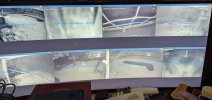
Thank you! is there any way to expand / strech the videos themselves? On the old setup I set the grid, then set the videos to 'fill' the spaces, I didn't see that in BI...

I did find how to create groups and did that, so I'm, getting there!
 

Attachments

  • 2026-01-21 22.08.03.jpg
    2026-01-21 22.08.03.jpg
    1.2 MB · Views: 2
  • Love
Reactions: SpacemanSpiff
Thanks, Yea, desperately need that. Unfortunately I'm a BAD reader and have almost no retention when I read. I found this guy though so I'm watching through this now:

Hopefully that will familiarize me with the majority of functions!