Not obtaining Stream Profiles on Blue Iris from PTZ4E25X-T180

Arjun

IPCT Contributor
Feb 26, 2017
12,077
15,062
The United States of America
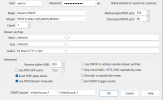
Nothing populates in in the stream profiles after I click on Find/Inspect
This camera has two streams - 1. for Panoramic and 2. for Detail
It is only obtaining Panoramic

1771520413571.png
 
Try this, create a clone of the camera and try setting the CAM# field to 2 and see if the gives you the other camera or just try changing that field in this camera and see if the the other view shows up! not sure if you will need to run the "Discover" again or not!

Also does anything show up when you click the down arrow in either the "Main" or "Sub" boxes
 
  • Like
Reactions: Arjun
Try this, create a clone of the camera and try setting the CAM# field to 2 and see if the gives you the other camera or just try changing that field in this camera and see if the the other view shows up! not sure if you will need to run the "Discover" again or not!

Also does anything show up when you click the down arrow in either the "Main" or "Sub" boxes
Tried that and it did not work. Nothing populates under Main and Sub except for Default - this is odd because I am able to see the other channels on other cameras like the triple lens camera and Dual-boobie cam which work flawlessly
 
Post what shows up in pop up windows when you hit find/inspect.

I suspect it is a ONVIF password issue.
 
  • Like
Reactions: Arjun
Post what shows up in pop up windows when you hit find/inspect.

I suspect it is a ONVIF password issue.
Opening xx.x.x.xxx port 80...
HTTP Get / request...
OK
ONVIF GetSystemDateAndTime
2026-02-19T20:37:52.000Z
Requesting device information...
Invalid response. Is the password correct?
GetCapabilities...
Querying services
Has Imaging services: /onvif/imaging_service
Has media services: /onvif/media_service
Has RTP_RTSP_TCP, requesting profiles
Has Event services: /onvif/event_service
Has WSPullPointSupport
RelayOutputs: 1
InputConnectors: 2
Has Device IO services: /onvif/deviceIO_service
AudioOutputs: 1
Checking for common cameras...
Foscam FI86xx/98xx compatible?
Foscam FI89xx compatible?
Foscam FI9821 V2 compatible?
Foscam FI9821 media port compatible?
Cantonk port 34567?
RTSP port open?
RTSP port detected!
Done


I am getting picture, but only for the panoramic camera, not the detail camera :(
 
Yep it is an ONVIF password issue.

You are either using an account that doesn't have admin rights or something went wonky with your admin account, especially if you changed the password after you initially set it up.

Their are two user and passwords.

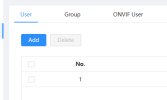
Go to account and go to ONVIF manager and change the admin password to the current password, or create a new user and password.
 
  • Like
Reactions: Arjun and Bruce_H
Its all good now. I changed the password and added / removed the admin account again in both User and most importantly ONVIF User. Added the camera 2 separate times to Blue Iris to enable both streams (Panoramic and Detail). Thanks again :D
1771536312581.png
 
  • Like
Reactions: Bruce_H