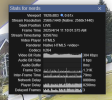
Yup, the bottom left of UI3's video player is the mute button and volume slider. UI3's audio is muted by default, partly because web browsers really hate it when a web page tries to play audio without the user interacting with the page first. When audio is muted, UI3 doesn't stream it at all, to save bandwidth, therefore you see flatline graphs for audio in the "Stats for nerds" panel.
Some other (less common) issues that can prevent audio playback in UI3 are:
1. The
Blue Iris user account not having Audio permission
2. The camera in Blue Iris having "Webcast audio" disabled (camera properties > Audio tab).
3. UI3 being configured to use a "Jpeg" streaming quality.
4. If the audio icon in the bottom left of UI3 is red colored, that means it is waiting for user interaction before the web browser will allow it to play audio.
Yup, the bottom left of UI3's video player is the mute button and volume slider. UI3's audio is muted by default, partly because web browsers really hate it when a web page tries to play audio without the user interacting with the page first. When audio is muted, UI3 doesn't stream it at all, to save bandwidth, therefore you see flatline graphs for audio in the "Stats for nerds" panel.
Some other (less common) issues that can prevent audio playback in UI3 are:
1. The Blue Iris user account not having Audio permission
2. The camera in Blue Iris having "Webcast audio" disabled (camera properties > Audio tab).
3. UI3 being configured to use a "Jpeg" streaming quality.
4. If the audio icon in the bottom left of UI3 is red colored, that means it is waiting for user interaction before the web browser will allow it to play audio.
Thank you!!! My user account didn’t have audio checked. I’ve been messing around with audio settings in camera and BI for hours. What an easy/silly solution.