New CodeProject.AI Object Detection (YOLO11 .NET) Module

Hoping someone running the YOLO11 .NET stack can spot what I'm missing. My plate detection works perfectly but the ALPR OCR read never gets called, so I never get plate numbers.


Setup:


  • CodeProject.AI Server 2.9.5
  • Object Detection (YOLO11 .NET) 1.4.0
  • License Plate Recognition (YOLO11 .NET) 1.1.1
  • Blue Iris (current)
  • GTX 1070, DirectML — both modules confirmed running on GPU
  • ALPR set to "This AI server" (NOT Plate Recognizer cloud)

What works:


  • Feeding a plate image directly into CodeProject.AI Explorer → License Plate Recognition reads it correctly (e.g. "BSV7099" at 96%). So the ALPR module itself works.
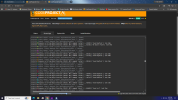
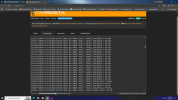
  • In Blue Iris, using custom model license-plate-v5, an ROI zone, detection is solid: CPAI logs show Object Detection (YOLO11 .NET) command 'custom' ['Found DayPlate'] reliably, fast (30-50ms), often 90%+ confidence.

The problem:


  • After "Found DayPlate," the alpr command never fires. There is no License Plate Recognition ... command 'alpr' line in the CPAI logs on live triggers — only the custom/DayPlate detection. So the plate location is found, but it's never sent to the ALPR reader for OCR. HA/webhook gets an empty plate every time.

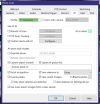
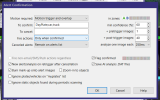
Relevant BI AI settings:


  • "Confirm alerts with AI" ✓
  • Custom object models: license-plate-v5 ✓
  • "License plates" ✓
  • "To confirm": DayPlate,NightPlate,car,truck
  • Default object detection ✓

Screenshot (128).pngScreenshot (129).pngScreenshot (130).pngScreenshot (131).pngScreenshot (132).pngWith the YOLO11 .NET ObjectDetection + ALPR modules, what actually triggers the ALPR read after a DayPlate detection? What BI setting bridges "found the plate location" → "run ALPR OCR on it"? Detection is clearly working; the OCR call just never happens.


Thanks!
 
  • Like
Reactions: Flintstone61
Yeah, I haven't figured that out either. But i am on Yolo10....
But I did not dig deep. If I really need the plate for a LEO i can scroll back and get it for up to 3-4 weeks.
I see in my AI object inspector on the clips playback it will populate a plate # if it get's a semi-decent read on it.
I'd need a larger %age of the total cam image to help it get a higher %age of plates.
Been quiet over here this year.
The Drug heads associated with the Apartments haven't been parking on our side of the street.
Haven't seen as much of the 1 man Crack/meth parties much since we got the back yard light.
I may be too much of a fossil to work out the ALPR.
I'm looking at your settings and adopting a couple things
I can't remember how to bring in yolo11 from yolo10....
 
Last edited:
Yeah, I haven't figured that out either. But i am on Yolo10....
But I did not dig deep. If I really need the plate for a LEO i can scroll back and get it for up to 3-4 weeks.
I see in my AI object inspector on the clips playback it will populate a plate # if it get's a semi-decent read on it.
I'd need a larger %age of the total cam image to help it get a higher %age of plates.
Been quiet over here this year.
The Drug heads associated with the Apartments haven't been parking on our side of the street.
Haven't seen as much of the 1 man Crack/meth parties much since we got the back yard light.
I may be too much of a fossil to work out the ALPR.
I'm looking at your settings and adopting a couple things
I can't remember how to bring in yolo11 from yolo10....
I just followed what I seen in the first screenshot of this entire thread
 
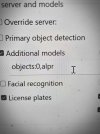
Tried objects:0,alpr but it stopped detecting anything, not even the car. Do you have Default/Primary object detection checked or unchecked? And what's in your Custom object models field vs the additional models field? Want to match your exact setup — I'm on the YOLO11 .NET ObjectDetection + ALPR modules.
 
  • Like
Reactions: Flintstone61
Tried objects:0,alpr but it stopped detecting anything, not even the car. What's in your Custom object models field vs the additional models field? Want to match your exact setup — I'm on the YOLO11 .NET ObjectDetection + ALPR modules.
 
Blue Iris only hands off the cropped bounding box to the CPAI ALPR/OCR engine if the detected label matches its internal keyword — which is strictly plate or license plate. When your custom model returns DayPlate, BI just sees it as a generic confirmed custom object and stops there without invoking the secondary /v1/vision/alpr endpoint.

To get the full detection -> OCR chain working:

  1. Camera AI Settings -> Custom models: Set this to your plate detector (e.g. license-plate-v5 or alpr).
  2. To confirm: Change DayPlate, NightPlate to just plate, car, truck (or map your custom model labels to output standard plate if you trained it yourself).
  3. Check "License plates": Ensure the dedicated "License plates" checkbox is ticked in the AI tab and set to use local CodeProject.AI.
Once BI gets an object identified specifically as plate, you'll immediately see the secondary alpr OCR command fire in the CPAI server log.
 
  • Like
Reactions: iwanttosee