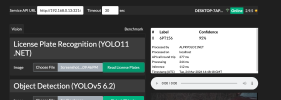
New CodeProject.AI License Plate Recognition (YOLO11) Module

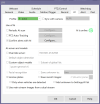
By main AI, do you mean these, View attachment 233084
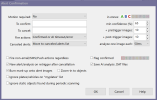
These setting look good, post the camera AI settings like the setting in the below post

 
These setting look good, post the camera AI settings like the setting in the below post

i'm pretty sure i've tried these ai tab settings.. one question, shouldnt save recent images be set to a folder? what does this plugin do when it grabs a plate otherwise? what should be occurring if its working?
 
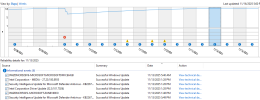
Mike, I didn't notice anything unusual, there were 2 Intel driver updates, one of them appear to be a video driver update based on the version numbering--but the running system currently shows an older
driver (32.0.101.6881) vs the updated one in system history (32.0.101.7026). It's been working fine since. Maybe it's just a Window's thing.

Thanks!

View attachment 232686View attachment 232687

Mike,

It crashed again today. Looks like it's triggered by windows update, one of these 3 components:
Screenshot from 2025-11-25 17-16-14.png

Is anyone else getting these updates and survive them?

Thanks
 
Mike,

It crashed again today. Looks like it's triggered by windows update, one of these 3 components:
View attachment 233161

Is anyone else getting these updates and survive them?

Thanks
It looks like the iGPU driver was updated, my new modules use the DirectML which is part of the iGPU driver. There is nothing to stop the crash if the driver is updated.
 
isnt part of the setup to make this work, setting the alert to not just goto the database but also to a jpg? (i've done that and followed the screen shots for each section but i end up with nothing, if i turn back on custom objects and set things the way i had them, i get a car/plate every single time as an alert just not with the plate letters and numbers in the border square)
 
It looks like the iGPU driver was updated, my new modules use the DirectML which is part of the iGPU driver. There is nothing to stop the crash if the driver is updated.

Maybe it's a failed update? Because it's the same driver version as the last time.

Screenshot from 2025-11-16 18-14-41.png
 
A small note for those who upgraded already to V6 . It seems that the new BI calls /v1/image/alpr, not /v1/vision/alpr ... so be advised. Just set the correct route inside the module settings, or ALPR won't work.
 
A small note for those who upgraded already to V6 . It seems that the new BI calls /v1/image/alpr, not /v1/vision/alpr ... so be advised. Just set the correct route inside the module settings, or ALPR won't work.
Not sure which module settings you are referring to, but I didn't change anything and mine is still working with V6.
 
  • Like
Reactions: Skinny1
Not sure which module settings you are referring to, but I didn't change anything and mine is still working with V6.
I've changed the module settings.json in this section :
"RouteMaps": [
{
"Name": "License Plate Recognition (YOLO11 .NET)",
"Route": "image/alpr",
"Method": "POST",

I've used WireShark to capture the BI API call to CPAI and found out that BI was calling image/alpr (that resulted in a 404 error) , while the explorer was calling vision/alpr (that was working) .
 
Before I reverted back to the older versions. I did just as you describe. I can try it once again, but there is no reason to suggest that it would start working now.
Happy New Year.

Not sure if you got problem resolved. I had exactly the same issue (no trigger from CPAI, but OK manually), and got it fixed with steps below:

  1. Uninstall CPAI.
  2. Removed both CodeProject folders in “Program Files” and “ProgramData” (this folder is hidden).
  3. Reinstall CPAI with ALPR 3.3.4 and Object Detection YOLOv5.6.2
  4. Confirm CPAI is running.
  5. Stop CPAI service.
  6. Copy new app settings.json.
  7. Restart CPAI service.
  8. Stop ALPR 3.3.4 and Object Detection YOLOv5.6.2.
  9. Install LPR YOLO11.NET.
  10. Install Object Detection YOLO11.NET (Optional).
I think step 3 is important. I had installed CPAI with no module prior to copy new json file, and BI could not trigger CPAI.
 
  • Like
Reactions: PeteJ
I just released Version 1.0.4, this version uses the original v1.0.0 way of initializing the models using default GPU Device ID 0. One addition is now you can also manually select the GPU Device ID as before v1.0.0 was fixed to GPU Device ID 0.
If the GPU does not initialize due to incorrect GPU Device ID it should automatically fallback to CPU. Check Task Manager and lookup you GPU ID and then go to CodeProject.AI Dashboard and under GPU Device Selection select the correct GPU Device ID

GPU initialized correctly and is using the GPU
View attachment 230593
View attachment 230594

GPU did not initialized correctly and is using the CPU
View attachment 230595
View attachment 230596
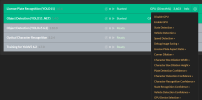
Hi Mike, 1.0.4 version is working fantastic. Tested with License plates (during day and night). i am not able to enable/disable few features like debug vehicle detect, etc. was trying to use without object detection module

1770047258993.png