
New Amcrest AD410 doorbell Cam Review
- Thread starter concord
- Start date

You are using an out of date browser. It may not display this or other websites correctly.
You should upgrade or use an alternative browser.
You should upgrade or use an alternative browser.

flynreelow
Known around here
- Dec 12, 2016
- 1,710
- 1,593
if not the app, try a computer.I can't find that option on the app.
dont really remember where i turned those on at.
flynreelow
Known around here
- Dec 12, 2016
- 1,710
- 1,593
I can ping the doorbell, but it won't open on a browser.
How to Initially Set up Doorbell PoE via Reolink Client
If you want to initially set up your Doorbell PoE camera via Reolink Client, please scroll down for a step-by-step guide. Ste...
 support.reolink.com

flynreelow
Known around here
- Dec 12, 2016
- 1,710
- 1,593
Mine is not POE though.. does that matter?
oh
not sure about that.
maybe someone else can chime in
Got it!.. thanks man! - yeah, I had to download that Reolink software and enable the settings through it.
So far, I gotta say I'm pretty impressed with the quality of this doorbell. Hands down a major upgrade from the Amcrest AD410. I hope this one lasts and doesn't give issues haha.
flynreelow
Known around here
- Dec 12, 2016
- 1,710
- 1,593
it's the best on the market.So far, I gotta say I'm pretty impressed with the quality of this doorbell. Hands down a major upgrade from the Amcrest AD410. I hope this one lasts and doesn't give issues haha.
Spoke too soon lol.
I notice if I block internet access the doorbell, it drops connection altogether and won’t reconnect to the router.
As soon as I enable internet access it stays connected .
.
It seems this doorbell doesn’t work when blocking internet access….that’s a shame!
I notice if I block internet access the doorbell, it drops connection altogether and won’t reconnect to the router.
As soon as I enable internet access it stays connected
.It seems this doorbell doesn’t work when blocking internet access….that’s a shame!
Anyone have any tips for improving image quality on this doorbell camera? Can't tell if my lens is going bad from a couple of years of sun exposure or what, but the picture is grainy both during the day and at night (though it was never really a great picture to begin with). At night, in particular, it's basically unusable. Could be because of IR reflections and ambient lighting (those are Christmas lights on house across the street) which isn't helping. I have both mounts in play to point it right and downwards, and it might benefit from some additional downward direction as well. Thanks.
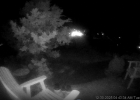
Maybe sun exposure or you had a bad lens from the start. Mine is protected by a large awning has always been quite clear both day and night. I have an IP cam facing it too with IR on, and the IR light appears as a bright spot, but doesn't wash out the image or cause reflections.
tech_junkie
Getting comfortable
I would download a wifi survey app and look for a better RF channel on the wifi access point. sometimes adjusting the sensitivity helps here tooAnyone have any tips for improving image quality on this doorbell camera? Can't tell if my lens is going bad from a couple of years of sun exposure or what, but the picture is grainy both during the day and at night (though it was never really a great picture to begin with). At night, in particular, it's basically unusable. Could be because of IR reflections and ambient lighting (those are Christmas lights on house across the street) which isn't helping. I have both mounts in play to point it right and downwards, and it might benefit from some additional downward direction as well. Thanks.
View attachment 235330