Need help with new networks install.

dudemaar

Known around here
Aug 18, 2018
1,364
2,886
Canada
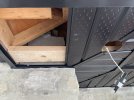
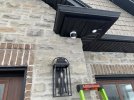
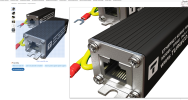
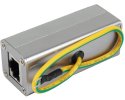
Good morning. I am looking for some advise on some equipment for a new network I have to setup at a friends place. They just built a new home and need to run the existing 6 cameras from the shop over to new home (where a new NVR will be installed) and also the star link internet from the shop to the new house. The house is 300 ft away and they did bury a 2 inch conduit underground between both buildings. I was thinking of running fibre but I am not very experienced with it. Otherwise I would 1. Simply just pull 2 x cat6 shielded w/(Ethernet Surge Protectors x 4). 1 x POE switch for cameras in shop.
one for internet and one for cameras. Or 2. Run the fibre and simply just add the cameras to the Starlink internet switch in the shop already. or 3. Run a fibre line and purchase some managed POE Multi-wan switches and create a Vlan for both networks, which I have not done before, but willing to learn.

This is the New 2026 model NVR I have ordered from Andy.

Here is what I found on Amazon that might help me with my fibre run.
cable - 328ft pre terminated outdoor.

Managed Switch which I can create a Vlan. I am assuming would need two of these switches??


Any help or advise would be greatly appreciated. Thanks!
 
I’d just run the fiber if not just for bandwidth but also if lighting struck the shop. And if this is just their man cave and not a commercial business with employees and clients accessing the network I wouldn’t bother with further complicating the network.

I’d also consider the length of the conduit, is it exactly 300’? What about vertical rise to demarc location? And don’t forget your sfp modules.
 
If the shop has power, I would 100% recommend running fiber. This is because it will completely remove the potential for electrical surges (usually from nearby lightning) from traveling through the network connection between the two buildings. If you run copper, you really need to properly ground everything which is actually much harder to do correctly than simply running fiber. Fiber is also immune to outside interference, so if the conduit is run close to the high voltage power supply to the garage for example, the fiber won't experience any interference problems that a copper cable might have.

You can buy premade fiber cables in any length - including custom lengths. Buying premade means you don't have to terminate the fiber which is hard to do and takes specialized equipment. Premade for the win! At this distance, I would suggest using "multimode" fiber instead of "single mode" fiber. OM3 grade multimode fiber supports 10gb out to 300m and 40gb out to 100m. This is probably good enough for this situation, but the OM4 grade multimode fiber support 10gb out to 550m and 40gb out to 150m. You all can decide if the higher spec cable is worth the extra cost (350' of OM3 is less than $100 while 350' of OM4 runs about $170 - see links below). Once you decide on the "grade" of fiber being used, you have to decide what type of connectors you want to use. I would suggest using "LC" connectors for this use case because they are going to be the most popular choice. You want "LC/LC" cable which means there is an LC connector on each end of the cable.

Given this, I would suggest purchasing a simple LC/LC OM3 (or OM4) premade cable and adding a multimode fiber converter box with SPF+ transceivers at each end. (Just make sure the SFP+ transceivers are multimode and use LC connectors). Then you just need to add a network switch on the garage side to "breakout" the connection to multiple devices. (If your network switches support SFP+ ports, then you don't even need the fiber converter boxes. Just plug the SFP+ transceivers directly into the switches). Given that there is conduit installed, I would feel comfortable only putting one fiber cable in. It should work reliably for a long time and if it gets damaged it wouldn't be hard to replace it. Therefore I don't see a need to purchase/install more than one fiber cable at this time.

I've always bought my fiber from FS and had great experiences with them. While I have never called them, I believe they are very helpful if you want to call to get advice on the situation as well. They might have a different/better solution than mine.
OM3 - OM4 -
Here is an example of a fiber converter. Just note that I don't have any experience with those myself (my switches have SFP+ ports) so I can't speak to the reliability of that unit. Just note that this particular converter don't support speeds faster than 10/100/1000. If you want faster speeds, you are going to have to spend a little more money on the converters.
Be aware, this listing has both multimode and single mode converters, so make sure you pick the multimode one.

Ultimately, this is what the end result will look like - except you will likely have a network switch at both ends (this picture shows a network switch at one end and a computer at the other).


61j7vPX8pnL._AC_SL1500_.jpg


As far as your network switch question, if you want to run VLANs, then yes both switches are going to need to support VLANs. If you are going to have to purchase switches anyway, I would suggest looking at used enterprise quality network switches. Personally I use several of the Brocade ICX-7250 48 port POE switches currently. They can easily be found for less than $100 used on EBay and they would do everything you could ever want. They also have 8 SFP+ ports, so you wouldn't even need the fiber converter boxes and would allow a 10gb fiber trunk line between the two switches to ensure there is plenty of bandwidth between the switches (which is a bottleneck). The Brocade switches support just about any brand of SFP+ transceivers (some switches are picky about transceiver brands), which means you can get cheap used SFP+ LC transceivers on EBay as well (less than $10 each usually). Here is a great thread on the ServeTheHome forum that will tell you everything you need to know about those switches, included a guide on how to update them and set them up. Brocade ICX Series (cheap & powerful 10gbE/40gbE switching). Just note that that thread is old enough that most people where using the ICX-6xxx series switches in the beginning of the thread because the ICX-7xxx series switches were still relatively expensive at that time. However the price of the 7xxx switches has dropped so much now that I would definitely suggest using the 7xxx series switches and the last 1/3 of the thread will show a shift to the 7xxx models.

Honestly it would be pretty easy to purchase two used network switches, two SFP+ transceivers, and the OM3 fiber cable with a total cost around $400 for all of it. (PS - if it's not clear, I would replace the whatever existing network switch they are currently using with one of the Brocade switches).
 
Last edited:
As an Amazon Associate IPCamTalk earns from qualifying purchases.
  • Like
Reactions: dudemaar and TonyR
@dudemaar the TP-Link managed switch you linked is in fact designed to be a router, and is overpriced for what you need.

I agree with @The Automation Guy that you can get cheaper cable. Though it doesn't really matter if it is single mode or multi mode fiber, just get whichever is cheaper in my opinion between OM3/OM4 (multi-mode) or OS2 (single-mode). In my experience single mode fiber is actually cheaper most of the time. Then match the fiber type with the transceiver type. SFP+ transceivers of either type can be found for $10 or less on ebay especially if you buy a pack of several of them.

I don't really know how much benefit there is to using outdoor rated cable, because as was pointed out, regular indoor patch cables are a lot cheaper. If you buy an option that doesn't come with a pulling eye you can always get that separately: Amazon.ca : fiber pulling eye

I'll also point out, fs.com has options with more than 2 fibers so you have spares in the same cable in case you happen to damage one. Most network connections require 2 fibers although some transceivers can operate with only 1 fiber.

4 fiber OS2 indoor rated: 4 fiber OS2 outdoor rated costs about double:
Either of those would work fine. You just want connectors to be LC UPC (UPC stands for un-angled connector. APC stands for angled connector and you don't want that). They can be simplex or duplex. Duplex is just simplex with an extra bit of connecting plastic holding them together which is entirely optional.

Those brocade switches are great I'm sure but also maybe overkill, e.g. too many ports, higher than necessary baseline power consumption.

If you'll already have any ubiquiti unifi setup there, they have plenty of switch models available that will integrate perfectly with the unifi interface. They have PoE and non-PoE versions with SFP+ slots.

It is hard to beat ubiquiti's administration interface, although TP-Link omada is a near clone of their interface at least as far as wifi.

If you want to pinch pennies there are a bunch of Chinese brands selling managed switches with 1-2 SFP+ interfaces.
The interfaces may suck but once you get the vlan setup working that shouldn't matter much.
 
  • Like
Reactions: dudemaar
Adding to the above wise suggestions...
If you decide to pull fiber, ALSO pull copper and ALSO a pull string for future use.
The copper could be used to install PIR alarm boxes, DC related objects (IR blaster, 24vdc LED lighting, etc). Also could be backup to the fiber.
Heck, I would still pull 4 or 6 Cat6 cables, a couple 18/2's for alarm sensors, a couple 22/4's for alarm wire pads, a couple SHIELDED 18/2's for audio speakers....for future proofing.
Granted, I personally have access to all that cable so I would go total HAM on pulling all sorts of different cables.
At minimum, run a pull string with your fiber.
 
  • Like
Reactions: dudemaar
At minimum, run a pull string with your fiber.
If this were my install, that ^^^ would be all I'd pull in with the fiber.....mainly because where I live the nearby lightning strikes set off car alarms and knock pictures off the wall. :cool:
 
If this were my install, that ^^^ would be all I'd pull in with the fiber.....mainly because where I live the nearby lightning strikes set off car alarms and knock pictures off the wall. :cool:
Just hook up some shielded underground Cat6 to your Tesla Wall battery and whalla :)
 
f you want to pinch pennies there are a bunch of Chinese brands selling managed switches with 1-2 SFP+ interfaces.
https://www.amazon.ca/s?k=managed+2.5+Gbps+PoE%2B+switch The interfaces may suck but once you get the vlan setup working that shouldn't matter much.
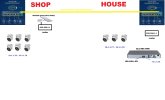
I have used these cheaper switches a few times on various projects, heck I even have one here at my place powering some cameras. I seen this YuanLey 11 Port Gigabit PoE Switch on the link you posted, but not quite sure if it would work ? says its capable of vlan. I have included a map below of what I want to do, I just cant connect the dots for the 2 separate networks both going into this switch. I like to segregate the cameras from the internet, as I always read this here on ipcamtalk as best practice. Thanks !
 

Attachments

  • dudesnetwork.jpg
    dudesnetwork.jpg
    194.3 KB · Views: 4
I have used these cheaper switches a few times on various projects, heck I even have one here at my place powering some cameras. I seen this YuanLey 11 Port Gigabit PoE Switch on the link you posted, but not quite sure if it would work ? says its capable of vlan. I have included a map below of what I want to do, I just cant connect the dots for the 2 separate networks both going into this switch. I like to segregate the cameras from the internet, as I always read this here on ipcamtalk as best practice. Thanks !

That switch won't do what you want. The thing it is calling "VLAN isolation" is just isolating the PoE ports from each other. That behavior is not useless, but it isn't really what you are looking for here.

To do VLANs, you need managed switches that support the VLAN standard IEEE 802.1Q. Most "web managed" switches support this. It is complicated to wrap your head around though, and it doesn't help that every brand handles the configuration interface for VLANs differently so there is no one-size-fits-all guide. It always takes me a bit of trial and error to get VLANs working the way I intend.

The default VLAN ID is typically 1 so that would be your regular LAN with internet access. Then you pick another number, lets say 2, to be your camera VLAN. You have your two managed switches connected to each other, and configured so the ports that connect the switches to each other are passing "tagged" traffic for VLANs 1 and 2. Then when you plug a camera or NVR into one of the ports, you configure that port to be "untagged" using VLAN 2. The ports that should be part of your regular LAN should be "untagged" using VLAN 1, which should typically be their default configuration.

Things of course get complicated when you want to remotely view the cameras, because your NVR will not be on the same network as your other computers and your wifi access point, etc, unless the NVR has a second network interface for that purpose that you connect to VLAN 1. If you only have one network interface on the NVR, then you need to have a router that routes between the two networks, and that means stuff just got even more complicated. Of course none of this complexity is the VLAN's fault, it is just the reality of having an isolated camera network whether you used VLANs to achieve it or just physically separate network switches.


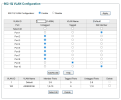
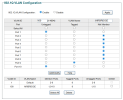
Here's an example of my VLAN configuration in a TP-Link managed switch (TL-SG1210MPE).

I used VLAN IDs 1 and 100.

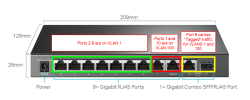
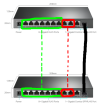
First, a picture showing the goal as simply as I can.

1764911619737.png
Ports 2-8 are outlined in green. These are effectively "assigned to VLAN 1".

Port 1 and Uplink 2 (a.k.a. Port 10) are outlined in red. These are "assigned to VLAN 100".

Devices plugged into the red or green ports are not VLAN-aware.

The yellow ports are a combo/shared (only the RJ45 or SFP can work at a time). These ports are together known as Uplink 1 a.k.a. Port 9. It carries traffic for both VLANs 1 and 100 by tagging each packet with its VLAN number. The switch at the other end of port 9 is configured the same way, to accept VLAN 1 and 100 tagged traffic.

Now the configuration that makes this work.

It is complex, I know.

1764911376261.png1764911384233.png
 
Last edited:
Now if you were to get two of these switches and configure them both identically (for simplicity's sake) as I showed above, then you could connect them to each other via their SFP ports.

And in doing so, you would be linking the green ports to the green ports, and the red ports to the red ports, all with just one physical link between the switches.


1764913041396.png

Does that make sense?