


Purchased BI a month ago but had been playing with the demo version for a year. This software is amazing. Stumbled across your forums and saw talk of ui3. I am interested in seeing my cams from other devices in my home. When I go to to that web interface from another PC in my house, I can only see one of my cams at a time in live view. Would like to see my layout of cameras at one time. Am I missing a setting?
Multiple Cam view on ui3?
- Thread starter VideoGiz
- Start date
You are using an out of date browser. It may not display this or other websites correctly.
You should upgrade or use an alternative browser.
You should upgrade or use an alternative browser.

Welcome!
If you have tapped a camera, it will show only that camera. Tapping in the image should return you to the multi-cam view.
Unless of course you have gone crazy with the setup and developed groups and are only showing a group with one camera.
Some screenshots of what you are seeing would be good to help diagnose if something else is going on if the above doesn't show them.
If you have tapped a camera, it will show only that camera. Tapping in the image should return you to the multi-cam view.
Unless of course you have gone crazy with the setup and developed groups and are only showing a group with one camera.
Some screenshots of what you are seeing would be good to help diagnose if something else is going on if the above doesn't show them.

In UI3 in the upper left corner, choose the 'All cameras' group in 'Filter by:' BI makes a group called 'All cameras'. You can make different groups in BI to display in this filter. Cameras can be members of multiple groups.

Mine doesn't look the same. I go to 192.168.1.160:81 and it brings up
I have tried 192.168.1.160/ui3 and it can't find it.
I have tried 192.168.1.160/ui3 and it can't find it.
Attachments
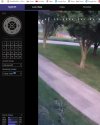

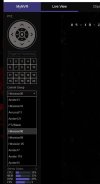
So you did as I mentioned above and went all crazy with groups lol
You put each camera in there own individual group, so it will only show that camera.
Create another group called "All Cams" and add every camera to that group and when you select the All Cams group then they all will show.
Or delete all the groups unless you need each camera in its own separate group.
You put each camera in there own individual group, so it will only show that camera.
Create another group called "All Cams" and add every camera to that group and when you select the All Cams group then they all will show.
Or delete all the groups unless you need each camera in its own separate group.
OK, you are in Live View, I was in Clips.
Go to BI and make an All Cams group. Then add each cam to that group. Open up the settings for a cam, any cam. See below:


Go to BI and make an All Cams group. Then add each cam to that group. Open up the settings for a cam, any cam. See below: