Mobile App connectivity (unable to connect / Reason: Unable to reach server)

Thank you. Driving me nuts. EERO is in bridge mode so theoretically same as router. But just in case wrong I directly connected the BI CPU to the ASUS router.
I can access BI CPU using UI3 from other computers on the network and phones on wifi. And I can access via BI app on android as well from within home network.
Asus does have wifi enabled. everything else working just fine off of it.
Web server tab photo pasted below.
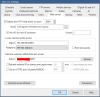
Capture.PNG
 
in the BI app on your phone what is the LAN address ? It should be 192.68.50.5:8081
What is the WAN address, it should be blank or the same at the LAN address.

You start the BI app after your connect with OpenVPN.
 
  • Like
Reactions: sebastiantombs
LAN and WAN are the same. When on home network I can access BI no problem.
Does it have to do with some block at the router level that it doesn't know how to fund / talk to the BI CPU?
ie do I need to wire 192.68.50.1 (the router) to 192.68.50.5 (the BI CPU)?
thank you, I appreciate it
 

Attachments

  • Screenshot_20211020-220916_Blue Iris.jpg
    Screenshot_20211020-220916_Blue Iris.jpg
    176.1 KB · Views: 6
  • Screenshot_20211020-220745_Blue Iris.jpg
    Screenshot_20211020-220745_Blue Iris.jpg
    185.7 KB · Views: 6
How come I can't connect to my BI server on the android app when using HTTPS but can on HTTP? I can type in the server IP:port on a browser and it works fine. But I cannot use HTTPS to connect using the mobile app
 
How come I can't connect to my BI server on the android app when using HTTPS but can on HTTP? I can type in the server IP:port on a browser and it works fine. But I cannot use HTTPS to connect using the mobile app

It has to do with you needing to create a certificate. It has shown to also wreak havoc in other areas. But it is a false sense of security. A VPN is the most secure way.
 
Thank you. Driving me nuts. EERO is in bridge mode so theoretically same as router. But just in case wrong I directly connected the BI CPU to the ASUS router.
I can access BI CPU using UI3 from other computers on the network and phones on wifi. And I can access via BI app on android app as well from within home network.
Asus does have wifi enabled. everything else working just fine off of it.
Web server tab photo pasted below.
View attachment 105531
Since local access is working, the Blue Iris server itself looks fine. I’d check the ASUS router’s port forwarding and make sure the forwarded port matches the port shown in the Blue Iris Web Server settings, then test using your external/public IP from outside the home network.