


The unintialized camera is not always at 192.168.1.108.
DHCP gets re-enabled in there and it can be handed a LAN address and the will cam will take it.
I swear I've re-enabled screwed up cameras several different ways, Quite often having a Dahua or Amcrest NVR laying around can give you other options in Device search. It will see Uninitialized cams IP addresses, Sometimes being on 192.168.0.xxx, The NVR or the camera, will allow an IP address of 192.168.0.108.
I attack it with everything.

For example my AD-110 doorbell does not hold a static IP address, After a power interruption it becomes the mystery Cam.
so I just open Config tool and it shows me what IP cams are on the LAN ( Not Tapo C121's though) grrr.
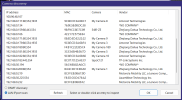
If I don't see in the list, I can run Advanced IP Scanner ( see result below)
It shows the IP address of the Tapo, but doesn't display the name.
I can do a "find inspect" with no IP address in BI, and let it display another set of results and I can compare the findings,
And in that list I can see the Tapo trying to hide out at ...183 and get it back online or add it to BI...etc..


DHCP gets re-enabled in there and it can be handed a LAN address and the will cam will take it.
I swear I've re-enabled screwed up cameras several different ways, Quite often having a Dahua or Amcrest NVR laying around can give you other options in Device search. It will see Uninitialized cams IP addresses, Sometimes being on 192.168.0.xxx, The NVR or the camera, will allow an IP address of 192.168.0.108.
I attack it with everything.
For example my AD-110 doorbell does not hold a static IP address, After a power interruption it becomes the mystery Cam.
so I just open Config tool and it shows me what IP cams are on the LAN ( Not Tapo C121's though) grrr.
If I don't see in the list, I can run Advanced IP Scanner ( see result below)
It shows the IP address of the Tapo, but doesn't display the name.
I can do a "find inspect" with no IP address in BI, and let it display another set of results and I can compare the findings,
And in that list I can see the Tapo trying to hide out at ...183 and get it back online or add it to BI...etc..
Attachments
Last edited:


