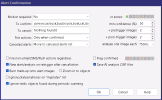
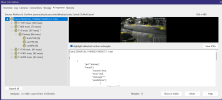
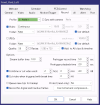
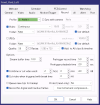
I am using the latest version 6.0.1.28 with build in AI. I found out at night, it is missing Alert with person triggers motion. It is working in day time. Checking on the log, I found following message when motion with person is detected. I don't understand what it means "occupied" and why the alert is cancelled. It is clearly a person in triggered image. Below is the AI setting for the camera.
I am using the latest version 6.0.1.28 with build in AI. I found out at night, it is missing Alert with person triggers motion. It is working in day time. Checking on the log, I found following message when motion with person is detected. I don't understand what it means "occupied" and why the alert is cancelled. It is clearly a person in triggered image. Below is the AI setting for the camera.
It means that an alert was triggered (perhaps a cam trigger) then the event was run though AI but AI did not find anything meeting the requirements you set. For example, it's possible that AI only had a 45% confidence that the object was something you wanted flagged and alerted but you have the minimum threshhold set to 50%.
It means that an alert was triggered (perhaps a cam trigger) then the event was run though AI but AI did not find anything meeting the requirements you set. For example, it's possible that AI only had a 45% confidence that the object was something you wanted flagged and alerted but you have the minimum threshhold set to 50%.
Thank you for the debug steps. I think I may find out what is going on. This is not related to confidence percentage.
I have two cameras overlapping on one area that has motion triggered. When one person enters and triggers alert, camera 1 detects motion and AI recognizes person correctly. I think camera 2 detects the motion (Based on snapshot of alert image) at the same with different view angle. By looking at AI inspector on camera2, it seems all 5 images sent to AI were x seconds behind initial time motion was triggered. Therefore, AI detects no person in these images since person already moved outside camera2. I suspect that the delay may caused by AI was busying processing Camera 1 at that time since both cameras should be triggered by same person. After AI is done with Camera1 and move on to Camera2, all images were already delayed and not showing a person in the images.
Now to fix the delay issue, does it help to increase Stream buffer time?
Have you taken the time to read the help for this screen
The Stream Buffer Time info says this
The Stream buffer time is actually an encoded video buffer when used in conjunction with
direct-to-disk recording. For the proper operation of recording and many other functions
(pretrigger images, snapshots, AI), this buffer must always contain at least one key frame
(full image) from each stream. Given that most cameras send a key frame each 1-4 seconds,
a minimum of 5.0 seconds of buffering is enforced. You will need to increase this buffer size
if your camera has a key frame rate of less than 0.25 fps. Without a network camera or
without direct-to-disk recording, this buffer will contain raw RGB bitmaps, so will be
limited to 1.0 seconds to conserve system resources.
I think I may found a bug on Camera or Blue Iris The problem is discrepancy between main stream and sub stream. When I replayed the alert video, I noticed the main stream is 30 seconds behind substream based on both time stamps from camera and blue Iris added to video. And I selected AI to use main stream images from a dual-system. By the default, the option is off. I don't know why there is a discrepancy between main stream and sub stream. I also checked on other cameras. It seems only two Reolink Dual Camera have this problem. Main and sub stream are 8-30 seconds apart. Use substream for AI detection solved problem.