

All of my cameras that run on sub stream can't seem to display main stream when I solo the camera anymore. It used to work but sometime in the past few months it stopped and I'm not sure if it was an update or not. I'm on 5.9.9.98 but it happens on 5.9.9.73, too. All of my cameras are Empiretech - Dahua equivalents. The thing is, the main stream DOES work. When an event triggers, I can see the full quality mainstream in the video playback in Blue Iris. I have 2 cameras running on continuous main stream and those work fine. If I swap my sub stream cameras to continuous main stream only they fail to connect. When I click to solo the cameras, about the same amount of time it takes for main stream to normally toggle, a warning icon shows and when I check settings on the camera with the warning icon it says to Check FPS and key rates. If I toggle OFF "Main stream when solo/full screen" and then solo a camera, the warning doesn't occur. I can also see main stream as normal in the camera UI. Any ideas? I feel like I've monkeyed with so many settings in BI and camera UI and nothing. It definitely used to work, I just can't remember when it stopped - i solo the cameras when I'm near my pc and see someone walking up and always would see the quality switch within 1-2 seconds. That no longer occurs.
If I use one of the cameras, in BI it says this:
Check FPS and key rates
Main stream
3.7MP, 13.98/0.01 fps, 1050.0 kB/s
Sub stream
0.4MP, 12.06/1.00 fps, 102.1 kB/s
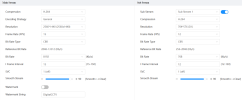
In the camera UI, the encode for main/sub stream is:
If I use one of the cameras, in BI it says this:
Check FPS and key rates
Main stream
3.7MP, 13.98/0.01 fps, 1050.0 kB/s
Sub stream
0.4MP, 12.06/1.00 fps, 102.1 kB/s
In the camera UI, the encode for main/sub stream is:

