Keyboard shortcut to open Alert .jpg image?

105437

BIT Beta Team
Jun 8, 2015
2,229
1,087
As the subject says, I'm looking to find this out. I use the double-click with the Control key to see the AI .dat file info, but easily/quickly opening the Alert image would be helpful. Thanks!
 
Do you have the JPEG's box checked on the Camera settings Record tab? What about the box on the record tab that says "Add to All clips & timeline"? Would this not add the JPG to the All clips list?
 
I can navigate to each alerts .jpg by looking in the Alerts folder where they all written. It’s a little tedious to find what I’m looking for there and hoping for a quicker way. Thanks
 
Is the alert not in the list of all clips right below the alert? I don't have the jpeg saving on my systems, but that is my recollection from a time when I had them turned on? I suspect that someone with more knowledge than me could create a macro that you could open the jpeg with a keyboard shortcut!

 
  • Like
Reactions: 105437
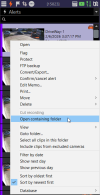
You can right-click on the alert in the alertlist and select "Open containing folder".

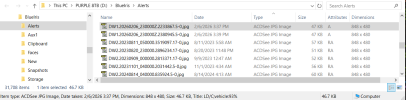
The Alerts folder will open, and if you're patient, the JPG file will eventually be selected and ready to use.

Additionally, Windows File Explorer will show the JPG file's metadata in the info bar at the bottom of the window. It should match the alertlist entry's timestamp, size and memo.

1770421107328.png

1770421310826.png
 
Last edited: