


It looks like better ONVIF support is coming to UniFi Protect
- Thread starter Molbo
- Start date
You are using an out of date browser. It may not display this or other websites correctly.
You should upgrade or use an alternative browser.
You should upgrade or use an alternative browser.


Arjun
IPCT Contributor
Is it different from your main network?Yes - UNVR is in the same subnet as the cameras.
LollerAgent
n3wb
Arjun
IPCT Contributor
Are you assigning them to a VLAN within UniFi Network settings? For some reason, when I move the cameras and associated UniFi Protect accessories / integrations (i.e. Superlink sensors) to a dedicated VLAN, I am forced to setup everything from scratch again; my UniFi devices get knocked offline from UniFi Protect as soon as I set a static IP under the respective VLAN.From my "main" network? Yes, my NVR and cameras are in a dedicated VLAN. What specifically is your problem and/or concern?
LollerAgent
n3wb
Arjun
IPCT Contributor
Oh, that makes sense - I assume you assigned dedicated ports on your switch to that particular VLAN right?I'm not exactly sure what you're asking. I have a VLAN (and associated L3 interface) configured on my Unifi gateway (a UDM-SE). The NVR and cameras are connected to switchports that are configured with a native (untagged) VLAN of my "security" VLAN.
LollerAgent
n3wb

Arjun
IPCT Contributor
Thank you for confirming - looks like I will need to reserve a day for thisYes -- the switchports need to be configured with a native (untagged) VLAN.
Arjun
IPCT Contributor
Well - speaking of ONVIF, here is recent discussion on Reddit - first thread has the OP deleted, but the comments are still helpful
Arjun
IPCT Contributor

Arjun
IPCT Contributor
Arjun
IPCT Contributor
Arjun
IPCT Contributor

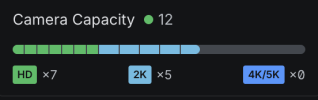
As a test, I adopted 12 of my 54IRs this afternoon. It's strange that some show up as HD and others as 2K.

vinmassaro
n3wb
- Jan 22, 2017
- 20
- 17
Is this related to the primary stream settings on the cameras being different?As a test, I adopted 12 of my 54IRs this afternoon. It's strange that some show up as HD and others as 2K.
View attachment 244759
All 12 are set up the same for the Primary and Secondary streams.Is this related to the primary stream settings on the cameras being different?
benallgood
Pulling my weight
- May 20, 2015
- 101
- 223
That's what I did. I was all excited until the bugs came out at night.

I've never used Smart Detection, sounds like it may not be so smart.That's what I did. I was all excited until the bugs came out at night.

Arjun
IPCT Contributor
It’s dumb actuallyI've never used Smart Detection, sounds like it may not be so smart.
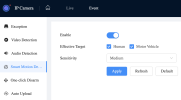
Too bad the IVS detections are not being passed down through ONVIF on UniFi Protect