Issue connecting to cameras without a router

SaeedKY

n3wb
May 5, 2021
16
2
Louisville, KY
I had an offline, wired setup in which IP cameras connect to a POE switch, which then connects to a PC running Blue Iris. All cameras and the PC have static IPs. I used to be able to access the cameras in this setup without the need to connect the switch to the router (I don't want the system to rely on internet/router). But since I changed my ISP and router, I lose connection to the cameras (both in BI and the cameras' own software) if I unplug the switch from the router. I even tried reestablishing the cameras in their software by deleting them and finding them again. I can confirm that their IPs have not changed and are the same static IPs that made the system work previously. What's gone wrong? How can I revive the ability to view the cameras without a router wired to the switch?
 
  • Like
Reactions: mat200
Sounds like you connected cables to the wrong thing. Maybe the poe switch to the router instead of to the BI computer.
 
  • Like
Reactions: JDreaming
And MY POINT is when you swapped out the old router, did you accidently connect the WRONG CABLE to the router and WRONG CABLE to the POE switch or BI computer and if you swapped them then it will work as intended....

That is the only way for it not to work since you had an isolated system previously....or maybe you thought you did and you didn't.

Is your BI computer dual NIC?
 
  • Like
Reactions: JDreaming
No, I did not connect anything to the new router when I swapped it in. All my devices are wireless. So, the router is just connected to the modem.
As for the POE switch. Those cables did not change (camera cables coming into it and one cable coming from it to the PC).

The only time I connected any cable to the router was to connect it to the POE switch after the cameras stopped working, in an effort to set things up again. Like I said, this did make the camera work again but only as long as the cable is connected.
 
I think it is time for a diagram of your network because something isn't right.

If your BI computer and cameras were all offline and not connected to the router in any form or fashion (wired or wifi), then the cameras would still work on the BI computer.

Or are you saying you could view things on other devices because your BI computer connects wirelessly to the router, but all the cameras go from a POE switch straight to the BI computer?

If so, then you likely have the wifi adapter in the BI computer on a different subnet than the router, and plugging in to the POE switch then gave it another access way.

OR as I said originally, you thought your system was isolated and it wasn't and the router is actually routing the cameras thru.
 
No, I did not connect anything to the new router when I swapped it in. All my devices are wireless. So, the router is just connected to the modem.
As for the POE switch. Those cables did not change (camera cables coming into it and one cable coming from it to the PC).

The only time I connected any cable to the router was to connect it to the POE switch after the cameras stopped working, in an effort to set things up again. Like I said, this did make the camera work again but only as long as the cable is connected.

Use tracert from the BI machines to see if it can trace route to the IP cameras ..

somehow I am guessing a route / gateway setting issue here
 
  • Like
Reactions: JDreaming
If I am understanding your initial post, in your "offline set-up" the PoE switch (hosting the cameras) is connected to the BI machine via an ethernet cable?

Does your BI machine have a second Ethernet card, or wireless network dongle/card to connect to your router?
 
  • Like
Reactions: mat200
I'm curious.....in January of 2023 you had some issues concerning the cable, termination spec and/or RJ-45 connectors. Since it seems you got things resolved and have had no issues for 32 months until now, what did you do to fix it?

 
  • Like
Reactions: mat200
I'm thinking that maybe that switch has something going intermitant with its "fluffy" configurable features: Extend Mode, Priority Mode, or Isolation Mode.

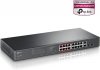
I'd buy this plain-jane, unmanaged Netgear POE+ switch here, try it and if it doesn't solve your problem, return it.
 
As an Amazon Associate IPCamTalk earns from qualifying purchases.
What devices were on your old ISP setup. Like exact name and model.
Your Home (local Area Network) / LAN, creates an environment so that communication can take place. If nobody is sorting the mail, it gets delivered to the wrong address, or all the addresses get a copy, when only one guy needs the letter. This is an inefficient way to have traffic control. You can get a $5 piece of shit D-link from the Salvation Army or E-bay and leave the WAN port un used and have a pain free life, or pound your head aginst the wall....being stuck on your way of doing it.
 
 
If I am understanding your initial post, in your "offline set-up" the PoE switch (hosting the cameras) is connected to the BI machine via an ethernet cable?

Does your BI machine have a second Ethernet card, or wireless network dongle/card to connect to your router?
Sorry for the delayed response. Yes, the POE switch is connected to the BI computer via Ethernet cable and the BI computer is connected to the router via a wireless adapter.
 
ASSUMING that the cameras all have static IP addresses, does the BI computer also have a static IP address OR get its address via DHCP? If there's no router, it cannot get an address via DHCP and must use a static IP address. If all the cameras AND the BI computer use static addresses on the same subnet, I believe it should work.
 
...and I'll wager @wittaj still would like to see that sketch of your network and how it's connected to the various components. I know I would and likely others here as well. It doesn't need to be fancy, just accurate, legible and complete. Hand-drawn is fine!

Include any assigned static LAN IP's....those are private so you can share them with us. My Blue Iris server IP and port is 192.168.200.250:81 :cool:
 
Last edited:
  • Like
Reactions: tigerwillow1
ASSUMING that the cameras all have static IP addresses, does the BI computer also have a static IP address OR get its address via DHCP? If there's no router, it cannot get an address via DHCP and must use a static IP address. If all the cameras AND the BI computer use static addresses on the same subnet, I believe it should work.
Yes, both cameras and PC have static IPs
 
...and I'll wager @wittaj still would like to see that sketch of your network and how it's connected to the various components. I know I would and likely others here as well. It doesn't need to be fancy, just accurate, legible and complete. Hand-drawn is fine!

Include any assigned static LAN IP's....those are private so you can share them with us. My Blue Iris server IP and port is 192.168.200.250:81 :cool:
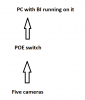
It's still the same setup you posted above: Cameras are connected to a POE switch via Ethernet cable. Switch connected to BI machine with Ethernet cable. BI machine connected to the router wirelessly. This setup used to work until I changed my ISP and router.
 
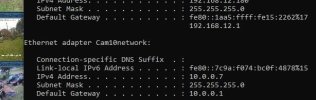
From the BI PC, do the COMMAND Prompt then Ipconfig and verify that your IPv4 address, Subnet Mask and Default gateway are showing. Your cameras must match the Subnet and Default gateway and their IPv4 must be in the same network. Here's an example of mine where my cameras IP's run from 10.0.0.100 thru 10.0.0.222. There is no router connected to the Default gateway.
My BI PC is assigned 10.0.0.7 see attached photo


cameranetworkipconfig.JPG

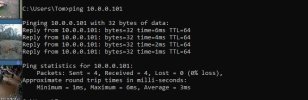
From the PC, ping one of the known camera IP's to verify that it is making the trip. see second photo

pingcam101.JPG
 
  • Like
Reactions: looney2ns
Don't know if this is resolved or not but you say your cameras are wireless but connected to the poe switch. Assume your only using the poe switch to power the cameras then and not connect to a network with a router? I would assume you need a router no? And you mention you don't need it online right? I have set up routers which you do need if not mistaking to set up cameras at places that have no internet. And you need a router with wifi and your phone and computer need to be on the same wifi as the cameras are. Make sure the wifi name password is correct for starters and your phone wifi is connecting to the wifi of the router, same with the computer on wireless wifi. I dont see why you can't connect if all of this is done