


Long time reader. First time poster (I think?).
I’m looking for candid input from experienced Blue Iris users, especially people running larger or more demanding installs. I’m not trying to start anything controversial. I know Blue Iris is very capable and a lot of people run it successfully. But I’m starting to question whether it is the right fit for my setup, or whether I’m spending too much time fighting fragility, hidden dependencies, and architectural limitations.
My system is not a lightweight home setup:
I have also put in the work. I have spent 100+ hours trying to get this system stable: reading forums, reading the manual, testing settings, using chatbots, tuning camera-side encoding, trying main/substream combinations, adjusting FPS/keyframes/codecs, testing GPU decoding, and so on. My career is in enterprise architecture, so while I’m not claiming to be a Blue Iris expert, I do understand systems at both a high level and a low level. This is not a case where I installed the software yesterday and expected magic.
One recent example is my LPR setup. I have two dedicated LPR cameras, LPR1 and LPR2. Each has a main configuration for continuous 4K recording and a clone configuration for alerting. As far as I can tell, the two cameras are configured similarly except for names, paths, etc. I record from the 4K main stream, and I had the 1080p substream configured because I understood that Blue Iris generally prefers using the substream for detection/alerting/display work.
The problem is that one LPR camera was capturing alert images at 4K while the other was capturing alert images at 1080p. I tried to fix the “small” alert image by disabling the 1080p substream on one camera and using only the 4K main stream. Counterintuitively, the camera immediately started throwing keyframe/FPS errors even though there was now less total bandwidth being pulled from the camera. With both streams enabled, no errors. With only the 4K stream, errors.
That is just one example. I realize LPR is notoriously hard, so I don’t want the whole discussion to become “LPR is hard.” I get that. My broader issue is that this kind of confusing side effect keeps happening across the system. It feels like changing one thing exposes some hidden dependency in Blue Iris’s internal pipeline — stream cloning, substream/mainstream usage, alert image generation, direct-to-disk behavior, AI/alert confirmation, keyframe handling, etc.
Other examples:
But at this point, the amount of ritual tuning and unexplained side effects makes me wonder whether I’m trying to make Blue Iris do something it is not really architecturally comfortable doing.
My question is not “Can Blue Iris work?” Obviously it can.
My question is:
Given this kind of setup — roughly a dozen 4K cameras, dedicated LPR cameras, continuous 4K recording, alerting/AI workflows, ONVIF events, GPU acceleration, and a fairly serious server/network/storage environment — is Blue Iris still worth pursuing, or should I be looking at a more commercial VMS? My system right now is what I consider baseline, and I will be looking to expand camera counts and workflow complexity.
I’m especially interested in hearing from people who have run both Blue Iris and a more commercial VMS. Did moving to a more commercial VMS actually improve stream stability, predictability, client responsiveness, and troubleshooting? Or did you find that the same camera/stream issues followed you there too?
I’m open to being told that I’m doing something wrong. But I’m less interested in “Blue Iris works great, you must be the problem” replies. I’m looking for a practical assessment of whether Blue Iris is the right tool for this level of system, or whether it is better viewed as an extremely capable prosumer/home-lab product that starts to show its limits in more demanding deployments. And, I suppose, if somehow I really am an idiot and am missing something obvious then I'd be open to hearing that.
I’m looking for candid input from experienced Blue Iris users, especially people running larger or more demanding installs. I’m not trying to start anything controversial. I know Blue Iris is very capable and a lot of people run it successfully. But I’m starting to question whether it is the right fit for my setup, or whether I’m spending too much time fighting fragility, hidden dependencies, and architectural limitations.
My system is not a lightweight home setup:
- All cameras are hardwired over 1 Gbps Ethernet
- Dedicated switching for the camera/network side
- Hyper-V host with 4x1 Gbps LAG to the switch
- Blue Iris runs in a Windows VM
- VM has 24 vCPU and 32 GB RAM
- RTX 4000 Ada Generation passed through directly to the VM
- OS VHDX is on SSD
- Recording storage is a large passthrough Storage Spaces volume, about 65 TB of spinning disk
- Around a dozen 4K cameras, 11 from Empire Tech, 1 from Dahua directly
- Several dedicated LPR cameras
I have also put in the work. I have spent 100+ hours trying to get this system stable: reading forums, reading the manual, testing settings, using chatbots, tuning camera-side encoding, trying main/substream combinations, adjusting FPS/keyframes/codecs, testing GPU decoding, and so on. My career is in enterprise architecture, so while I’m not claiming to be a Blue Iris expert, I do understand systems at both a high level and a low level. This is not a case where I installed the software yesterday and expected magic.
One recent example is my LPR setup. I have two dedicated LPR cameras, LPR1 and LPR2. Each has a main configuration for continuous 4K recording and a clone configuration for alerting. As far as I can tell, the two cameras are configured similarly except for names, paths, etc. I record from the 4K main stream, and I had the 1080p substream configured because I understood that Blue Iris generally prefers using the substream for detection/alerting/display work.
The problem is that one LPR camera was capturing alert images at 4K while the other was capturing alert images at 1080p. I tried to fix the “small” alert image by disabling the 1080p substream on one camera and using only the 4K main stream. Counterintuitively, the camera immediately started throwing keyframe/FPS errors even though there was now less total bandwidth being pulled from the camera. With both streams enabled, no errors. With only the 4K stream, errors.
That is just one example. I realize LPR is notoriously hard, so I don’t want the whole discussion to become “LPR is hard.” I get that. My broader issue is that this kind of confusing side effect keeps happening across the system. It feels like changing one thing exposes some hidden dependency in Blue Iris’s internal pipeline — stream cloning, substream/mainstream usage, alert image generation, direct-to-disk behavior, AI/alert confirmation, keyframe handling, etc.
Other examples:
- I frequently see yellow exclamation warnings on cameras, usually FPS/keyframe/stream-health type warnings.
- One camera repeatedly complains about not getting ONVIF events, even though I have ensured that ONVIF does not require authentication. I have read that Blue Iris can be sensitive to ONVIF auth, so I specifically checked that.
- Two other cameras decode the 4K stream with no problem but report FPS/keyframe issues on the 1080p substream. This was working at one point, and the configuration for those cameras did not change. The issue just appeared. I even reduced a 30 FPS camera down to 20 FPS and the issue continued.
- Stream stability changes based on relatively small adjustments to FPS, codec, hardware decoding, or stream configuration.
- H.264 vs H.265 can behave very differently.
- Some cameras are stable at one FPS but unstable one or two FPS higher, even when bitrate does not appear to be the limiting factor.
- Enabling GPU decode sometimes requires lowering FPS to remain stable.
- Trigger/alert/AI behavior is difficult to reason about because alert images, trigger timing, recording timing, and AI snapshots do not always line up the way I expect.
- Clone camera behavior and stream ownership are not always obvious.
- The UI often hangs during long-running work. From a Windows development standpoint, that is frustrating because keeping long-running work off the UI thread is basic application design.
- The application sometimes takes minutes to open, getting stuck on “Creating Window” at the splash screen.
- Viewing the Blue Iris console over Remote Desktop seems to cause all cameras to slow down and can interrupt frame rates across the system. This appears to be a known issue. I bought a second Blue Iris license to run as a remote desktop/viewing client, which works better for viewing, but it is not ideal for configuration. The AI setup on my desktop is different from the server, and some settings, such as MQTT server configuration, cannot be done remotely. So I am constantly switching context.
- Some people suggest using UI3, but I do not want to use the web app for this kind of work. I want a proper thick client for configuring and managing a VMS.
- I am probably forgetting other problems because there have been so many.
But at this point, the amount of ritual tuning and unexplained side effects makes me wonder whether I’m trying to make Blue Iris do something it is not really architecturally comfortable doing.
My question is not “Can Blue Iris work?” Obviously it can.
My question is:
Given this kind of setup — roughly a dozen 4K cameras, dedicated LPR cameras, continuous 4K recording, alerting/AI workflows, ONVIF events, GPU acceleration, and a fairly serious server/network/storage environment — is Blue Iris still worth pursuing, or should I be looking at a more commercial VMS? My system right now is what I consider baseline, and I will be looking to expand camera counts and workflow complexity.
I’m especially interested in hearing from people who have run both Blue Iris and a more commercial VMS. Did moving to a more commercial VMS actually improve stream stability, predictability, client responsiveness, and troubleshooting? Or did you find that the same camera/stream issues followed you there too?
I’m open to being told that I’m doing something wrong. But I’m less interested in “Blue Iris works great, you must be the problem” replies. I’m looking for a practical assessment of whether Blue Iris is the right tool for this level of system, or whether it is better viewed as an extremely capable prosumer/home-lab product that starts to show its limits in more demanding deployments. And, I suppose, if somehow I really am an idiot and am missing something obvious then I'd be open to hearing that.
Last edited:


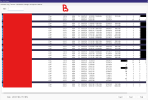
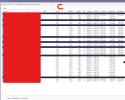
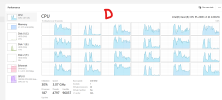
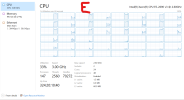
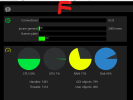
 . I suspect your clones are causing some of this (I don't use clones at the moment), because there is more video passing through the pipeline, but not having to arrive on the NIC (it's already there from the primary 'copy' of each camera.


