Is Blue Iris worth pursuing for my situation, or am I pushing it beyond its practical comfort zone?

@chaosengine, you indicated you felt that image D looks like a GPU-bound issue. Can you elaborate on what makes you suspect that? GPU is at 39% in that image. I am not sure what aspect of the GPU that "39%" refers to (3D, decode, etc.) or if it is a heuristic guess. Any thoughts? Also, agree the CPU is old but it doesn't seem bound. In fact, I was quite surprised how old it was when I was looking up info for this thread.

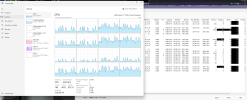
I mean the spikes in the GPU 0 graph in image D. Especially the third spike is far too wide. That is the typical “table mountain” shape you see when the GPU is hitting a limit. The spikes should normally be much sharper and shorter.
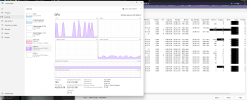
Also, 39% utilization while basically idle is already quite high. On my system it is around 15–19% while UI3 is showing the overview of all cameras at 10 FPS. And that load only comes from decoding 3× 3.7 MP cameras where I cannot use substreams.

Here are two screenshots from my dedicated BI machine (UI3 running). You can also see how the decode performance drops every time the AI object detection kicks in, and that adding more than about 12 CPU cores does not really help much anymore.

Additionally, there are always reports about all kinds of strange video decode issues related to different Nvidia driver versions. That is why I stayed on 560.76, because everything is stable and working properly for me with that version.

Bildschirmfoto_20260520_094650.pngBildschirmfoto_20260520_094710.png

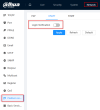
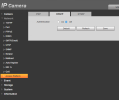
not getting ONVIF events:

Bildschirmfoto_20260520_163549.pngBildschirmfoto_20260520_164550.png
 
I've got to go out shortly, but some quick thoughts from a user running 14 x 4K cameras (Hikvision) to a Proxmox virtualised BI VM (and a second test BI system on another Proxmox host, both with GPUs for AI):

You don't say what CPU the host is using and whether you've monitoring the various resources CPU, Disk IO, networking etc to show any bottlenecks. The comments about delays, stability, BI desktop stuck for minutes opening etc points to some problems. My BI desktop apps both open in about 2 to 3 seconds and both my hosts are running 6 year old desktop CPUs and they are also running other Windows, Linux and Linux docker host VMs. With the BI desktop app open the CPU shows some more load as its now running the BI service and desktop BI but it doesn't impact the system in significant way. I use RDP to my BI VM and set 'unristricted' for video during RDP so that's more load than native desktop. I also have 3 kiosk devices showing at least half the cameras that are on 24 x 7 albeit sleep about 40% when no-one is nearby and no events have occurred.

Having used a few other more commercial grade systems in the past (but not for a few years now), Blue Iris is somewhat a different proposition. As a single developer product where BETA testing is done by general users if they use the latest updates there can be issues appear on previously fine systems. Equally some features may need some badgering to Ken to get them to work well. For example I struggled with static object detection which is improved in v6 compared to v5 where it was broken in a number of ways such as more than one static object could cause issues if their order from AI analysis changed. However on the plus side, I have found BI to offer a hard to equal amount of flexibility and I've been able to tie motion to many complex home automations and use inputs to BI to control camera modes and other features. For me I've never had ongoing performance or reliability issues other than latest BI releases, drivers or my own misconfiguration.
So my quick summary would be to get to the bottom of your current issues before deciding. If the host CPU is good enough and the virtualised environment is getting the required CPU/GPU features (and drivers) it requires then it should work well. If not then the issues could affect other camera software anyway.
That’s been my experience too - when it’s set up right, it just runs. Most of the weird issues I’ve hit ended up being some hidden config or resource bottleneck rather than BI itself.
 
If a VM is correctly configured (passthrough for GPU, correct virtualisation device drivers etc) then it works really well. I migrated both my dedicated BI systems to VMs (one on the same physical host) and its been far better as an overall experience for use and maintenance. A large percentage of the software we use is now running on various cloud platforms (I develop software) and even GPU intensive tasks like gaming and CAD can work well. I tested before and after and the performance difference was hard to measure it was that small.

I now how four VM hosts (Proxmox now after moving from ESXi) running all my home services including routing/firewall software and being able to migrate a VM between hosts or have high availability is a game changer. Even if I had one PC for BI and no other services I would still run it in a VM on that host as I used to rely on Macrium Reflect for emergency recovery if things went bad, but I can now restore a snapshot or backup in under a minute.
I think I'm starting to see the light on this approach. At work I found myself with a need to host a public-facing web server from an on-prem machine, which scares the bejeezus out of me, based on my latest experience with port-forwarding.

Then I realized that I could spin up a VM on a completely isolated network segment, with it's own public IP and its own physical ethernet port, and then I really have zero risk, since there's no way for any exploit to escape the VM. It'd be the same security situation as hosting it on a rented server somewhere else.

Except that I can back it up with my normal Veeam infrastructure and restore it in 5 minutes if something goes wrong.

So I might just virtualize my work BI instance, as you've done, for security and manageability reasons.
 
Fine, OK. My OS is Server 2022, and my hypervisor Qemu, but I shouldn't think it makes all that much difference.

Apologies if any of this sounds daft, or if I am pointing out anything you already spent ages thinking about. These are just my very first observations.

1. I have never personally seen, on my system, the 'UI glitches' you showed in G. Wait, silly me, that's probably you redacting your cameras :-). Can you show another screenshot, but with blur, not black masks? Is it just the icons you are showing or is some other part of the UI going wrong?

2. Are you definitely running BI as a Service?

3. Your MP/s value of 779 seems quite high. I have a system with about 130Mbps nominal on the NIC (compare to your 200), which shows about 195MP/s I think. So on your system, you have about 55% more Mbps on the NIC, but about 295% more MP/s, :wtf:. I suspect your clones are causing some of this (I don't use clones at the moment), because there is more video passing through the pipeline, but not having to arrive on the NIC (it's already there from the primary 'copy' of each camera.

4. Your substream are set to quite a high resolution! Most of them are on 2.1MP. I know 2.1MP seems like 'a lot less' than 8MP, but there are still many cameras whose highest resolution for the MAIN STREAM is 2MP. Usually, people run substream considerable below 2MP, and that is perfectly good enough for the substream. It's the whole point of the substream after all. So is there a reason this is so high?

5. In image C, it looks like most of your cameras are running 25FPS. There is nothing wrong with 25FPS, and I used to run it as standard, until someone pointed out to me it might not be needed. Now my standard frame rate is 15, unless otherwise required. Although the viseo is slightly less smooth with fast moving objects, 15FPS is still plenty for a reasonable viewing experience in my opinion, and it saves plenty of storage and processing power. Note, FPS usually doesnt impact the freeze frame shots, which is the key thing in most security applications, so consider lowering your FPS unless you have a specific reason to keep it high.

6. There is a big difference between C and B. With the more healthy one, it looks like most cameras are running 25FPS. In the other, many have dropped by nearly 10FPS, to pretty varying, random looking values. Now is this a symptom of having the BI UI open, or does this variation happen irrespective of that? Is it possible there is some other odd bottleneck, like on the network, or even a Poe switch running out of power budget and browning out?

Might be worth posting a few screenshots of your config, particularly HA etc.

Sorry, I'm not sure if any of that answers your question rewarding the capabilities of BI, just some thoughts.

My (albeit not too extensive) experience has so far lead me to believe that if / when I need my BI server to handle a higher workload, I just feed it more and it'll do it. E.G more cores and more RAM. I suppose at crazy high workloads it may start to break down, but keep in mind that BI supports up to 128 cameras - I doubt if the limit would have been raised from 64 to 128 if BI fundamentally couldnt handle it, if you see what I mean? Win casino casino Bangladesh

That MP/s jump does look suspicious - clones plus high substream res could definitely be inflating the load more than expected. I’d probably start there before blaming the hardware.