IPC T54IR-ZE-S3 initial setup for mobile and desktop

You do not want to use self adaptive.

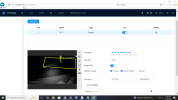
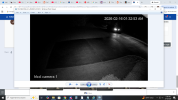
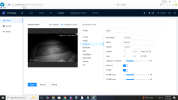
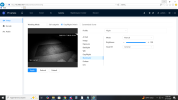
Post screenshots of your settings and image at night with your field of view with IVS rules drawn.

It could be the classic case of trying to do too much with one camera field of view.
See below for IVS screenshot. Mind you, last week with NO IVR and MD on, I'd get detection from cars and unfortunately all the bugs around the camera.

Now, no hits at all from any motion.
 

Attachments

  • 1771203603182.png
    1771203603182.png
    293.9 KB · Views: 14
Of course you would with MD as that will trigger for everything, whereas IVS runs it thru an AI model.

The intrusion box area is too dark.

The camera needs to be able to see the object and decide if it is an object to trigger on. It is too dark for the model to determine what the movement is.

Without more light in the box area it will struggle.

Is your infrared on manual and 100%?

You need to either get more infrared to it or slow the shutter, but recognize the slower the shutter, the more likely to get motion blur.

And if that is the area of interest, tilt the camera up slightly so that box area is in the middle and would thus get more IR.
 
  • Like
Reactions: bigredfish
^^^^
This

The Camera is angled downward pretty good and your IR seems to be either turned down (is it Manual 100%?) or being obstructed by something

It cant see what it cant see
 
Of course you would with MD as that will trigger for everything, whereas IVS runs it thru an AI model.

The intrusion box area is too dark.

The camera needs to be able to see the object and decide if it is an object to trigger on. It is too dark for the model to determine what the movement is.

Without more light in the box area it will struggle.

Is your infrared on manual and 100%?

You need to either get more infrared to it or slow the shutter, but recognize the slower the shutter, the more likely to get motion blur.

And if that is the area of interest, tilt the camera up slightly so that box area is in the middle and would thus get more IR.
it's on manual and 100% now. but with MD enabled before, headlights moving through the dark area would trigger it.

I went outside just now and ran around in the lit area and it triggered, so that's good.
 
it's on manual and 100% now. but with MD enabled before, headlights moving through the dark area would trigger it.

I went outside just now and ran around in the lit area and it triggered, so that's good.

Right, because MD/SMD is "dumb" and will trigger for any movement, which is causing all the false triggers you don't want.

At night, IVS will not trigger just seeing headlights because the AI is trained on seeing a full vehicle.
 
Right, because MD/SMD is "dumb" and will trigger for any movement, which is causing all the false triggers you don't want.

At night, IVS will not trigger just seeing headlights because the AI is trained on seeing a full vehicle.
so...what are my options? adjust the camera direction? any advice appreciated.
 
Yes adjust the camera so that the area you want it to trigger on is in the center so that it gets most of the IR. Or add an external IR blaster to get more light to the area.
 
Yes adjust the camera so that the area you want it to trigger on is in the center so that it gets most of the IR. Or add an external IR blaster to get more light to the area.
As you can see, it worked last night.

And most of the time today. CAught us all leaving this morning, caught a delivery at noon, BUT did not catch my wife driving in about 5:30 or her walking down driveway a little later.
It DID catch a visitor driving in around 6 pm and then leaving. (There is plenty of light at this time of day). DID NOT trigger when I got home around 6:30.

So, what's up?

1771288955515.png
 
It needs to be able to see the whole object and it match the AI.

In that image the headlights are clear but not the rest of the vehicle.

Dusk and dawn times can be tough as well, especially if the car color is close to the road color.

Make sure your contrast number is about 8 higher than brightness.
 
^^^^
This

The Camera is angled downward pretty good and your IR seems to be either turned down (is it Manual 100%?) or being obstructed by something

It cant see what it cant see

Here's the thing. I would have liked to have the camera pointed out more but The cable coming out the camera back would bind in the housing the further I tried to go up. This is about as far as I could get it. It's like the housing was optimized for the camera to point straight down.
 
Up the gain to 55 and turn Smart IR off.

You can make the camera point out more - you will have to take the round "cone" part off and then reposition the ball of the camera to where you want it - by having the cone part off, you can move the ball more freely and move the cable around one of the ball supports and then have the opening of the cone facing up when you replace it over the ball.
 
  • Like
Reactions: bigredfish
Welp, adjusted the gain and turned Smart IR off and.......still nothing at night. Is it possible that I inadvertently switched off nighttime recording? is that even a thing?

Would a separate IR illuminator be the answer?
 
Take a picture on your phone looking up at the camera so we can see how it’s mounted.

It acts like your IR is being deflected or absorbed by something, perhaps soffit
 
  • Like
Reactions: Chokolinho
Take a picture on your phone looking up at the camera so we can see how it’s mounted.

It acts like your IR is being deflected or absorbed by something, perhaps soffit
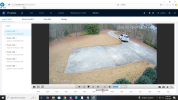
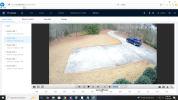
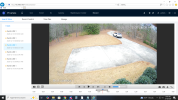
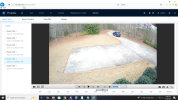
I got home too late to make a picture; too dark. See screenshots below from today. This is it. Notice anything? Cars going but no cars coming in. Is it my tripwire designation? or camera position?
 

Attachments

  • 1771465209794.png
    1771465209794.png
    1.7 MB · Views: 10
  • 1771465267750.png
    1771465267750.png
    1.7 MB · Views: 10
  • 1771465316473.png
    1771465316473.png
    1.7 MB · Views: 9
  • 1771465362768.png
    1771465362768.png
    1.7 MB · Views: 10
Is your tripwire set to one way or both?

Ideally, IVS works best the closer the action is to the center of the image.

What is your primary objective of this camera - to capture vehicles on that drive or the parking pad?

A readjustment of the angle is probably in order and possibly two cameras depending on your goals.